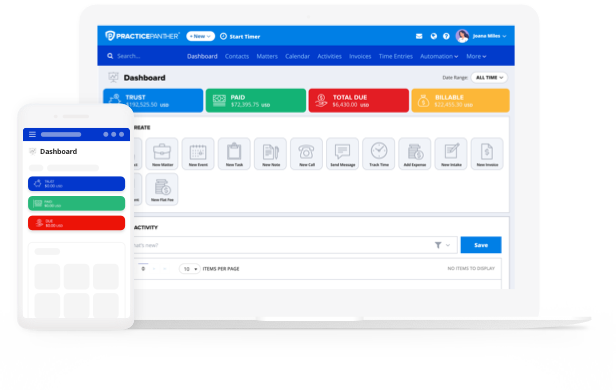


Law firms are tuning into the electronic billing movement, a trend reshaping financial management across industries. Companies are shifting to e-invoicing at a rapid rate, with the e-invoicing market expected to grow at a compound annual growth rate of 20.4% by 2028. Businesses following this trend experience major benefits: efficiency, accuracy, enhanced client service, and, often, a positive impact on their bottom line.
In the midst of these rapid advancements, the legal industry is increasingly embracing new technology. According to Bloomberg Law’s recent Legal Ops + Tech Survey, around “90% of respondents believe that legal tech is important to meeting client demands and improving legal services.”
Adopting legal billing software as part of an overarching legal practice management solution is a highly strategic move for any law firm. In this guide, we’re taking a closer look at legal billing software and how you can leverage this technology effectively, positioning your firm for success in an increasingly competitive industry.

What is E-Billing?
E-billing, or electronic billing, is the digital process that enables law firms to generate, send, and manage invoices without relying on a manual approach. Rather than exchanging PDFs through email chains (where invoices easily get lost), e-billing allows attorneys to transmit billing information through secure digital platforms, like PracticePanther.
E-billing connects all parts of the payment lifecycle from time entry to payments. With an e-billing system, law firms can streamline their billing processes by creating, reviewing, and sending client invoices electronically. This eliminates the time-consuming traditional method of developing, printing, and mailing paper invoices. An e-billing solution also provides convenience for clients, who can view and instantly pay their bills with the click of a button—no phone calls, no checks in the mail, and no unnecessary back-and-forth.
What Is Legal Billing Software?
Legal billing software is a specialized technology solution designed to help law firms and legal professionals manage their billing efficiently. For example, legal software like PracticePanther can transform how you track time, manage invoicing, and record expenses to accurately bill your clients. This level of precision and automation is crucial in an industry where accurate billing directly influences a firm’s revenue, trustworthiness, and client satisfaction.
One primary advantage of using legal billing software over manual billing is the reduction of errors. Manual billing processes are prone to inaccuracies, as human error often sneaks in when recording billable hours or generating invoices.
Legal billing software minimizes this risk by automating most of the billing cycle, including time tracking, invoice generation, and payment processing. This technology improves accuracy and saves significant time, which you can then redirect toward billable work.
Want to see how legal billing software works? Sign up for a free demo of PracticePanther to see it in action.
How Does E-Billing Work?
An effective legal e-billing process should be accurate and automated wherever possible. It should make life easier for your team and crystal clear for your clients. Ideally, you’re using a legal e-billing platform that connects to the rest of your practice management software, providing a single source of truth for your firm. In general, your legal e-billing process should look something like this:
Track Time Accurately
Every billing cycle starts with time capture. Attorneys and staff should log billable hours as they occur—during calls, client meetings, or court appearances—to avoid gaps or inaccuracies later. Consistent time tracking ensures transparency, supports accurate invoices, and strengthens client trust.
Generate Professional Invoices
Once time entries are complete, they’re compiled into invoices. Legal e-billing systems typically allow you to customize invoice formats, ensure LEDES compliance when required, and apply rates, taxes, or discounts automatically. The goal is to create clear, professional invoices that reflect the value of your services.
Send and Track Invoices Electronically
E-billing eliminates manual follow-up by allowing firms to send invoices directly through secure digital channels. Attorneys can monitor when clients receive, open, or pay their invoices. This effectively reduces the need for back-and-forth communication and minimizes administrative overhead.
Automate Payment Reminders and Collections
Following up on overdue payments is one of the most time-consuming parts of billing. Automated reminders and status tracking help firms stay on top of receivables without repetitive manual outreach. Adding late-fee policies can also encourage timely payments.
Simplify Payment Collection
E-billing works best when paired with easy, digital payment options. Allowing clients to pay online by credit card, ACH transfer, or other secure methods shortens the payment cycle and improves cash flow. The simpler it is to pay, the faster firms get paid.
Review Reports and Financial Insights
At the end of each billing cycle, it’s essential to review performance metrics. Reporting tools within e-billing systems can reveal outstanding balances, client payment patterns, and matter profitability, helping firms make informed financial decisions and improve long-term billing strategies.
An effective e-billing process marries automated tasks with human oversight. It should be easy for both your team and your clients, and with the right resources in place, it can be.
As an example, PracticePanther’s timers are built directly into your workflow across desktop and mobile devices, so every billable minute is captured no matter where your day takes you. Team members can run multiple timers simultaneously, logging work descriptions in real time so everything is tracked in real-time.
When it’s time to bill, tracked time and descriptions automatically populate into a custom, electronic invoice. From there, you can adjust, delete, or add any line items as needed before sending.
If your clients require standardized invoicing, PracticePanther also supports the Legal Electronic Data Exchange Standard (LEDES) with Uniform Task-Based Management System (UTBMS) codes, ensuring your invoices meet universal billing requirements for corporate clients and insurance carriers.
Once the invoice is ready, you can deliver it electronically via email or through PracticePanther’s secure client portal, where clients can view and pay their bill instantly by credit card or ACH. You can also apply automated payment reminders on your preferred schedule. This means following up on outstanding balances happens without adding anything to your to-do list.
What Is the Difference Between E-Invoicing and E-Billing?
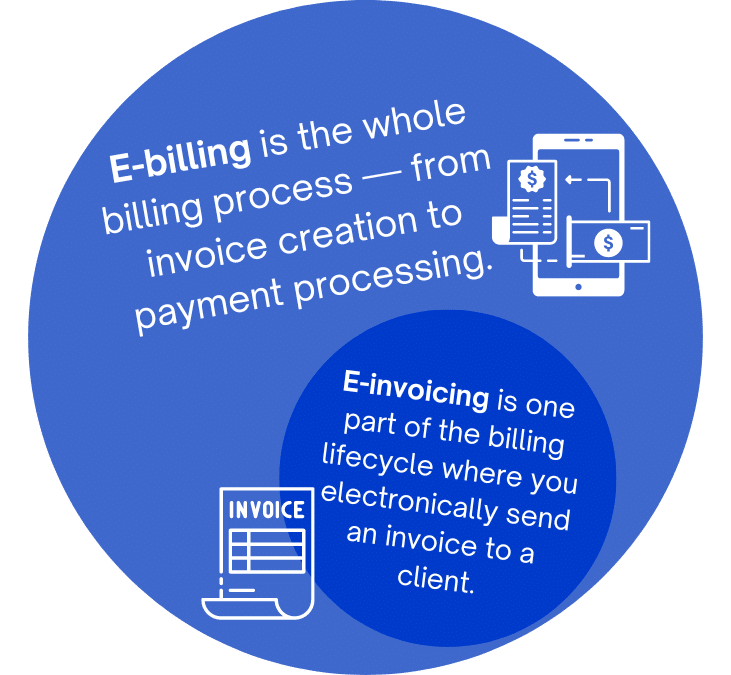
The main difference between these two is scope, with e-billing being the broader of the two. Where e-invoicing is a step in the billing lifecycle, e-billing is the entire process.
-
E-invoicing is the process of electronically sending a specific billing document to a client.
-
E-billing is the whole billing process — from invoice creation to payment processing.
The terms “invoice” and “bill” are often used interchangeably, but the term “invoice” is notably more common in business-to-business models. Consumers will often refer to “bills” when paying for a product or service, whereas businesses will call these “invoices.”
But in terms of billing software, this distinction bears more weight than semantics; it tells you what the software can (and cannot) perform. Software that’s focused on e-invoicing will most likely handle the creation and sending of an invoice — but not much else; e-billing software, on the other hand, covers the entire process from start to finish.
PracticePanther, for example, has e-billing features for law firms, covering not just time tracking and expense details, but invoice creation, follow-ups, and even payment processing. You can also use PracticePanther to handle your entire firm operations, from legal document management solutions to full practice management.
See how PracticePanther works with a free demo.
What Type of Software Do Law Firms Use for Effective E-Billing?
The best billing software for accounting within a law firm context combines a range of essential functions for managing the complexities of legal billing. What are the functions of a successful legal billing system? A successful system should offer the following features:
- Time and expense tracking so you can accurately record the time spent on different billable tasks and any associated expenses directly related to client work.
- Personalized invoicing to create professional legal invoices that you can tailor to your law firm’s branding and the specific needs of each client.
- Customizable billing rates and fee structures that allow you to offer different billing arrangements, including hourly rates, flat fees, and contingency fees.
- Online payment processing to provide secure options for clients to make ePayments via credit card, eCheck, and ACH, facilitating quicker payment cycles.
- Financial law firm reporting that offers insights for better decision-making. Look for detailed reports on billing, payments, outstanding balances, and overall financial performance.
- Legal workflow automation, which is important for saving time and reducing the risk of human error.
- Integration functionality that allows you to seamlessly connect with the other essential software you use, like Google Calendar or Outlook.
- Secure data management is paramount. Look for a platform that protects sensitive client information with robust security measures like encryption and access control.
- User-friendly interface that offers an intuitive workflow with minimal training needed for staff members.
- Dedicated customer support to assist you with any software questions or issues.
Once you understand what makes a billing system successful, the next step is to consider the specific demands placed on these systems by today’s legal authorities.
What Are the Benefits of Legal E-Billing Software?
Legal e-billing software makes the billing process simpler, faster, and more accurate — but more than that, certain software can be a great asset to business goals. A law firm that uses good e-billing software and methods will have:

Immediate Access to Billing and Financial Data
E-billing offers real-time access to billing information and financial analytics, making law firm reporting and decision-making quick and easy. A firm can instantly review the profitability of ongoing cases, adjust strategies as needed, and improve resource allocation to maximize returns.
Enhanced Client Satisfaction Through Transparency
Clients value transparency, especially when it concerns financial obligations. E-billing systems make it easy to provide itemized invoices and offer an attorney-client portal for clients to review their accounts, enhancing trust and satisfaction. This transparency can lead to stronger client relationships and strengthen long-term client engagement.
Optimized Cash Flow with Faster Payments
By simplifying the payment process for clients, e-billing significantly shortens the payment cycle. Law firms, especially those in high-volume practice areas, notice a marked improvement in cash flow as clients utilize convenient online payment options, reducing the lag time between invoicing and receiving funds. Plus, online payments have increased considerably recently, meaning they are slowly becoming a necessity to stay competitive.
Adaptable Billing Practices for Diverse Client Needs
The flexibility of e-billing software allows law firms to cater to a broad spectrum of client needs through customizable billing arrangements. Whether implementing value-based billing for corporate clients or fixed fees for standard legal services, e-billing supports diverse billing models. This adaptability attracts a wider clientele while also positioning the firm as a forward-thinking, client-centric practice.
What Type of Software Do Law Firms Use for Effective E-Billing?
The best billing software for accounting within a law firm context combines a range of essential functions for managing the complexities of legal billing. What are the functions of a successful legal billing system? A successful system should offer the following features:
- Time and expense tracking so you can accurately record the time spent on different billable tasks and any associated expenses directly related to client work.
- Personalized invoicing to create professional legal invoices that you can tailor to your law firm’s branding and the specific needs of each client.
- Customizable billing rates and fee structures that allow you to offer different billing arrangements, including hourly rates, flat fees, and contingency fees.
- Online payment processing to provide secure options for clients to make ePayments via credit card, eCheck, and ACH, facilitating quicker payment cycles.
- Financial law firm reporting that offers insights for better decision-making. Look for detailed reports on billing, payments, outstanding balances, and overall financial performance.
- Legal workflow automation, which is important for saving time and reducing the risk of human error.
- Integration functionality that allows you to seamlessly connect with other essential software you use, like Google Calendar or Outlook.
- Secure data management is paramount. Look for a platform that protects sensitive client information with robust security measures like encryption and access control.
- User-friendly interface that offers an intuitive workflow with minimal training needed for staff members.
- Dedicated customer support to assist you with any software questions or issues.
Once you understand what makes a billing system successful, the next step is to consider the specific demands placed on these systems by today’s legal authorities.

What Are the Requirements of a Billing System in Today’s Legal Industry?
With the rate of cybercrime rapidly increasing, a billing system for today’s legal industry must meet specific requirements to be effective, secure, and compliant with regulatory standards.
According to a report by the American Bar Association (ABA), approximately one in four law firms have experienced a data breach. The consequences of a data breach can be devastating — starting with the basic fact that this undermines client trust, the foundation of any legal practice.
Clients entrust law firms with sensitive information, expecting it to remain confidential. A breach can harm clients’ interests and legal standing, as well as opening your law firm up to legal liability, regulatory fines, and the costs associated with rectifying the breach and enhancing security measures.
When considering a legal billing system, thoroughly inspect its security features. For example, PracticePanther includes key requirements for today’s legal industry, with features like:
- Military-grade encryption that safeguards all data transmitted and stored with encryption at the highest available standards (265-bit) to protect against unauthorized access.
- Two-factor authentication (2FA) capabilities that add an extra layer of security, significantly reducing the risk of a bad actor accessing your software.
- Compliance with legal and financial standards like IOLTA, ABA, state bar, and PCI guidelines, ensuring that all financial transactions are processed securely and in accordance with industry regulations.
- Role-based and IP address permissions so that your administrators can control access to sensitive data based on user roles and specific IP addresses.
- Version history and data backup with detailed logs of changes to documents and data, and robust backup solutions like geo-redundant servers, to prevent data loss and maintain data integrity.
Implementing a billing system that meets these requirements protects your law firm and your clients from cyber threats, keeps you in compliance with legal and financial standards, and avoids potential fines and fees.
Key Features and Functions of Legal E-Billing
Your legal electronic billing system should be doing the heavy lifting for you. From the moment time is tracked to the payment landing in your account, each step should be smooth, accurate, and easy to manage. Here’s what to look for, and how PracticePanther delivers real value across the billing process.
Customizable Invoices
Not every client or case is billed the same way. You need invoices that match your billing structure and still look professional. PracticePanther lets you customize invoice templates with your logo, billing method (hourly, flat fee, contingency), and detailed descriptions, so your bills are clear and polished.
Time Tracking That Feeds Billing
Time tracking is the foundation of billing. With PracticePanther, timers are built directly into your workflow. You can track time while drafting, emailing, or even in court and it all links back to the right matter.
Detailed Reporting
Need to see what’s outstanding, which matters are the most profitable, or which clients are chronically late? PracticePanther’s billing dashboard and custom reporting give you a bird’s-eye view of your firm’s financial performance.
Accurate Billing, Every Time
When billing relies on memory or manual entry, mistakes happen. PracticePanther pulls time entries, rates, and expenses directly into your invoices, reducing human error and keeping every invoice compliant with your clients’ billing guidelines.
Payment Reminders That Run Themselves
Following up on overdue invoices is awkward and time-consuming. With PantherPayments, you can automate polite, timely reminders that nudge clients to pay without adding another task to your list. PracticePanther integrates directly with PantherPayments, so your clients can pay by credit card or ACH with just a few clicks. No paper checks. No faxed PDFs. Just faster payments and fewer headaches. (Bonus: firms using PantherPayments get paid up to 70% faster than the industry average.)
Invoices Clients Can Actually Use
If a client needs to download, print, and mail back a check, you’ve lost momentum. PracticePanther makes invoices easy to access through a secure client portal and even easier to pay with a credit card or ACH via PantherPayments.
A Seamless Billing Workflow
The best billing systems don’t exist in a vacuum. PracticePanther’s workflows connect billing with your time tracking, matter management, and client communications so the entire process runs without roadblocks or duplicate work.
How E-Billing Solutions Work for Your Practice
A top e-billing solution supports every step of your firm’s billing process–think of it as an automated billing assistant. PracticePanther is built with the capabilities your firm needs to bill accurately, get paid faster, and stay on top of your financial performance. Here’s how:
- Capture hours in real-time across desktop and mobile devices so no billable hour is ever missed, no matter where your day takes you.
- Bulk add and edit time entries across multiple matters at once, cutting down on tedious administrative work and keeping your records up to date.
- Generate custom branded invoices in one click using pre-built templates that reflect your firm’s identity and can be tailored to any client or matter.
- Set custom and default billable rates per client, matter, or attorney so every invoice accurately reflects your firm’s fee structure.
- Keep legal billing and payments in one place by managing invoices, collecting payments, and tracking balances all within a single platform — no need to toggle between systems.
Generate custom time and expense reports and get a holistic view of your firm’s financial performance with real-time reporting that surfaces everything from outstanding receivables to your most profitable matters.
What Technology Do Lawyers Use to Enhance E-Billing Processes?
Among the available technologies for lawyers, mobile apps, cloud technology, and client portals stand out as key tools in modern legal billing workflows.
Mobile applications, including those designed for iPads and other tablets, have become essential for lawyers on the move. For example, an iPad invoice app would allow you to generate and send invoices directly from your portable device — billing workflows that keep up with your busy pace. This mobility is crucial for lawyers on the move, whether in court, at client meetings, or working remotely.
A legal billing app like PracticePanther’s mobile app further extends the functionality at your fingertips, with time tracking, expense recording, invoice management, and more, all quickly accessible from your smartphone or tablet. This type of app makes it simple to capture billable activities in real-time, reducing the likelihood of missing or forgetting to record your billable hours and expenses.
Cloud technology is the foundation of these mobile solutions, providing a secure and accessible platform for storing data. Gone are the days of being tied to your desktop computer or having to find a WiFi connection for your laptop — cloud legal software gives you the ability to securely access the cloud from any device, anywhere you may find yourself. Other major benefits of using the cloud are real-time updates and backups, which safeguard against data loss and ensure you’re always looking at the most recent information.
Client portals represent another significant technological advancement in legal billing. These portals offer a secure way for clients to view their invoices, payment history, and outstanding balances. Clients can also make payments directly through the portal, simplifying the payment process and improving your firm’s cash flow. This type of portal increases the transparency and communication between you and your clients, contributing to higher client satisfaction and trust.

Legal E-Billing Vendors: A Comparison
Selecting a vendor for your legal software needs can be overwhelming. The legal software list is long, and it can be difficult to make a choice. We’re here to help.
While we may be a bit biased, it’s also evident that in a competitive portfolio of legal software, PracticePanther stands out among notable names like Clio, MyCase, or CARET Legal. We’ve put together this comparison of these legal software companies, focusing on four key criteria: ease of use, legal billing functionality, client portal capabilities, online payments, and subscription requirements.
PracticePanther Legal Software
- Ease of Use: A highly intuitive interface allows users to navigate and utilize features effortlessly, significantly reducing the learning curve. Extensive tutorials and resources are available to help you get the most out of this software.
- Legal Billing: Streamlines the billing process with time tracking, expense management, customizable invoices and more, making it straightforward to manage legal billing.
- Mobile App: Offers a comprehensive app that mirrors the desktop experience for full functionality. You’ll be able to manage cases, track your time, communicate with clients, and zip through every workflow while on the go.
- Client Portal: Provides a robust portal where clients can view case documents, make payments, and communicate securely with military-grade encryption and two-factor authentication security features.
- Online Payments: Integrates PantherPayments for seamless and secure client transactions with transparent and competitive fees.
- Subscriptions: Simplifies access with an all-in-one platform that doesn’t require multiple subscriptions or integrations for complete functionality.
Clio Legal Software
- Ease of Use: Requires a steeper learning curve and additional training to navigate its feature set.
- Legal Billing: Offers detailed billing features but may necessitate third-party integrations for extended capabilities.
- Mobile App: The app provides access to many of Clio’s features but with reported limitations compared to its desktop counterpart.
- Client Portal: Features a client portal for document sharing and communication, though it lacks some tracking functionalities found in PracticePanther.
- Online Payments: Clio Payments facilitates online transactions but with a varying fee structure that may lack the transparency of PracticePanther’s offerings, as well as reports of longer turnaround time for receiving payments.
- Subscriptions: The Clio brand includes integrations with many platforms that require separate subscriptions, affecting the overall ease of use and monthly cost.
Explore the full PracticePanther vs. Clio comparison.

MyCase Legal Software
- Ease of Use: Offers an integrated experience but relies on third-party tools for some functionality, which can complicate usability.
- Legal Billing: Provides core billing functionalities, however, has an emphasis on integrations for comprehensive financial management.
- Mobile App: The MyCase app allows for case management and communication but has been noted for having limitations in functionality.
- Client Portal: Includes a client portal for case updates and document sharing, yet it may not offer the depth of engagement tools that PracticePanther does.
- Online Payments: Utilizes a native payment processor, but users might notice that payment deposits can take a bit longer to process compared to some other platforms in the market.
- Subscriptions: Aims to be an all-in-one solution, yet the reliance on external integrations may lead to additional costs.
Explore the full PracticePanther vs. MyCase comparison.
CARET Legal Software
- Ease of Use: Some users find the platform less intuitive, which can lead to a longer adjustment period.
- Legal Billing: CARET’s features include basic billing needs but may lack the advanced customization and efficiency of PracticePanther.
- Mobile App: Does not prominently feature or promote a mobile app equivalent in functionality to PracticePanther’s offering.
- Client Portal: Provides fundamental client portal functions, however, there are limited capabilities for in-depth case tracking and client interaction.
- Online Payments: Payment processing is facilitated through a third-party provider, potentially complicating the billing experience.
- Subscriptions: The need for external integrations to achieve full functionality may affect the overall simplicity and cost-effectiveness of this solution.
Explore the full PracticePanther vs. CARET Legal comparison.
Which Is the Best Billing Software for Legal Practices?
Here at PracticePanther, we’re proud to lead the pack of legal software with our user-friendly design, comprehensive legal billing features, fully functional mobile app, engaging client portal, streamlined online payments, and straightforward subscription model. We’re committed to pushing the boundaries of technology to offer an advanced, efficient, and comprehensive legal practice management solution that benefits both clients and lawyers.
Of course, whenever you’re considering implementing a solution like this, it’s important to evaluate your needs. While the best legal billing software for small firms may not always be the best legal billing software for a solo practitioner, with PracticePanther, we’ve got you covered. Our scalable solution is built to meet the unique challenges of any legal practice, no matter the size. Whether you manage a small firm looking to grow or a bigger firm seeking to optimize your workflows, PracticePanther hands you all the tools you need to succeed.
Ready to take your legal practice to the next level? Sign up for a free trial or free demo with PracticePanther today and experience firsthand how our platform can transform your billing processes, operations, and client relationships. Join us as we step into the future of legal software.