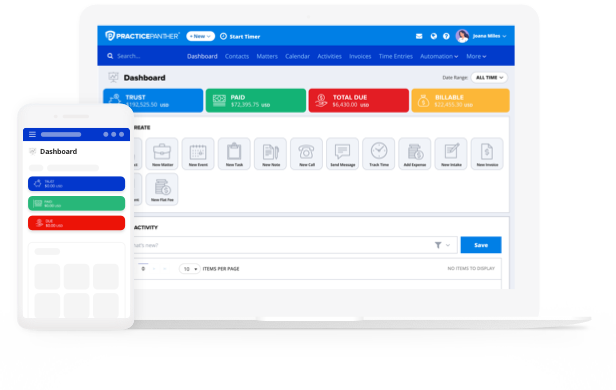
Running a law firm means balancing more than client meetings and court appearances. Behind the scenes, there are cases to track, documents to manage, bills to send, and payments to collect. That’s where legal practice management software makes all the difference. The right platform can cut down administrative work, speed up your billing process, and improve the client experience from start to finish.
The challenge? Sorting through the endless options. Each platform comes with unique features, and it’s not always clear which ones matter most for your firm. Before you get lost in comparisons, it helps to step back and identify your top priorities.
This guide walks you through that process—highlighting what to look for and how to weigh your choices—so you can select online legal practice management software that actually supports the way your firm works.
What Does Legal Practice Management Software Do?
Legal practice management software, sometimes called law practice management software, gives law firms a single secure system to manage every aspect of daily operations. Instead of juggling spreadsheets, sticky notes, and paper files, legal teams work from a single source of truth. With PracticePanther, everyone—from partners to paralegals—can access up-to-date case information, client communications, and billing records in one place.
The PracticePanther Difference
Law firms that adopt PracticePanther see measurable improvements in efficiency and client service. In fact, firms report saving up to 8 hours per week by automating repetitive tasks. Beyond saving time, here are some of the most valuable benefits:
- Increased Efficiency & Productivity: Automation and centralized data reduce the time spent on admin work. For example, firms using PracticePanther LPMS save 8 hours per week on administrative tasks.
- Improved Organization: Every case detail and client record is securely stored and easy to find.
- Enhanced Client Satisfaction: Faster communication and smoother workflows create a better client experience.
- Better Financial Management: Automated billing and accurate time tracking improve revenue cycles.
- Scalability: As your firm grows, the software adapts to handle more cases and clients without added stress.

Questions to Consider Before Choosing Legal Practice Management Software
Whether you’re running a solo practice or managing a larger firm, everyone involved in day-to-day operations experiences different pain points. A solo attorney may be stretched thin balancing client work with billing, while in a larger firm, paralegals may struggle with document management, and legal secretaries with scheduling. To find software that truly supports your practice, you need to clearly prioritize these challenges.
Here’s a list of sample questions you can use in a meeting or anonymous survey:
Case and Matter Management
- How easy is it for you to find the documents or case details you need? Do you feel information is scattered across multiple places?
- Do you spend too much time organizing files, or switching between systems to track matters?
Client Intake and Onboarding Workflows
- How smooth is the process of onboarding new clients? Do conflict checks or intake forms create bottlenecks?
- Does onboarding new clients eat up time you could spend on casework? Could automated intake forms help you work faster?
Client Communication
- How do you usually communicate with clients (email, phone, portal)? What challenges do you face in keeping them updated?
- Do client calls and emails pull you away from billable work? Would a client portal help reduce interruptions?
Time and Billing
- How much time do you spend tracking billable hours each week? Do invoices go out promptly, and are payments often delayed?
- Do you lose track of billable time because you’re handling both client work and admin? Does billing feel more manual than it should?
Document Management
- How do you currently store and share documents? Are templates and automation used effectively, or do you repeat work often?
- Are you wasting time re-creating forms and letters instead of using templates? Do you worry about document security?
Workflows and Task Management
- Which repetitive tasks take up the most time? How often do deadlines sneak up on you or your team?
- Do you struggle with staying ahead of deadlines without someone else keeping track? Would task reminders help you feel more organized?
Reporting and Analytics for Legal Case Management
- Do you feel you have a clear view of the firm’s performance? Which metrics would help you do your job better?
- Do you know which clients or matters are most profitable for your practice? Would quick reports help you make smarter business decisions?
Accounting and Financial Management
- How often do you run into challenges reconciling accounts or managing trust accounting?
- Do your firm’s books, connecting billable work, reimbursable expenses, and trust activity feel disconnected?
- Would integration with QuickBooks reduce the time you spend on gathering and organizing accounting information?
These questions not only surface frustrations but also show where priorities overlap across roles. Once you collect responses, you can map them against short-term fixes (like automating billing) and long-term strategies (like scaling operations).

Core Features of Legal Practice Management Software
When evaluating software, keep an eye on features that directly address your firm’s needs. Here’s a short list of features that matter the most.
- Billing & Payments: Automate invoice creation, manage retainers, track payments, and process client payments directly in the platform. PracticePanther offers automated invoicing, LEDES formats, and PantherPayments for credit card, ACH, and eCheck. Firms using PantherPayments get paid 70% faster, with 85% of invoices cleared within the first week.
- Case & Matter Management: Organize and store all case details—documents, client data, notes, and tasks—in one central hub. PracticePanther keeps everything searchable and accessible, so your team always works from the latest information.
- Client Communication: Stay connected with clients through secure messaging, document sharing, and real-time updates. With PracticePanther’s client portal, clients can access case details anytime, reducing back-and-forth emails.
- Time & Expense Tracking: Capture billable hours and expenses automatically, eliminating manual timesheets. PracticePanther tracks time in real time, integrates with billing, and reduces revenue lost to underreported hours.
- Document Management: Securely store and organize files with the ability to generate documents from templates that auto-populate with matter details. PracticePanther’s automation saves hours of repetitive drafting and minimizes errors.
- Automated Workflows: Automate repetitive administrative tasks and court workflows to reduce manual effort. PracticePanther lets firms set up custom triggers and templates, helping staff focus on higher-value work.
- Case Management & Scheduling: Assign tasks, track progress, schedule meetings, and set reminders to stay ahead of deadlines. PracticePanther syncs with popular calendars, ensuring important dates never get overlooked.
- Reporting & Analytics: Gain insights into firm performance with customizable reports that highlight profitability, productivity, and case outcomes. PracticePanther’s reporting dashboard makes financial and operational health easy to measure.
- CRM & Client Intake: Streamline onboarding by performing conflict checks and gathering client information through automated intake forms. With PracticePanther, new clients can be set up in minutes instead of hours.
- Accounting & Financial Management: Manage trust accounts, reconciliations, and compliance directly within PracticePanther or through integrations with QuickBooks Online and Xero. PracticePanther includes compliance-ready reports, IOLTA safeguards, and three-way reconciliation
What Makes the Best Law Practice Management Software?
The best legal practice management software does more than keep cases organized—it supports the way attorneys actually work. It should simplify daily tasks, protect sensitive information, and adapt as your practice grows. When evaluating options, look for these characteristics:
- Cloud vs. On-Premise
On-premise software requires servers and IT support. Cloud solutions give you browser and mobile access, automatic updates, and secure storage without the cost of hardware. - Cost and Maintenance
Cloud subscriptions are predictable and updated automatically. On-premise systems may look like one-time purchases, but they pile up hidden IT and licensing costs. With PantherPayments, there are no monthly fees, and you benefit from some of the lowest transaction rates in the legal industry. - Security and Compliance
Lawyers have strict ethical duties under rules like ABA Model Rule 1.15 and state bar requirements. Mismanaging client funds or exposing confidential data can result in audits, sanctions, or worse. Secure legal software supports compliance through encryption, backups, access controls, and trust accounting safeguards. PracticePanther includes IOLTA-ready trust workflows, audit trails, and built-in payment compliance. - Remote Access
With more work happening outside the office, mobile access is now non-negotiable. Cloud-based systems let attorneys check calendars, log hours, and send invoices securely from anywhere. PracticePanther’s mobile app is used daily by attorneys working from client offices, courthouses, and remote locations. - Integration
Look for compatibility with your current tech stack. PracticePanther integrates with QuickBooks Online, Office 365, Google Workspace, Dropbox, Box, and DocuSign, cutting down on duplicate data entry. - Migration & Training
A smooth transition matters. Ask vendors about data migration, onboarding, and support. PracticePanther offers guided implementation and training libraries to reduce disruption. - Ease of Use
An intuitive interface means faster adoption. A modern dashboard and user-friendly design prevent resistance from staff who don’t want to wrestle with outdated systems. - Ongoing Support
Support shouldn’t stop at onboarding. Look for live chat, tutorials, documentation, and responsive help. PracticePanther provides direct assistance plus a comprehensive support library.
Final Considerations
By focusing on compliance, workflow fit, and billing efficiency, you’ll be able to invest in software that strengthens your firm now and positions you for long-term growth. With features covering case management, billing, payments, trust accounting, and reporting—all in one secure platform—PracticePanther provides a complete solution.
Trusted by tens of thousands of attorneys worldwide, the platform is built to help firms grow, stay compliant, and serve clients better.
Schedule a free demo of PracticePanther legal practice management software to see how your firm can save time, stay compliant, and get paid faster.