For small and mid-sized law firms looking to increase their efficiency, streamlining the client intake process through automation is an effective way to reduce administrative drag, prevent costly errors, and convert leads before they can defect to a competitor.
Today’s clients expect quick, thoughtful responses during a stressful time. And they don’t expect a single detail of their case to slip through the cracks. That means if you’re still routing every new lead through some combination of phone calls, emails, notes, and folders, you might be inadvertently losing clients.
That’s largely why legal intake software exists: to close that gap between a new lead and a fully onboarded client, without adding a single extra step for your staff. Which raises the obvious next question: “What is the best legal intake software?” The best options are those that enhance your current processes and connect intake to everything that happens after it, from conflict checks to case files and billing.
Manual Client Intake Is Costing Your Firm Time and Clients
Many firms don’t realize the actual cost of manual intake processes and underestimate the extent to which the right software impacts their ability to serve more clients. Clients today also expect “responsiveness, convenience, and a personalized experience that instills trust from the very first interaction,” according to the American Bar Association (ABA). That starts with the first impression, established during the intake stage.
Speed and accuracy are both important, as your intake process sets the tone for the entire client relationship. The firms that win repeat business are the ones clients can count on to respond fast and get every detail right. In most cases, manual intake processes feel manageable enough right up until their caseloads reach a certain threshold. The impact? Slow response times, lead leakage, inconsistent conflict checks, and staff burnout thanks to repetitive admin work. Automating intake, especially within a complete case management platform, enables you to overcome the administrative bottlenecks that cause delayed response times and inconsistency, putting the client relationship at risk.
Slingbaum Law, a personal injury and malpractice firm, was constantly running into one specific bottleneck: manually populating a new client’s intake packet was taking staff around 40 minutes, delaying casework before it could even start. After automating intake with PracticePanther, the law firm is doing the same task in less than five minutes, freeing them to focus on clients rather than paperwork.
Standalone Law Firm Client Intake Platforms
Most firms’ initial automation journey starts with a standalone lead capture or intake feature. These point solutions serve a specific purpose, collecting names and basic contact information and routing them to a dedicated inbox or spreadsheet for review. This is a functional enough process, but the limitations of these dedicated tools soon reveal themselves. Standalone tools have no connection with, or visibility into, your existing case files, scheduling, or billing systems. That means someone still has to manually transfer that information into your actual practice management software once a lead converts.
This approach automates the first step of intake, but every step thereafter still has to be done manually, exactly how it was done before. This is where automated client intake for law firms works best as part of a connected system, rather than a collection of separate platforms. When intake, case management, and billing share a single space, every lead you capture gets carried through the entire client lifecycle, requiring zero manual data entry.
Legal Case Management Platforms with Intake Automation
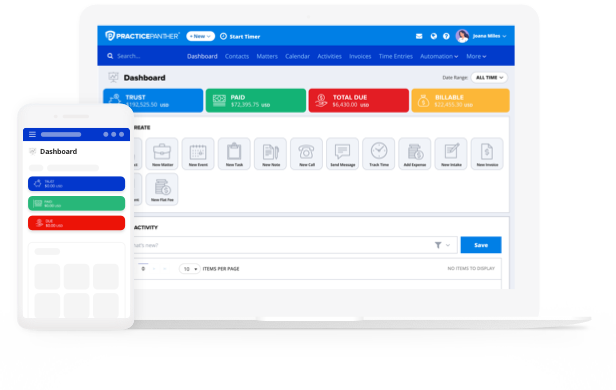
Law firm intake process automation is only as useful as the platform providing it. Instead of treating intake as a standalone process or add-on feature, PracticePanther is built for the entire client lifecycle, starting with intake. When your intake automation is built into the same platform where you already manage cases, calendars, documents, and billing, every single client, lead, and active matter exists within a single, smooth workflow.
PracticePanther’s Automated Intake Features
PracticePanther’s client intake capabilities account for the entire path from first contact through open matter, including features like:
- Custom Digital Forms: Build fully customizable online intake forms with fields tailored to each practice area, then embed them on your website or share them by link so prospective clients can complete them from any device.
- Automated Lead Capture and Follow-Up: Every completed intake form automatically creates or updates a client contact in your CRM and notifies specific teammates when a new intake form is submitted. For instance, when a team member is assigned to a specific intake form, they will be notified as soon as the form is completed. Additionally, a follow-up task will be created in PracticePanther. PracticePanther also lets you send up to five automated reminders via SMS or email to clients ahead of their appointments.
- E-Signature Requests: Send engagement letters and retainer agreements out for signature directly from the platform, letting new clients sign on any device without a separate trip to the office or with third-party software integrations with added fees. You can also create document templates in PracticePanther for frequently signed intake packets, and pre-populate client information and signature lines automatically.
- Conflict Checking: Cross-reference new client and party names against your existing records to catch potential conflicts of interest before you take on a matter.
- Seamless Lead-to-Client Handoff: Apply the platform’s workflows to your intake stage, automatically assigning tasks and events once a lead becomes a matter, so nothing falls through the cracks between intake and case setup.
What to Look for in the Best Legal Intake Software
Clients are not against legal firms using software for certain aspects of case management, provided they are using the best options available. This idea is even codified in the Model Rules of Professional Conduct (Rule 1.1: Competence), which requires you to stay up-to-date on “changes in the law and its practice, including the benefits and risks associated with relevant technology.” In addition to the automated intake features listed above, the legal intake software you choose for your firm should also…
- Protect client data with encryption and security safeguards that meet bar association standards.
- Connect directly to your case management, calendaring, and billing systems, not a standalone inbox.
- Scale alongside your firm as caseloads grow and new practice areas are added.
PracticePanther’s comprehensive case management platform was built to deliver all of this and more; automating intake is really just the entry point.
PracticePanther: Streamline More Than Your Legal Intake Process
Once a lead becomes a client within PracticePanther, the same automation naturally extends into scheduling, document management, and trust accounting. That means the efficiency you gain during the intake process carries throughout the entire case lifecycle. If your firm is still stitching together forms, spreadsheets, and separate software to manage new clients, it’s worth seeing what a single connected platform looks like in practice. Start a free trial of PracticePanther today to see how intake automation fits into your firm’s existing workflow.