

Working as a solo lawyer is a rewarding career path, but it does come with challenges. Attorney work is already demanding on its own, but as a solo lawyer, you must serve every other business role, each with its own processes and strict code of ethics.
For a one-person practice, the cliche ‘be your own boss’ turns into ‘be your own paralegal, accountant, administrator, scheduler…the list goes on.’ To quote solo attorney Kathleen Day-Seiter, “Most of us start our own firm on a shoestring, and we’re trying to figure out how we can do as much as we can with as little as possible.”
Being a solo practitioner is a lot to handle, but it’s not impossible — especially with the right setup in place. And that’s where legal practice management software can step in to help out.
A solo law firm with software can make one lawyer feel like ten. Modern law practice management software has come a long way in the past three decades, now able to provide features and support that are especially helpful for small to midsize firms. From document storage to time tracking software and even cybersecurity systems, a solo law firm with practice management software can take on attorney work with greater efficiency, all while creating better client experiences and adding protection for its most sensitive data.
For a solo law practice, software is one of the easiest and most cost-effective ways to boost business — but it’s important to know why it helps and what features to look for. Keep reading as we discuss the basics of solo law practice management software, including the most essential features, how using legal practice management software elevates a solo practice, and how to identify the best software for your needs.
First, let’s start with a basic overview of what technology you’ll need as a solo lawyer (and why you’ll need it).

What Type of Technology Does a Lawyer Use as a Solo Practitioner?
Typically, starting with a bare-bones setup — things like a computer, a printer/scanner, or other smart devices — is good for a solo lawyer. Software also plays a critical role in the beginning setup, as it is one of the few pieces of technology that can scale alongside your practice.
Portable devices are of increasing importance to solo lawyers. According to the American Bar Association (ABA), laptop usage in solo firms increased over the last 3 years (from 32% to 41%), while desktop usage dropped at a similar rate (from 64% to 51%).
Here is some of the digital technology you will need as a solo practitioner:
Legal Billing and Time Tracking Software
For solo attorneys, every billable minute counts. Legal billing and time tracking software ensures no work goes unbilled by making it easy to capture time as you go—whether you’re drafting a motion, taking a client call, or reviewing documents.
Automated timers, flat-fee tracking, and expense capture reduce manual entry and billing errors. Invoices can be generated directly from tracked time, improving accuracy and accelerating the billing cycle. Instead of scrambling at the end of the month to reconstruct your work, you maintain a real-time record of your productivity.
This results in faster invoicing, improved cash flow, and a clearer picture of profitability—without hiring additional staff.
Legal Payment Processing Software
Getting paid quickly is critical for solo practitioners. Legal payment processing software enables firms to accept online payments via credit card, ACH, and other secure digital methods—making it easier for clients to pay promptly.
Built-in safeguards help ensure proper handling of trust accounting and operating account funds, supporting compliance with IOLTA requirements and state bar regulations. By offering convenient payment options directly through invoices and client portals, solos reduce friction in the payment process and shorten the time between invoice and deposit.
Faster payments mean steadier revenue—and fewer awkward collection conversations.
Legal Case Management Software
As a solo attorney, you’re managing cases, deadlines, documents, and client communications simultaneously. Legal case management software brings all of it together in one system.
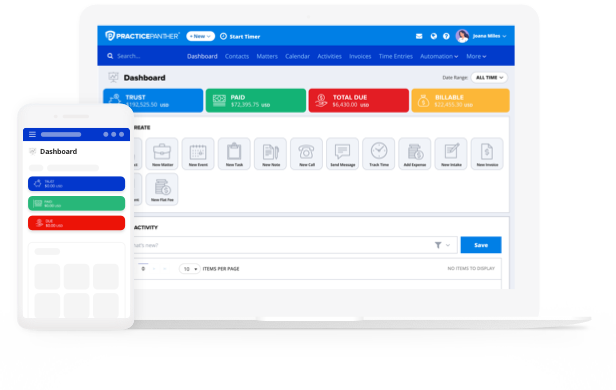
With matter dashboards, task management, document storage, billing integration, and communication tracking in a single platform, you gain full visibility into each case. Automated workflows reduce repetitive administrative work, while centralized records ensure you never miss key details.
Instead of juggling disconnected systems or manual processes, you operate from one organized hub—giving you greater control over your caseload and the ability to scale efficiently.
Legal Reporting Software
Data-driven decision-making isn’t just for large firms. Legal reporting software empowers solo practitioners with real-time insights into revenue, billable hours, collections, and matter performance.
Customizable reports help you identify trends, spot bottlenecks, and evaluate which practice areas are most profitable. Rather than relying on intuition alone, you can make informed decisions about pricing, workload distribution, and growth strategy.
For solos who wear both the attorney and managing partner hats, reporting visibility transforms raw data into actionable business intelligence.
Law Firm CRM and Legal Client Portal
For solo practitioners, client experience can be your biggest competitive advantage. A built-in legal CRM helps you track leads, consultations, and follow-ups—ensuring no opportunity slips through the cracks.
Once clients are onboarded, a secure client portal provides a centralized space for document sharing, invoice review, and case updates. Two-way business texting allows you to communicate quickly and professionally without using your personal number, while a mobile app keeps you connected to clients and cases from anywhere.
This combination of CRM functionality, secure communication, and mobile accessibility helps solos deliver responsive, modern service—without adding administrative overhead.
Legal Calendaring
Missed deadlines can have serious consequences for solo attorneys. Legal calendaring software safeguards your practice by tracking court dates, filing deadlines, meetings, and reminders in one synchronized system.
Automatic deadline calculations and reminders help reduce risk, while calendar syncing ensures your schedule is consistent across devices. Integrated with your matters and tasks, calendaring becomes more than just a schedule—it becomes a risk-management safeguard.
For solo practitioners, reliable calendaring offers confidence that critical dates won’t slip through the cracks, even when you’re managing everything yourself.
Legal Document Management Software
For solo practitioners, organization is everything. Legal document management software centralizes your pleadings, contracts, discovery, and client communications in one secure location—eliminating scattered files across desktops, inboxes, and cloud drives.
With matter-based organization, every document is automatically tied to the correct case, so you can retrieve what you need in seconds. Version control reduces the risk of working from outdated drafts, while secure sharing simplifies collaboration with clients and co-counsel. For solos who don’t have an internal IT department, built-in security and structured file management create peace of mind without added administrative burden.
Ultimately, streamlined document management means less time searching for files—and more time serving clients.
While this may seem like a long list of software, not to worry — you can find all of these features in high-quality legal practice management software. It may be tempting to use free or near-free options to save money (such as paper time tracking or Excel spreadsheets), but the amount of time, stress, and money you save by using a single software will more than make up for the cost.
This is especially true considering there are software providers who offer quality, low-cost options for starting a solo firm. Companies like PracticePanther, for example, provide legal practice management software that has all the features solo lawyers need in one affordable, self-contained system.
Even so, as a solo lawyer, you may wonder if legal practice management software is really worth it for just you.
How to Choose the Right System
Choosing the right all-in-one legal practice management system isn’t just about picking the slickest interface — it’s about finding software that truly supports how you work, keeps you organized, and grows with your practice. As a solo lawyer, you’re balancing client work, deadlines, billing, and business development all at once. Here’s what to ask when choosing the right small law firm management software for your practice.
What are your firm’s top challenges today?
Start by clarifying where you lose the most time or money: Is it tracking billable hours? Finding documents across drives and inboxes? Managing deadlines? Having a clear picture of your biggest bottlenecks helps you evaluate whether a system actually solves your problems rather than impressing with bells and whistles. A true all-in-one practice management platform like PracticePanther brings these functions together so you don’t have to stitch multiple apps together — and many solo lawyers report it simplifies workflows across the board.
Does this platform truly bring everything under one roof — without adding complexity?
All-in-one should mean integrated, not bloated. Ask how seamlessly core functions like case management, calendaring, documents, billing, payments, CRM, and reporting work together. You don’t want to stitch multiple apps together manually or export and re-import data to make different modules talk to each other. For example, PracticePanther’s cloud-based system is used by tens of thousands of attorneys worldwide, illustrating its broad appeal as an all-in-one solution for solos and small firms.
How intuitive is the user experience — especially on mobile?
You’ll be using the system on the go, whether it’s reviewing documents between hearings or logging time after client calls. Test the mobile experience and make sure essential actions — time tracking, calendar updates, invoice sending, matter notes — are smooth and fast. A steep learning curve can cost more time than the software saves.
How well does communication with clients work?
For solos, responsiveness builds trust and differentiates your service. Ask whether the software provides secure client portals, easy file exchanges, real-time case updates, and modern communication tools like two-way business texting. A unified inbox and client portal that keeps everything in one place can dramatically improve client satisfaction. PracticePanther offers native texting and comes with a robust CRM and client portal; eliminating the need for third-party tools and helping solos keep all client communication logged and organized.
Can the system grow with your practice — or will you outgrow it?
Solo practices change — new practice areas, occasional contractors, or plans to hire support staff. Look for software that scales without forcing you into a painful migration later. That includes flexible pricing tiers and the ability to add new users or advanced features as needed.
What reporting and financial insights does it provide?
Understanding your firm’s performance isn’t a luxury — it’s essential. Good practice management software should give you quick visibility into billable hours, collections, expenses, client profitability, and workflow bottlenecks. Ask to see customizable dashboards and reports that help you make smarter business decisions. Many solos appreciate PracticePanther’s built-in dashboards and reporting that highlight productivity and financial performance, helping you make informed business decisions.
How robust is support, training, and onboarding?
The best software in the world won’t help if you struggle to implement it. Inquire about live support, onboarding assistance, training materials, and user communities. Especially when you’re juggling everything solo, dedicated help can make adoption less painful and more successful. PracticePanther’s onboarding resources, training libraries, and responsive support — factors that help solos get up to speed quickly and derive value faster.
What about security and compliance?
Your clients trust you with sensitive information. Confirm the platform uses strong encryption, offers secure access controls, and meets legal industry standards for data protection. For practices handling client funds, verify that billing and payment features support ethical requirements like proper trust accounting. PracticePanther combines military-grade security and cloud infrastructure with practice-specific features like trust accounting, so confidentiality and compliance stay top of mind.
Does a Solo Practice Law Firm Really Need Practice Management Software?
While a solo practice does not technically “need” practice management software, it is a huge help with operations, cybersecurity, compliance, and administrative tasks. You could argue that every firm’s needs will vary, but you’d be hard-pressed to argue the benefits that practice management software provides. This is especially true for solo lawyers, since they handle every part of their practice.
Being a one-attorney team (especially without support staff) means you are responsible for every step of handling a caseload, from initial client communications all the way to collecting the final payment. Practice management software helps with each step of that process, all the while saving time, reducing opportunities for error, and creating an overall better client experience.
So, if you’re a solo lawyer who’s debating whether you need software, ask yourself these questions:
- Do you need an efficient process for time tracking, billing, and invoicing?
- Do you need a place to safely and securely store client data that protects against cyber threats?
- Does your practice need an easy way to organize your caseload that you can easily access from anywhere, at any time?
- Do you need high-touch communication between your clients and ways to make your customer experience more professional?
If you answered “yes” to even one of these questions, chances are you have a lot to gain from using practice management software — and so does your business. Not only has this software dramatically improved in quality in the past couple of decades, but it has also become more user-friendly and much more affordable.
The best software providers will even offer plans that scale to different budgets, all without forsaking functionality. PracticePanther, for example, offers several software plans, one of which is tailored for solo law firms. This simple investment in your firm can (and will) elevate your practice and lower the burden on you. How exactly will that happen? Let’s take a closer look and find out.

How To Manage a Law Firm as a Solo Practitioner — And How Software Can Help
Managing a law firm on your own isn’t easy, but with a plan in place, it’s more than possible. Below, we’ll go into some basic steps for handling your solo practice and explain why software like PracticePanther provides great support for legal practice management.
Step 1: Create Your Policies and Procedures Manual.
While this may seem unnecessary when you are the only staff at your firm, laying out clear procedures for each part of a solo firm is just as important, if not more so. As a solo practitioner, you’re wearing many hats at once (literally all of them), so keeping yourself organized is paramount.
What will your intake process be like? How will you stay in touch with clients? And how do you plan on tracking your hours? This is where having practice management software can make things much easier: by giving you the systems to manage your firm’s operations, helping your firm stay organized, and keeping documents in a safe place.
Software like PracticePanther supports each part of running a firm, all while compiling everything in a single, secure source of truth. For example, PracticePanther assists with:
- Client Communications — Through a customized attorney-client portal, you can send messages, share important documents, and even collect payments.
- Time Tracking — Managing timesheets is complex, but software today is well-equipped to handle the challenges of varying rates and switching between tasks. Track billable hours in the same software that you’ll use to draft invoices and even collect payments, streamlining the billing process.
- Calendaring — You already know calendars are key to staying on top of consultations, court dates, deadlines, and other important meetings. Legal practice management software takes your calendar a step further by letting you set court rules-based calendar events and create legal workflows to always stay connected.
- Trust Accounting — Using an legal practice management software like PracticePanther lets you manage trust and operating accounts while maintaining compliance with IOLTA, the ABA, and regulations in all 50 states.
Step 2: Find Ways To Reduce “Busy Work.”
Time is always money, but your time is even more valuable as a solo lawyer. Since your attention is constantly split between all aspects of your practice, it’s essential to find strategies that minimize unnecessary tasks. Legal practice management software features can help do just that, like:
- Invoice Templates — Repetitive tasks, like creating invoices, can eat up valuable time that could be spent on billable work. PracticePanther simplifies this process with customizable invoice templates that let you set various parameters, pull client account details, and generate professional invoices in just a few clicks. This will not only save you time but give your clients an overall better experience.
- Automated Task Management — Instead of manually doing every part of your practice, PracticePanther lets you create workflows that trigger when you complete certain tasks. From invoice creation to client reminders, task managers are like having your own virtual paralegal to help you with detailed work.
- Business Analytics — Rather than spending sleepless nights wondering what to focus on as a practice, what if you had a way to see that information at the touch of a button? With PracticePanther’s detailed reports and sorting capabilities, you can see just how much each part of your practice generates, monitor unpaid invoices, track where you spend time, and what opportunities for growth exist.
Step 3: Maintain High-Quality Client Experiences.
Especially as a solo attorney, you must have high standards for how you handle clients. Good communication, attentive response time, and transparent billing processes will not only boost your brand’s professionalism but will help clients see you as safe and trustworthy. While some of this does have to do with how you personally communicate it, much more of it comes down to having the right systems in place (which software helps with).
Client relationships involve a lot of different facets: intake, casework, ongoing communications, accounting, payment collection — the list goes on. Practice management software gives you secure methods for handling client relationships that are convenient for you and the client.
For example, workflow automation can speed up your intake process. Client portals give you a way to easily communicate and share documents. And using invoice generation, you can send clear and detailed invoices, which will make your clients feel more comfortable working with you.

How Much Does Law Firm Software Cost for Solo Practitioners?
Legal practice management software typically follows a subscription model with multiple tiers of plan options. This provides a fixed cost and allows firms to purchase the setup that best aligns with their budget and goals. Additionally, since most legal practice management software providers are cloud-based, there will be no surprise IT costs, and any updates to your software will happen automatically. Below, we’ll look at a few different legal practice management software providers — PracticePanther, MyCase, and Clio — to give you an idea of what to expect.
As you review, note that we are not examining any free options. This is because free options will not be the best law practice management software. If you’re solo, free software may sound like a great way to save money, but in reality, you will end up costing yourself more in the long run. Free options mean sacrificing quality, security, efficiency, and customer support. Especially as your firm grows its caseload, having quality software in place will be more efficient and create more opportunities for success.
PracticePanther
PracticePanther prioritizes creating a platform that’s both robust and user-friendly. With features like native payment processing and secure document management, PracticePanther aims to boost a firm’s efficiency while improving client experience.
The base subscription plan (at $49/user/month billed annually) offers all the features needed to grow law firm operations, with the three higher tiers ($69/user/month, $89/user/month, and $114/user/month annually) providing additional features like native trust and operating accounting capabilities, eSignatures, 2-way business texting, and audit-ready reports.
For solo firms at any stage of development, PracticePanther is a great addition to their operations. The base plan is affordable while providing all the features a solo lawyer needs.
MyCase
MyCase offers a base plan at $39/user/month billed annually, with two higher tiers at $79/user/month and $99/user/month annually. While their base plan is technically affordable, it, unfortunately, lacks much of what makes practice management software useful for solo practitioners. Additionally, MyCase only includes much of their workflow automation in the middle or highest-tier subscriptions.
While MyCase offers a budget-friendly base point, a solo lawyer would need the higher tier subscriptions to access the features they need the most. Additionally, MyCase relies heavily on third-party integrations, which are complicated to handle — particularly for a solo attorney who already has enough to oversee.
Clio
This legal practice management software is known for its reliance on a long list of integrations, as well as key features like cloud access and client relationship management. They currently offer three tiers of monthly subscriptions, respectively priced at $39/user, $79/user, and $139/user a month (plus additional fees) billed annually.
Clio is a common choice for medium to large firms with the budget to foot its pricier plans and multiple software integrations. But is Clio a good software for solo lawyers? Its base plan, while affordable at $39/user/month annually, doesn’t include hardly any of the features a solo practitioner needs the most, such as client portals and document templates. And Clio’s two higher tier subscriptions get expensive quickly, especially with the initial $399 onboarding fee tacked on.
What Is the Best Legal Software for Solo Lawyers?
If you’re a solo practitioner, PracticePanther is the best choice for your firm. And if you’ve been looking into scouring Reddit for law practice management software reviews, you’ve probably seen us come up a time or two — for good reason! With our true all-in-one solution, we are uniquely equipped to support solo practitioners. And with our high-touch customer support, we can have you ready to use PracticePanther the day you purchase it (seriously!).
Don’t just take our word for it — solo attorney Lauren Bryant, founder of Lauren Bryant Law, stated she “figured out the ins and outs of PracticePanther on my own in a couple of hours. Literally the day I opened my firm, I had PracticePanther set up.”
Investing in the right practice management software is critical as a solo lawyer. Get started with us today through a free trial, or click the button below to sign up for a free demo. See firsthand why solo lawyers across the country trust PracticePanther!