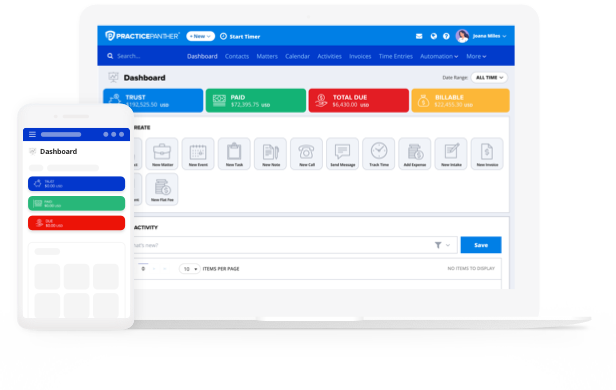
Mid-sized legal firms often find that selecting the right legal practice management software can have an outsized impact on their ability to streamline their day-to-day work, from matter organization and deadline tracking to billing, payments, and client communication.
According to ABA’s 2024 Legal Technology Survey, a majority (73%) of firms currently use cloud-based legal software, with practice management software among the most widely adopted solutions.
If you’re like most small- and mid-sized firms, you’ve almost certainly moved past the point where a shared spreadsheet or basic calendar works well. At this point, the question isn’t whether you need legal practice management software; it’s how to choose the right one.
The best legal practice management software for small firms (and mid-sized firms) supports multiple attorneys and practice areas — and it will be able to scale with your firm as the years go on.
Here’s a practical guide for evaluating your options, so you can make the right choice for your firm. It will focus on the seven most important priorities you’ll want to consider.
Assess Your Processes and Workflows
Before you start reviewing different platforms’ feature lists, take some time to consider your current workflows and the legal workflow automation plays in your firm’s operations. Think especially hard about the processes that currently cause friction or could be more efficient.
- What causes matters to become disorganized?
- What types of deadlines tend to fall through the cracks?
- Where are you losing billing time or sending out delayed invoices?
- Are client communications well-organized and accessible, or are they siloed in individual inboxes?
The answers to these questions should directly inform your “features wishlist” when evaluating different solutions. Streamlining your workflows with practice management software directly addresses common friction points like:
- Inconsistent matter organization across different attorneys and practice groups.
- Time and billing inefficiencies that leave revenue on the table.
- Difficulty tracking deadlines and tasks across a larger team.
- Client communication that’s scattered across emails, phone calls, and documents.
- Reporting that doesn’t give firm leadership a clear picture of performance.
Consider Multi-User Functionality
The best legal case management software for mid-sized firms supports real-time, multi-user collaboration. This includes multi-user features like:
- The ability to assign matters to specific attorneys or teams
- Delegating tasks with clear ownership
- Setting role-based permissions so each user sees what they need without unnecessary access to sensitive information.
As you evaluate features, think about specific scenarios. For example:
- Can a paralegal add notes or update a document while an attorney reviews the same matter?
- Can your intake coordinator move a new client through the pipeline without pulling in an attorney?
Cloud based practice management software that supports seamless team collaboration eliminates version-control headaches and the miscommunications that slow firms down. And role-based permissions are extremely important, since your office manager needs different access than your associates, your associates need different access than your partners, and so on.
Evaluate Legal Billing and Trust Accounting Features
Legal billing is where the complexity of a mid-sized firm really shows, with more timekeepers, more billing arrangements, and more client accounts than a solo or small practice. Here are some key features of law practice legal billing software:
- Billing Flexibility: Since your firm most likely handles a range of billing types, pay special attention to platforms that support hourly, flat fee, contingency, and retainer-based billing. Choosing software that accommodates them all is more efficient, cost-effective, and accurate than using manual workarounds with software not set up for multiple billing types.
- Automated Payments: The ability to automate payment reminders and provide integrated online payment options also improve the client experience while streamlining billing workflows and reducing the gap between work performed and payment received.
- Operating and Legal Trust Accounting: If your firm manages client funds, you should also look for solutions that include legal accounting features, especially trust accounting. Legal-specific platforms (like PantherAccounting Plus) handle IOLTA compliance, three-way reconciliation, and customizable reporting in ways that basic accounting software simply can’t match.
Prioritize High-Quality Reporting
A mid-sized firm running on real-time data is better positioned to spot billing delays, identify capacity issues, and take action before small problems compound. With legal reporting features like real-time dashboards and robust filtering capabilities, you can monitor performance at any point and respond to trends quickly. Look for a platform that surfaces key metrics like:
- Billable hours by attorney
- Realization rates
- Collection rates
- Outstanding balance
- Matter profitability
- Origination tracking
When this data is organized, up-to-date, and easily accessible, you can make smarter decisions about staffing, practice area investment, and where to focus your energy in the next quarter.
Don’t Forget Migration, Implementation, and Training
It doesn’t matter if you invest in the best platform on the market if your team doesn’t use it consistently. “Law firms should recognize that change management is as vital as technical implementation,” as the American Bar Association notes, while highlighting the importance of “robust training, accessible support, and clear communication about the purpose and value of the technology.”
Look for vendors that specifically understand the legal industry, with a track record of responsive, knowledgeable support. Here’s what strong implementation support actually looks like.
- Hands-on onboarding
- Dedicated customer success team
- Training resources (whether videos, tutorials, or live sessions)
- Straightforward migration capabilities
Think About the Future
As you evaluate platforms today, keep your firm’s short- and long-term future in mind, as well. When meeting with vendors, be sure to discuss what the upgrade path looks like and how pricing scales as users are added.
You’ll want to get a sense of whether a given platform makes it straightforward to scale users and features without forcing a full migration to an entirely new system, so the time and energy you invest in setting it up isn’t lost when you reach its limits.
Integrations matter, too. You already have platforms for calendaring, email, and document management. A practice management platform that connects smoothly with your existing systems reduces friction and makes adoption easier across your team. E-signature capabilities built directly into the platform, for example, removes one more manual step from client intake and document workflows.
Start Exploring Your Options
Choosing your new legal practice management platform represents a significant investment, and not just in terms of the price point. The evaluation process takes time and energy, as well as communication and coordination. Start engaging with vendors by:
- Looking through reviews
- Reading their resources to gauge their level of expertise
- Signing up for free trials
Get started today and explore PracticePanther for your firm to see how we can change the way you work.