The difference between a firm that runs smoothly and one that’s constantly playing catch-up usually comes down to one thing: whether the systems holding everything together are actually working.
For many small firms, information exists in silos. Their client details live in assorted email threads, deadlines sit in spreadsheet cells, and billing systems seem to operate independently from everything else. Each piece of their process technically “works,” but nothing connects. That’s the gap that costs attorneys billable time while quietly creating compliance and communication risks that are hard to spot until they become problems.
That’s precisely the problem the right legal practice management software solves. And especially for small firms, getting this decision right matters more than most people realize.
Why Do Small Firms Need Legal Practice Management Software?
As a firm grows, the patchwork of DIY solutions it started with begins to show its limits. In a practical sense, what works for a firm with two attorneys and a handful of active matters starts to break down as a firm grows its client base or matter volume. After all, more clients mean more documents, communications, and deadlines to track. And more staff means more handoffs, meaning more opportunities for vital details to slip through the cracks.
The latest small law firm management software consolidates operations into a single, centralized platform, enabling attorneys and staff to track each matter from intake through close, capture billable time, generate invoices, accept online payments, maintain compliance with trust accounting, and improve client communication.
Ultimately, the right legal practice management software for small law firms provides three core benefits:
- Reducing administrative overhead, freeing attorneys to focus on billable work instead of chasing down information.
- Centralizing matters and billing data, giving firm leadership real-time visibility into performance, so decisions get made on facts rather than guesswork.
- Automating workflows and deadline reminders to keep your team aligned and clients informed, without adding more to anyone’s workload.
What Makes the Best Legal Software for Small Firms?
There’s a lot to consider when evaluating legal case management software for small firms, but a few characteristics set the best platforms apart from the rest. These include:
- Fast Adoption: When attorneys or paralegals can’t learn the system quickly, adoption can slow significantly. The best law office practice management software should feel intuitive from day one, minimizing training time and getting your team productive fast.
- Cloud Accessibility: Modern attorneys work from courtrooms, home offices, and client sites. Cloud-based legal practice management software provides secure access to matter files, calendars, contacts, billing data, and documents from any device.
- Built-In Automation: Excessive administrative work reduces profitability. That’s why the best legal case management software for small firms automates task assignments, deadline reminders, intake workflows, payment reminders, and document generation, reducing human error and freeing attorneys to focus on billable work.
What’s the Difference Between Cloud-Based Legal Practice Management Software vs. Desktop Systems?
Some firms still rely on server-based systems, not because they work well, but because switching can feel overwhelming and disruptive, especially for smaller firms. But the cost of retaining these premises-based systems is increasing due to lost time and ongoing costs associated with manual backups, security risks, limited mobility, IT overhead, and complex upgrade cycles.
For many smaller firms, cloud-based software addresses these friction points, with the best platforms offering automatic updates, real-time backups, multi-device access, secure permissions, and room to scale.
For any firm with growth on the horizon, moving to web-based legal practice management software is worth prioritizing. It’s the best way to ensure long-term flexibility without bloated infrastructure costs.

What Are the Core Features Every Legal Practice Management System Should Include?
One of the best places to start when evaluating legal practice management systems is by prioritizing your practice’s daily workflows. That way, you can quickly filter out platforms that aren’t going to make those workflows any quicker or more effective. For most small firms, a majority of these workflows will fit into one of five buckets:
Matter and Case Management
A top-quality legal practice management solution starts with strong matter and case management. Look for software that lets you create matter profiles, track statuses, assign staff, manage deadlines, log communications, and attach documents.
In other words, the best practice management software for attorneys at small firms provides its value day-in and day-out through the kind of reliable, time-saving matter and case management features that can scale with the firm.
Legal Client Management and CRM Features
Small firms often depend on winning referrals and retaining their best clients, the focus of a legal practice CRM for a small legal firm. Prioritize legal practice software that includes contact management, automated intake forms, consultation scheduling, conflict checks, and automated follow-up reminders.
Billing and Payments
For small firms, cash flow can be a make-or-break proposition, with the American Bar Association going as far as to call it “critical to business success,” especially in post-pandemic years. The best legal business software handles the entire billing cycle, including time tracking, expense tracking, invoice automation, payment plans, and online payments.
Document Management and Collaboration
Legal document management software should serve as a centralized repository where attorneys can securely store, search, organize, track, and retrieve specific case-related files like contracts, pleadings, and discovery materials. Key document management features to look for include cloud storage, version history, template automation, folder permissions, and e-signature capabilities.
Choosing a single, cloud-based platform that provides these features can significantly reduce administrative work and ensure that their records are complete, up-to-date, and easily accessible. It’s also important to select a platform with a strong reputation for document security and remote accessibility.
Reporting and Business Intelligence
While most firms can tell you their revenue, not nearly as many can confidently speak to their firm’s profitability. So it shouldn’t be surprising to learn that the worldwide legal software market has been growing for years.
The right legal management platform can bridge this gap through the ability to report on metrics like billable utilization, collection rates, matter profitability, client acquisition cost, and aging invoices.
Trust and Operating Accounting
With the right infrastructure, trust accounting becomes a structured and transparent process in which balances are visible in real time, and reconciliations are part of daily operations. This results in stronger compliance, greater operational control, and greater confidence in how client funds are managed.
With the support of legal accounting software, you can rest easy knowing your trust accounts are fully compliant, thanks to automated reconciliations and built-in guardrails that prevent commingling, overdrafts, and early revenue recognition.
How Do I Choose the Best Law Firm Practice Management Software?
Finding the right platform starts with an honest look at your current workflows and where they’re breaking down. As mentioned earlier, quick adoption and cloud accessibility should be at the top of any practice management software checklist.
Here are a few additional questions to ask as you evaluate different platforms and their potential impact on your firm:
- Will it support your workflows? A platform that doesn’t align with how your firm actually operates creates workarounds instead of eliminating them, which leads to adoption problems early on. The best platforms will reduce administrative burden, not increase it.
- Will it scale? The last thing you want is to outgrow your new software before it’s fully implemented. Evaluate how easy it will be to add users, expand practice areas, or increase case volume without a time-consuming system overhaul.
- Will it improve client experience? Clients increasingly expect the convenience of online payments, digital intake, and timely communication. You should consider them baseline expectations while evaluating your options.
- Does it offer reliable support and onboarding? Even the most intuitive software has a learning curve; it’s usually the quality of onboarding and ongoing customer support that makes the difference between a successful or stalled implementation.
- Is it secure and fully-compliant? For attorneys, protecting client data is an ethical obligation, not just a best practice. That means security features and compliance standards should be non-negotiable factors in your decision-making.
How Does PracticePanther Help Small Firms Keep Pace?
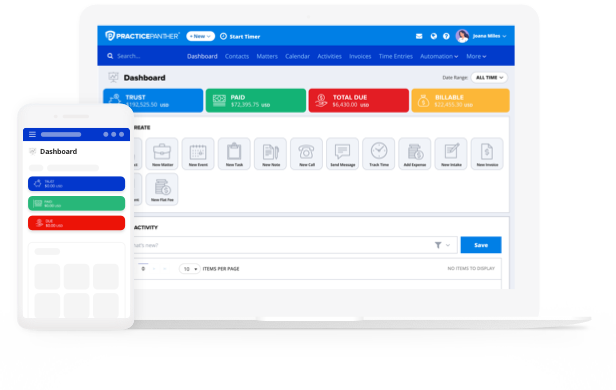
Most small firms are competing for clients in an increasingly crowded market. PracticePanther was built to deliver powerful, time- and cost-saving features in an intuitive, scalable platform. From matter and case management through reporting and business intelligence, they’re all provided within a unified platform.
- Matter and Case Management: PracticePanther’s legal case management features give every team member a single, organized view of all active matters, so no one has to chase down information that should be at their fingertips.
- Legal Client Management and CRM Features: Built-in client intake tools, contact management, and automated follow-up reminders mean fewer prospects fall through the cracks and more clients stay engaged throughout the process, making PracticePanther ideal for small firms.
- Billing and Payments: PracticePanther consolidates time and expense tracking, invoicing, and online payments in one place, shortening the gap between performing work and receiving payment.
- Document Management and Collaboration: With secure cloud storage, matter-linked files, and built-in e-signature capabilities, PracticePanther keeps your firm’s documents organized and accessible.
- Reporting and Business Intelligence: PracticePanther surfaces the kind of firm-level metrics that revenue numbers alone won’t tell you, with customizable reporting capabilities to give leadership the visibility needed to make smart decisions about staffing, pricing, and growth.
- Trust Accounting: Through PantherAccounting Plus, PracticePanther provides the resources to manage day-to-day accounting while offering the safeguards required for proper trust accounting compliance.
The Future of Legal Software for Lawyers
Not all small firms grow at the same rate, but those that grow the fastest are the ones with systems that capture leads faster, automate the intake process, bill consistently, automatically follow up with clients, and track profitability through custom reporting.
If your firm is still working with a DIY system of old-school spreadsheets, disconnected apps, and manual billing workflows, there’s never been a better time to consider an upgrade to PracticePanther. Because when your systems run smoothly, your attorneys can focus on what matters most: client matters and firm growth. Start your free trial today.