

Client relationships are the backbone of every law firm, whether you’re running a solo estate planning practice or a growing personal injury firm with dozens of attorneys. Yet many firms still track leads on spreadsheets, chase intake forms buried in inboxes… the list goes on. That approach works until a prospective client falls through the cracks, or an existing client feels forgotten mid-case.
Legal client relationship management software (CRM) gives your firm a single, organized system for every touchpoint in the client journey, from the first inquiry to the final invoice. Below, we’ll walk through what a CRM for law firms actually does, how to evaluate your options, and how PracticePanther’s client intake and CRM software helps build stronger relationships without adding more work to attorneys’ plates.
What is a CRM for a Law Firm?
A legal CRM is a system that organizes and tracks every interaction your firm has with a prospective or existing client. Instead of scattering contact details, case notes, emails, and intake forms across different apps and inboxes, a CRM centralizes that information so your whole team can see exactly where a relationship stands.
Client relationship management aided by software has a direct line to profitability. Research from Bain & Company, widely cited by Harvard Business Review, found that increasing client retention by just 5% can increase a firm’s profits by 25% to 95%.
Ultimately, the systems you use to stay in touch with clients—remembering to follow up, sending timely updates, and responding quickly to questions—are a measurable driver of revenue. A CRM built to consistently support those habits is one of the more direct ways a firm can protect that retention rate.
Building and Maintaining Healthy Attorney-Client Relationships
Client relationships start as soon as someone finds your firm’s website. A prospective client fills out an intake form, calls the office, or gets referred by a past client. How quickly your firm responds, how much information is captured, and how consistently you follow up all shape whether that person becomes a client.
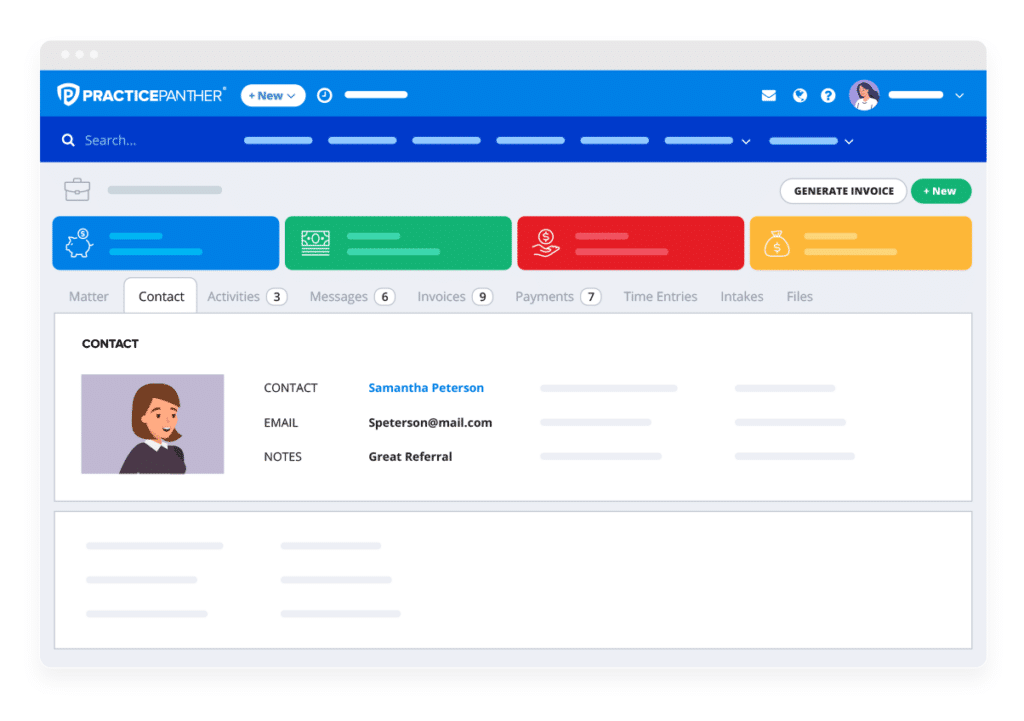
Once someone is a client, the relationship needs the same level of attention. Clients want to know their case is moving forward, even during the quiet stretches between court dates or filings. A CRM keeps a record of every call, email, and note associated with that person and case, so no one on your team has to guess what was last discussed. That consistency builds trust, and trust is what keeps clients from feeling like just another file number.
The Advantage of Choosing Software Built for the Legal Industry
General business CRMs are designed with sales teams in mind—tracking deals, quotas, and pipelines. Law firms have more specialized needs. Client matters involve confidentiality obligations, trust accounting rules, conflict checks, and practice-area-specific nuances. A CRM designed around legal client intake and case-based relationships fits how attorneys actually work, rather than requiring your firm to bend a generic sales system to support a law practice.
Six of the Best CRM Tools for Law Firms
If you’re comparing options, here’s an overview of some of the platforms firms consider when researching the best legal CRM software.
- PracticePanther is a cloud-based legal practice CRM built specifically for the day-to-day realities of running a law firm. It combines client intake, contact management, and workflow automation with the practice management features firms already rely on for billing, calendaring, and case tracking. Because PracticePanther is designed around the legal client journey, firms can move a contact from “prospect” to “client” without re-entering information or juggling separate systems.
- Clio is a well-known legal software that offers CRM functionality alongside case management, billing, and document handling. It’s a common choice for firms that want customization, with pricing that scales based on the plan and feature set they select.
- MyCase offers case management with client communication features, including a client portal and messaging capabilities. Firms often evaluate it alongside other practice management platforms.
- Lawmatics was built specifically around legal client intake and marketing automation, with a focus on capturing leads and nurturing them through the intake process before a matter is even opened.
- HubSpot is a widely used general-purpose CRM built for sales and marketing teams across industries. Some firms use it for marketing automation, but because it wasn’t designed with legal workflows, trust accounting, or case-based client relationships in mind, they typically need to add extra customization—or pair it with legal software—to make it work for a law practice.
- Airtable is a no-code platform that combines a spreadsheet interface with a relational database. Through some manual configuration, firms can use it to build a CRM or sales platform. It is similar to HubSpot, but requires more manual configuration.
Of these, PracticePanther stands out for firms that want client intake, CRM, billing, accounting, and case management working together in one place, rather than stitching together separate systems.
What are the best legal CRM features?
Not every CRM offers the same depth of functionality. Here’s a look at the time-saving features of legal CRM solutions that help firms manage client relationships from first contact through case resolution.
- Automated intake forms. PracticePanther lets firms build custom online intake forms that prospective clients fill out directly, capturing the details your team needs without a staff member having to manually log notes from the initial meeting. Categorize contacts in PracticePanther using Tags—by client, prospect, professional contact, or other classifications. Custom Tags can also track business metrics such as high-value clients or lead generation sources.
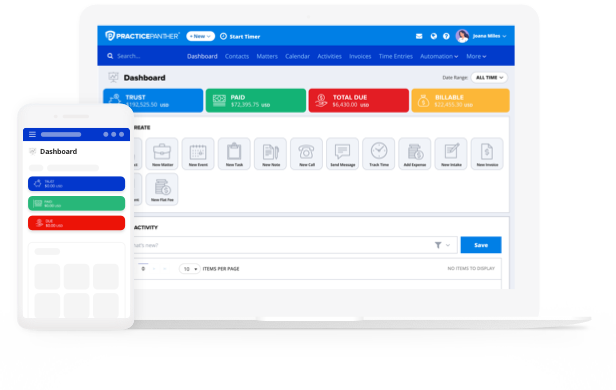
- Intuitive reporting. PracticePanther gives your team a clear view of where every current and prospective client stands, so nothing sits untouched because no one remembered to check on it. Categorize contacts in PracticePanther using Tags—by client, prospect, professional contact, or other classifications. Custom Tags can also track business metrics such as high-value clients or lead generation sources. Additionally, PracticePanther’s dashboards show the totals for trust, paid, amount due, and billable hours. You can also use Quick Create buttons to jump around the platform and see recent activity.
- Adding contacts to workflows. Once a contact is in the system, PracticePanther lets your team add them directly to a workflow, triggering the sequence of tasks, reminders, and communications that keep a matter—or a prospective client relationship—moving forward.
- Seamless conflict checks. In PracticePanther, you can create workflows to require a conflict check before a new matter or engagement letter can be generated. Simply search through all internal notes, tasks, events, emails, contacts, matters, and even custom fields with one click.
- Automated client follow-up. PracticePanther allows firms to set up automatic follow-up sequences, so leads and clients hear from your firm on a consistent schedule without an attorney having to remember to send that next email—send automatic appointment reminders to clients, reducing missed consultations and last-minute rescheduling. Firms can also automate payment reminders, increasing the likelihood of a faster payment. For example, firms that use PracticePanther get paid 70% faster.
- Simple E-signature. PracticePanther makes it easy to request electronic signatures from clients, safely store all client documents, and track document status—all in one place.
- Staying on top of case progression. Because contact records, communications, and workflow status live in one system, your team can see how a matter is progressing at a glance, without digging through separate email threads or paper files.
- On-demand access with the attorney Client Portal. PracticePanther’s Client Portal gives clients a secure place to check in on their case, view documents, and communicate with your team, without waiting on a callback. These features let firms give clients real insight into where their case stands at every step. This provides visibility, ensuring clients feel informed and reducing the volume of “just checking in” calls to your front desk.
- Securing client data. Client intake often involves sensitive personal and financial details, and PracticePanther secures form submissions with 256-bit SSL encryption and CAPTCHA protection, helping firms meet the confidentiality standards clients expect. PracticePanther also uses role-based access control to determine exactly what information users (such as attorneys, paralegals, or office managers) can see, edit, or delete. This ensures transparency across the firm while protecting sensitive client confidentiality.
How Does a Legal CRM Support Law Firm Marketing?
When a prospective client reaches out, they’re often comparing your firm against a few others. How fast you respond, how organized your intake process feels, and how personalized your follow-up is can be the deciding factor. Law firm marketing software that’s connected to your CRM means a lead who fills out a contact form doesn’t wait days for a reply—they get a prompt, consistent response, because the follow-up is built into the system rather than dependent on someone remembering to check a shared inbox.
This matters most for prospective clients evaluating their options during stressful moments. A firm that responds quickly, asks the right intake questions upfront, and keeps them updated throughout the process signals reliability before a single document is signed. That first impression, shaped largely by intake and follow-up, often has more influence on a prospective client’s decision than the marketing that brought them to your website in the first place.
For a deeper look at building out your firm’s marketing strategy, see PracticePanther’s law firm marketing guide.
Choosing the Right Legal CRM for Your Firm
Choosing a legal CRM ultimately comes down to how well it fits the way your firm already works. The right system should speed up intake, keep your team aligned on where each client relationship stands, and free up time that would otherwise be spent on manual follow-up and data entry.
Firms that get this right tend to see the difference in both directions. This means more prospective clients converting into signed matters, and more existing clients staying with the firm for the long haul.
Ready to see how PracticePanther’s client intake and CRM software can help your firm build stronger client relationships? Schedule a demo or start a free trial to see it in action.