On paper, a heavy caseload can seem like an indicator that your firm is thriving. But if you don’t have the resources, personnel, and processes in place to handle that caseload appropriately, legal matter management can become a true headache. Before you know it, morale and results are compromised, and cases can even be lost.
If you’re not leveraging the most reliable legal case management system for your firm’s needs, you’re not going to be at your best. Keep reading to learn more about how the right legal case management software mitigates the risks of missed deadlines, delays in client communication, and overall disorganization, enabling you to focus more on building productive client relationships and winning cases.
This article will explore legal case management system examples and help you envision how to find and implement the best case management software for lawyers at small firms dealing with heavy caseloads.
What Is the Best Legal Case Management Platform Overall?
The best legal case management software is the one that best fits your practice’s needs and the way you prefer to work. You’ll want to consider factors like your practice’s area (or areas) of focus, team size, workflow preferences, and so on.
In other words, there is no one-size-fits-all platform that will be “best” for every firm across the board. Smaller firms with larger caseloads benefit most from platforms that make them more efficient, effective, and organized. The best platforms for small firms achieve this through time-saving automation of routine tasks and increased visibility with deadline tracking and reporting.
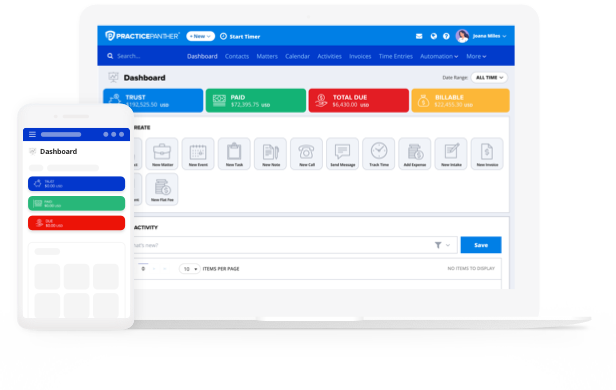
Whether you’re looking for small firm or solo law firm software, PracticePanther’s legal matter management platform should make your shortlist, with key features including:
- Matter dashboards that centralize case information and provide a single source of truth
- Automated task lists that save time and prevent important details from slipping through the cracks
- Legal calendar to keep teams aligned and deadlines under control
- Document storage that is intuitive and reliable
- Workflow templates that unlock new efficiencies and untapped revenue

Simply comparing online features lists isn’t always the best way to compare your options, since different platforms will use different terms for their features or position themselves in ways that aren’t exactly apples to apples. Prioritize objective factors like reliability, speed, and scalability, and consider their impact on your firm’s ability to succeed when things get busy.
Features That Make the Best Case Management Software for Solo Practitioners
While working as a solo practitioner provides a great deal of autonomy, solo lawyers also face unique challenges. According to American Bar Association (ABA) research, over 90% of solo practitioners and lawyers at small firms largely make their own tech-related decisions. This, of course, can be a double-edged sword. While it does promote flexibility and autonomy, the ABA also notes another reality: that “this often reflects limited infrastructure and outside support,” as solo and smaller firms typically lack internal tech support, work with modest tech budgets, and may also struggle with cybersecurity.
Another ABA study uncovered what it considers a “troubling trend”: while larger firms are increasingly leveraging case management software, the adoption rate among solo practitioners and small firms is moving in the other direction, most likely due to budget constraints. For these practices, what are the must-have features to make their investment in small law firm case management software worthwhile? There are four:
Feature #1: Centralized Case Management
Whether you’re a solo practitioner or work for a small firm, a centralized case management system is the backbone of an effective, agile practice. When all client and case data is collected and organized in a single, accessible repository, essential insights are just seconds away.
The best case management software for lawyers also includes features like custom fields, status tracking, and matter tagging and filtering that improve organization, elevate the client experience, and reduce day-to-day stress.
Feature #2: Workflow and Task Automation
While smaller firms and solo practitioners do have a level of autonomy in decision-making that their larger counterparts don’t, they still face many of the same challenges. The fact that many small and solo firms struggle to complete administrative work, despite so much revenue-generating work demanding their attention, is well-documented. It’s no wonder so many solo practitioners and small firms are increasingly looking at platforms with workflow and task automation capabilities, like PracticePanther.
Choosing the right case management platform can have an outsized impact on your ability to reduce administrative friction, improve client relationships, and manage cases effectively. For example, the time saved by automating routine, recurring tasks and court deadline tracking adds up quickly, freeing you to focus on other details.
PracticePanther provides solo practitioners and small firms with the ability to fine-tune their end-to-end, intake-to-close workflows, from automated intake and onboarding workflows through case management, legal document management, billing, and more. Our platform lets you transform your ideal, automation-enhanced workflows into a customized legal case management template, a standardized and scalable blueprint for success.
Feature #3: Document and Communication Organization
While things like email syncing or document version control might not sound like big challenges for solo practitioners or smaller firms, the idea of “death by a thousand paper cuts” may come to mind. Even smaller firms and solo practitioners benefit from software that enhances their ability to remain highly organized and communicate effectively.
If you’re still relying on email, spreadsheets, or manual workflows to keep your practice organized, you’re likely dedicating much more time and effort to things you simply don’t need to be dealing with. PracticePanther’s case management platform helps firms of all sizes to work smarter rather than harder with email syncing, document storage organized by matter, version control, and more.
Feature #4: Reporting and Caseload Visibility
The right legal case management software lets you access actionable insights with ease, exactly when you need them. It helps to keep your data organized and safe, and enables you to organize and prioritize open matters by stage, case type, or potential revenue so you can focus on the right tasks at the right time.
A platform like PracticePanther empowers solo lawyers and small firms with the features they need to keep their practice organized and effective. You can track billable hours, time, and expenses, manage workload distribution, and keep legal documents organized, all with the underlying assurance that your firm’s data is all kept safe and secure.
Visibility plays a large role in a small firm’s ability to work quickly and confidently move cases forward. To put it simply, without adequate visibility, you risk burnout and errors; with visibility, however, you stay on top of important matters and manage growth confidently. A platform like PracticePanther enables shared visibility for small teams, so everyone is on the same page, working together to review contacts, manage case details, and deliver client wins, making it the best case management software for lawyers at small firms.
Should Small Firms Try Free Legal Case Management Software?
It’s understandable for smaller law firms to consider free legal case management system examples that let them take advantage of a typically limited feature set for their practice. While this approach might make sense for a brand-new solo practitioner with an extremely limited caseload, sustained success will quickly outgrow its capabilities, leaving you back at square one.
Free legal matter management platforms generally impose too many restraints to be truly useful to a firm seeking sustainable, meaningful growth. These can include document storage limits, limited reporting capabilities, and difficult integration with your legal office billing software and other systems. Other drawbacks include a lack of automation features and considerably weaker security than their paid counterparts.
You’re probably wondering about legal case management software pricing. It really depends on the features. For basic functionality, you could expect to pay as little as $50 per month per user. As you add features, increase functionality, and the ability to customize and automate workflows, the per-month, per-user cost will likely increase.
You might not always need every available feature, but you don’t necessarily know that until you’ve started to use the product. That’s why you’re better off either scheduling a product demo or choosing a small law firm case management platform like PracticePanther that offers a free trial. You can sign up without any obligation, test-drive its features, and ultimately determine whether the full software version is worth paying for.
To learn more about the impact PracticePanther could have for your practice, check out our recent case studies and customer testimonials.

Key Takeaways: Finding the Right Case Management System for Your Firm
The right case management system for your firm provides the essential features you need alongside powerful customization and automation options to create the ideal workflows to build better relationships, close more cases, and grow your firm. It gives you structure without unnecessary complexity, removes (rather than adds to) administrative friction, and helps you manage growth in a mindful, sustainable way.
Finding the right platform actually turns out to be easier said than done, though, in many cases, thanks to how different platforms package their features and position their impact. Use the following decision checklist to find the right option for your needs by asking seven essential questions.
- Can I see all active matters at a glance?
- Can I create a legal case management template for recurring case types?
- Does it support automation for tasks and reminders?
- Can it grow with my caseload over the next 3–5 years?
- Does it offer reliable support and onboarding?
- Is pricing transparent and predictable?
- Will it reduce administrative hours each week?
Ready to Try PracticePanther?
If you’re curious how the right legal case management software can help you reduce prep time, complete cases faster, and bring organization to your ever-growing caseload, PracticePanther could be the answer. To explore our platform further, start your free trial today!