

As a law firm, your billing process should be considered part of your marketing strategy. Your clients may not understand the complexities of litigation or negotiation, but they always understand an invoice. And fair or not, the billing stage is often where clients decide whether your firm feels trustworthy, professional, and a good value.
With this in mind, any software you use for billing should help communicate your skills and efforts to your clients—by giving them a clear, convenient experience. Depending on what legal billing software you choose, making your case to your clients can be as seamless as submitting an invoice.
But there’s an important distinction to make: time and billing software for law firms performs best when it’s built into your practice management system, not when it’s operating separately. Integrated billing connects the financial side of your firm with the operational side—creating fewer errors, faster payments, and better client experiences.
What is Legal Office Billing Software?
Legal billing software helps law firms manage time and expense tracking, invoicing, and payment processing with greater accuracy and speed. It replaces manual spreadsheets or basic accounting programs with legal-specific automation designed to reduce administrative work and improve cash flow.
However, when billing software exists as a standalone application, it often creates information silos. Attorneys must jump between platforms to track time, generate invoices, or update client records. This fragmentation increases the risk of data errors, unbilled hours, and compliance gaps.
By contrast, billing software integrated within a practice management system keeps all client, case, and financial data in one place. The result is smarter workflows, stronger reporting, and better client visibility into every dollar billed.
Real Results from All-in-One Legal Billing Systems
PracticePanther users report:
- 8+ hours saved per week on administrative tasks
- 73% reduction in year-end accounts receivable
- 70% faster payments than the industry average
These numbers reflect what happens when billing and case management work together, rather than apart.

Why Billing Software Works Best Inside a Practice Management System
When billing is fully integrated into your law firm’s daily workflows, it transforms from a back-office task into a strategic advantage. Here’s why:
1. Unified Data Reduces Mistakes
Disconnected systems require duplicate data entry. That means more opportunities for typos, mismatched records, and compliance errors. An integrated system ensures that time entries, client details, and trust balances automatically sync across your firm.
2. Real-Time Insight into Profitability
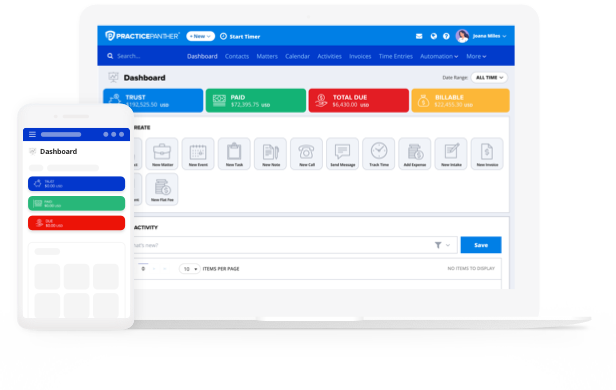
Inside a practice management platform, billing data powers real-time reporting—allowing you to track realization rates, aged receivables, and matter profitability in a single dashboard. This helps firm leaders make informed decisions about staffing, pricing, and workflow management.
3. Seamless Time Tracking
Attorneys can record time directly from case activities—emails, phone calls, tasks, or meetings—and immediately apply that time to invoices. No switching between programs and no lost minutes.
4. Automated Invoicing and Reminders
When billing lives inside your practice management system, you can set automation triggers to create invoices as soon as work is completed, send reminders automatically for overdue balances, and update client portals in real time. This reduces administrative work and accelerates payments without adding friction to client relationships.
5. Easier Trust Accounting and Compliance
Integrated systems automatically track trust balances, transfers, and disbursements in line with IOLTA rules. You can generate detailed trust reports instantly—without reconciling data across separate applications.
6. Better Client Experience
Clients want transparency and convenience. With integrated billing, clients can view invoices and payment history through secure portals, pay online using credit cards or ACH, and access case updates and billing details in one place. The result is a smoother, more professional experience that reflects positively on your firm.
Essential Features of Legal Office Billing Software
Every firm’s needs differ, but strong legal billing software should include:
- Flexible billing arrangements (hourly, flat fee, contingency, LEDES)
- Time and expense tracking is accessible from any device
- Automated invoicing and recurring billing
- Online payment processing for faster collections
- Trust accounting with built-in reconciliation
- Integration with client intake, legal document management, and legal CRM features
When all these functions exist within a single system, firms can eliminate data silos, improve collaboration, and maintain complete visibility across cases and accounts for seamless case management.

What is the Best Legal Office Billing Software?
The best billing software doesn’t just process payments—it connects your team, clients, and cases. PracticePanther’s integrated billing capabilities are built directly into its comprehensive practice management system, allowing firms to manage the entire client lifecycle in one place.
Firms choose PracticePanther because it helps them:
- Save time through automation
- Simplify compliance and trust accounting
- Improve transparency with clients
- Generate detailed financial and performance reports
- Receive payments faster without constant follow-up
Read how real firms are streamlining billing with PracticePanther in our customer stories.
Legal Office Billing Software for Small Businesses
Smaller firms and solo practices face unique challenges: limited administrative support, competing priorities, and clients who expect top-tier service with quick turnaround times. Every hour spent chasing invoices or reconciling accounts is an hour lost to billable work.
That’s why legal billing software built into a practice management system can be a game-changer for smaller practices. It brings automation, transparency, and organization to firms that need to operate efficiently with lean teams.
With PracticePanther, small firms can:
- Track every billable minute from any device—whether in court, on the road, or working remotely.
- Automate invoice creation so pre-bills, statements, and recurring invoices are generated and sent on schedule.
- Accept online payments through credit card or ACH, helping clients pay faster and eliminating manual processing.
- Simplify trust accounting by automatically recording deposits, transfers, and disbursements in compliance with IOLTA standards.
- Consolidate everything in one place, from client intake and case notes to billing and collections.
For small and solo attorneys, this level of integration creates time to focus on client relationships and strategy, not paperwork. It also projects professionalism to clients by providing a smooth billing experience that rivals much larger firms.
Resources for Solo Practices and Small Firms
PracticePanther for Solo Practices
PracticePanther for Small- and Medium-Sized Firms
Legal Office Billing Software for Large Firms
Large and mid-sized firms operate at a different level of complexity. They manage hundreds of matters, multiple practice areas, and detailed client requirements—all while maintaining compliance with varying billing formats and standards.
For these firms, fragmented billing systems can quickly become a bottleneck. Re-entering time records, reconciling ledgers, and managing separate client billing preferences across departments often lead to inconsistencies and delays.
An integrated billing system within a robust practice management platform provides the scalability and structure large firms require to maintain both accuracy and efficiency.
With PracticePanther, large firms can:
- Centralize billing across multiple departments, ensuring consistency in invoice formatting, reporting, and client communications.
- Use LEDES billing and custom rate management to meet corporate client and insurance carrier standards.
- Gain real-time visibility into firm-wide performance with analytics that track profitability by matter, attorney, or client.
- Automate bulk billing and reminders, reducing time spent on repetitive administrative processes.
- Maintain multi-user permissions and role-based access, so partners, associates, and accounting staff can collaborate securely without data overlap.
- Integrate billing with document and workflow management, allowing every invoice to connect directly to its related tasks, expenses, and case files.
These capabilities give firm leaders a clear view of financial health while reducing friction between teams. Whether managing trust accounts for hundreds of clients or coordinating billing for multiple practice groups, PracticePanther helps large firms operate with precision and predictability.
Learn more about how larger firms are modernizing their billing with PracticePanther for Large Firms
Should You Try Legal Office Billing Software for Free?
Free or limited versions of billing software often fall short where it matters most: accuracy, compliance, and client confidence. While they can offer a glimpse into automation, they rarely provide the integration and reliability law firms require.
Instead of testing temporary software, invest in a platform that’s built for long-term success—like PracticePanther, which includes full onboarding, migration support, and ongoing training to help firms get started quickly and confidently. Sign up for a free trial today!
How to Compare Standalone vs. Integrated Law Office Billing Software
Standalone billing tools can help you generate invoices, but they don’t tell the whole story of your firm’s financial operations. Comprehensive systems like PracticePanther connect billing with case management, communications, and document storage.
That means:
- No double data entry between systems
- Real-time insights into billable performance
- Fewer errors in invoices and payments
- Better collaboration across your firm
Here is a helpful chart that outlines key differences between a singular legal billing platform and billing within a comprehensive legal practice management solution.
| Feature | Standalone Billing Software | Integrated Billing Software |
| Client Data | Managed separately | Linked across all records |
| Trust Accounting | Requires sync with accounting programs | Built-in compliance tracking |
| Reporting | Limited financial metrics | Full firm performance analytics |
| Payments | Often via third-party connections | Native payment processing |
| Client Portals | Rarely included | Centralized CRM with billing and case updates |
The difference is clear: integration brings greater accuracy, insight, and efficiency.
Tips for Implementing New Billing Software in a Law Firm
Transitioning to new billing software can seem daunting. But with the right approach and the right partner, the process can garner immediate results. Here are several best practices to help ensure a successful implementation:
- Start with a firm-wide audit.
Identify how billing currently works, what causes the most inefficiencies, and which features are essential for your team. Understanding your pain points helps tailor your setup from day one. - Clean your data before migration.
Consolidate client records, check for duplicate entries, and resolve outstanding invoices. A clean import ensures a smoother transition and avoids future complications. - Create internal champions.
Designate team members to lead onboarding and support others during the transition. Having go-to experts within your firm increases adoption and minimizes downtime. - Set up automated workflows early.
Automate invoice generation, reminders, and payment notifications from the start. Building automation into your daily operations ensures immediate time savings. - Prioritize training and support.
Encourage your team to take advantage of training sessions, webinars, and help resources provided by the software company. The better your team understands the system, the faster your firm benefits from it. - Monitor and adjust.
After launch, review reports on billing turnaround times, realization rates, and payment speeds. Continuous optimization ensures lasting efficiency gains.
How Does Seamless Integration Improve Law Firm Billing Workflows?
When billing software is included within a legal practice management system, your entire workflow becomes connected and transparent. Attorneys can log time directly from their case files, automatically generate invoices based on completed work, and send payment links to clients—all without switching systems.
Integration also enhances collaboration across teams. Accounting staff can see time entries as they’re logged, partners can review invoices in real time, and clients can receive instant updates through their portals. This visibility eliminates delays, reduces administrative backlogs, and creates a consistent, professional experience for clients.
In short, seamless integration transforms billing from an isolated process into a continuous part of your firm’s daily operations, driving both efficiency and client satisfaction.
See Billing at its Best with PracticePanther
The legal industry continues to move toward full digital transformation, and billing is at the center of that change. For firms of any size, billing that operates inside an integrated practice management system delivers measurable results: faster payments, fewer administrative burdens, and better insight into firm performance.
The difference isn’t just about features—it’s about connection. When your billing, case management, and client communications work together seamlessly, your firm operates with the speed and precision today’s clients expect.
Whether you’re a solo attorney, a growing boutique, or a large multi-office practice, PracticePanther provides the infrastructure to make billing simpler, smarter, and more profitable, because every part of your firm should work together to move your practice forward.
Learn more about PracticePanther’s billing and practice management capabilities and sign up for a free demo!