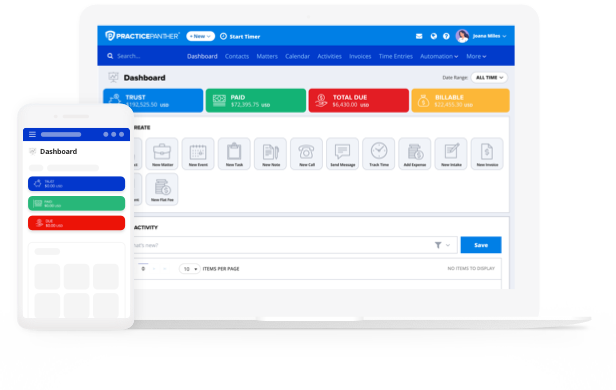
Not all legal practice management software is built with small firms in mind. While feature-rich, many platforms come with complexity and costs that can overwhelm a lean operation.
This guide will help you evaluate your options clearly, avoid common missteps, and choose the best legal practice management software for small firms that actually fits how you work.
Step 1: Understanding What a Legal Practice Management Software Should Do for You
On a basic level, a legal practice management platform is a centralized platform that brings your cases, clients, billing, documents, and communications together in one place. But what does that mean for your firm’s day-to-day operations? More granularly, a true all-in-one solution for your practice should be capable of handling:
- Matter and case tracking from intake to close
- Time tracking and billing
- Invoice creation and payment collection
- Document storage and template automation
- Client communication and scheduling
- Trust accounting and financial compliance
Step 2: Identify What’s Actually Slowing You Down
Before you browse a single pricing page, take time to truly determine where your workflows break down. Ask yourself:
- Which tasks take longer than they should every week?
- Where have mistakes or near-misses happened in the last six months?
- What are clients’ concerns—response time, invoices, access to their files?
- Which parts of your workflow still run on paper, email, or spreadsheets?
Step 3: Understand the Small-Firm Software Tradeoffs
Here’s what to watch for as a small firm evaluating your options:
All-in-One vs. Mixed Approach
Some attorneys piece together a stack of specialized platforms: one for billing, one for documents, one for calendaring. This mixed approach sounds appealing—a sort of a la cart menu where you pick and choose—but for a small firm, it creates integration headaches, data silos, and multiple vendor relationships to manage. An all-in-one platform keeps everything connected and reduces the time spent jumping between systems.
Cloud vs. On-Premises
Cloud-based legal practice management is accessible from any device, updates automatically, and doesn’t require server maintenance. On-premises software may feel more “in control,” but it demands infrastructure investment and IT oversight that most small firms aren’t equipped to provide. Cloud platforms are generally the better fit for lean teams that need flexibility and reliability without a dedicated tech staff.
Per-User Pricing That Scales With You
Many providers charge per user per month. At a small firm, this works in your favor early on since you’re not paying for seats you don’t need. But as you grow, it’s worth modeling what your costs will look like at five attorneys versus ten. Make sure the pricing structure aligns with your firm’s growth goals.
Step 4: Evaluate the Features That Matter Most for Small Firms
Billing and Payment Processing
Legal billing and payments are among the most complex aspects of running a successful firm, where even small inefficiencies can have a significant impact. Time entries that aren’t captured, invoices that go out late, and payments that sit unpaid for weeks. Look for software that makes billing fast and automatic.
Key questions to ask:
- Can you start and stop timers directly from a case file?
- Does the platform generate invoices automatically from your time entries?
- Can clients pay online via credit card or ACH?
- Is payment processing built in, or do you need a separate subscription?
PracticePanther, for example, includes PantherPayments, a native payment processor with no monthly fees and some of the lowest transaction rates in the industry. Firms using it get paid significantly faster, with the majority of invoices cleared within the first week.
Operating and Trust Accounting
For small firms handling client funds, trust accounting compliance is non-negotiable. The software you choose must support IOLTA-compliant workflows, three-way reconciliation, and clear audit trails. Mistakes here carry serious professional consequences.
Ask whether legal accounting software is available as a feature. If it’s a core part of your practice, it needs to be a core part of your platform.
Client Intake and CRM
Small firms often win clients on responsiveness and relationships. Your software should help you deliver both. Look for:
- Automated intake forms that new clients can complete before their first appointment
- A client portal where clients can check case status, view documents, and pay invoices without calling your office
Document Management and Automation
If you’re recreating the same agreements, letters, and motions from scratch every time, you’re leaving hours of productivity on the table every week. Good legal document management means templates that auto-populate from case data, version control, and secure cloud storage accessible from anywhere.
For small firms that handle high volume in a specific practice area, document automation can be one of the fastest ROI features on the platform.
Workflow Automation
Legal workflow software organizes your entire process into manageable, automated steps—triggering tasks, sending reminders, and routing documents without manual follow-up. For a small team handling a full caseload, even modest automation makes a meaningful difference.
Step 5: Put the Platform Through a Stress Test
Reading feature lists only gets you so far. Before committing, evaluate platforms against how you actually work.
Start by using a free trial to run real scenarios:
- Open a test matter and track your time on a task
- Build a sample invoice and send it to a test client
- Upload a document and pull it back from your phone
- Set up a simple intake form for a new client
- Schedule a hearing and see how it connects to the case file
If any of these processes feel clunky or confusing, that’s a sign the platform may not be the best fit.
Don’t Forget Customer Service
Once you’ve tested the features, start learning more about the vendor’s customer service. Ask the vendor these questions:
- What does onboarding look like, and how long does implementation typically take?
- Do you provide data migration from our current system?
- What does customer support look like after onboarding?
- Can we reach someone directly if we run into an issue?
For small firms, vendor support quality is often the difference between a smooth adoption and an abandoned subscription.
Step 6: Evaluate Cost
Small firms don’t need enterprise pricing. Look for platforms with transparent per-user plans, reasonable starting tiers, and clear upgrade paths as you grow. PracticePanther, for instance, offers tiered pricing designed to work for solo practices and small teams, with room to scale.

Why Small Firms Choose PracticePanther
PracticePanther was built to serve firms exactly like yours: focused, fast-moving, and serious about doing right by clients without being buried in overhead. It’s an all-in-one platform that handles case management, billing, payments, documents, client intake, trust accounting, and automation—all from a single source.
Ready to see it in action? Start a free trial or schedule a custom demo and find out how much time your firm could get back.