Between client intake, competing deadlines, billing, and the actual practice of law, any lawyer’s to-do list can feel like it never ends. You can easily find yourself at the end of each day wondering where, exactly, your time went.
By centralizing and streamlining the daily tasks that are consuming more of your time than they should, legal practice management software enables you to focus more on billable, client-facing work that actually requires your expertise.
That helps explain why 73% of legal firms are using “cloud-based legal tools,” according to an American Bar Association (ABA) survey.
Software alone, however, isn’t the answer. For firms of all types and sizes, the best results come from pairing your platform with the right processes, including well-designed workflows and effective staff training.
This guide covers how to evaluate legal software and what should be used with practice management software for the best results.
What Is Legal Software?
“Legal software” is a broad category that includes various platforms law firms use to streamline their operations, automate administrative workflows, and maintain compliance.
The term can be applied to anything from basic productivity apps to more all-encompassing legal matters software capable of managing the entirety of your firm’s operations.
Legal Software Categories
Common categories of legal software include solutions for:
- Legal case management
- Time tracking and billing
- Document automation
- Legal research
- E-signature
- Secure communication
The number of legal software options on the market can be overwhelming and difficult to compare, though, especially for smaller firms.
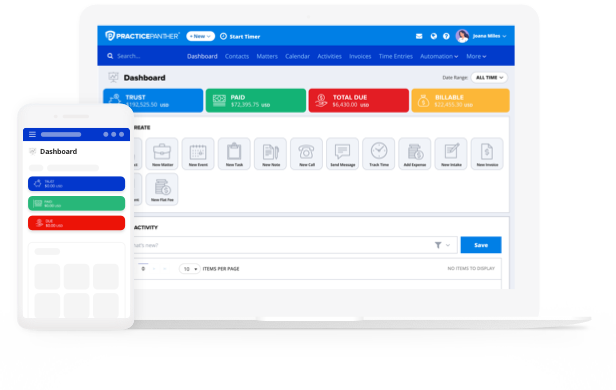
PracticePanther is a Unique All-In-One Solution
The best legal software solutions effectively replace the piecemeal approach with a comprehensive interface capable of not only helping with day-to-day tasks, but also unlocking new efficiencies, improving the client experience, and scaling alongside your firm. PracticePanther is the only all-in-one cloud-based legal practice management software that offers everything firms need:
- No redundant data entry or dropped handoffs. Trying to juggle a half-dozen standalone software usually means you’re going to be typing the same client details multiple times, in multiple places. Errors inevitably occur, and some details fall through the cracks when systems aren’t in sync. An all-in-one solution keeps one source of truth for every matter. That way, your time entries, invoices, and case notes stay consistent no matter who on your team touches them.
- An infrastructure that scales with your firm. The more apps your firm uses, the messier things tend to become. Not only does a unified platform consolidate your logins, subscriptions, and integrations, it’s also built for solo practices and multi-attorney firms, meaning it should continue to work well as you add staff or take on more cases.
Why Should You Use Legal Software?
It’s probably safe to assume you became a lawyer because you wanted to practice law, not because you enjoy reconciling invoices in your spare time. Further complicating matters is the fact that today’s legal clients “expect more than just expertise from their law firms—they seek responsiveness, convenience, and a personalized experience that instills trust from the very first interaction,” according to the ABA.
Among its many benefits, the right legal practice software benefits your clients almost as much as it benefits you, helping you deliver the experience they increasingly expect. It helps you meet that responsiveness expectation while giving you back time through automation.
Through extensive customization options, the best legal software platforms are designed to work the way you prefer to work, rather than making you change up your workflows in order to accommodate the software.
The best platforms are designed to scale, too. For example, a custom implementation of PracticePanther enabled Eckart Wostmann Wiese to save time and take on more cases without increasing staff. Read the full customer story to learn more about how…
- Custom-configured conflict checks PracticePanther’s robust level of customizability allowed Eckart Wostmann Wiese to save 2-3 hours per case that were previously spent manually cross-referencing files.
- Those reclaimed hours let the firm take on more cases without adding staff, supporting their caseload of 5,000+ indigent defense clients a year.
The right software can have an outsized impact on your firm’s efficiency and ability to scale. For similar results, choose a platform that can be configured to your specific needs.
What Should Be Used with Practice Management Software?
Pairing your platform with well-designed workflows, thorough staff training, and integrations with the apps you already rely on (like Google Drive) ensures your team actually uses the features available to them. Otherwise, there can be a tendency to fall back on old habits. When workflows and training are built around the software from day one, you get the full return on your investment instead of a partial one.
How Much Time Does Legal Software Save?
The time savings that come with the right legal software can impact almost every aspect of your practice, including client communication, billing and payments, scheduling and deadlines, documents and files, and more. How much time your software saves depends on a few factors, including:
- Firm size and case volume
- Practice area and case complexity
- Which features you actually use
- How much customization it enables
- Staff training and adoption
- Integration with existing software
A better way to understand the time savings of legal software is through specific examples. For example, by adopting PracticePanther’s cloud-based legal practice management software, firms have been able to…
- Collect client payments 88% faster (Megan Will)
- Reduce case preparation time by 50% (Haber Blank)
- Complete cases 25% faster (Slingbaum Law)
- Save 10+ billable hours/month (Jen Lee Law)
To learn more about these companies and how PracticePanther has helped them to save time and improve their firm’s overall efficiency, you can read the full customer stories here.
How Does Legal Software Improve the Client Experience?
Client experience has never been more important for small and midsize legal firms, and today’s clients have higher expectations than ever before, as the ABA notes. They expect around-the-clock availability (across phone, email, and text), as well as fast response times and personalized, empathetic responses that make them feel heard and understood.
The right legal software makes it easier for you to meet your clients’ expectations, giving you the ability to respond quickly through automated status updates and client portals, keep every interaction personalized with a centralized record of each client’s history, and stay accessible around the clock without adding staff. The result is the type of client experience that builds trust right from the start, and leads to new business through word-of-mouth referrals.
How Can I Learn to Use Legal Software?
When your plate’s already full, adopting new software can feel like one more thing you have to deal with. That’s why it’s important to do your research before committing to a new platform, to ensure that it will meet your needs, provide robust support and customization, and help your firm to scale.
While comparing feature lists can be helpful, it’s not always easy to understand the similarities or differences between platforms based on features alone. The best legal software providers want to make sure every implementation is smooth and offer varying types and levels of support.
In addition to free demos and platform trials, PracticePanther offers an online help center and resources page with downloadable guides, webinar recordings, livestreams, training videos, and more.
If you want a broad overview before you commit, PracticePanther’s Buyer’s Guide to Law Firm Software walks through the features worth prioritizing based on your firm’s size and practice areas. For a more hands-on experience, you can also view this webinar that shows how firms use automation to reclaim billable hours.
Is Legal Software Difficult to Implement?
For many firms, the idea of moving to a new legal software platform can sound both difficult and disruptive. There are a few common challenges that firms face, including staff resistance to changing established workflows and habits, the pain of migrating existing case files, contacts, and documents without data loss or duplication, and a learning curve that can temporarily slow down day-to-day productivity.
Implementation doesn’t have to be difficult, though, as…
- Staff resistance to change can be mitigated by involving the team early on and explaining the “why” behind what’s changing.
- Migration pains are often eased by guided migration and integration from specific vendors, reducing the need for manual transfers, which can be time-consuming and error-prone.
- The learning curve softens when a vendor provides a range of demos, guides, and live support during onboarding and beyond.
When it comes to how to implement new legal software, it’s true that a little planning goes a long way. Start by mapping out your current workflows, prioritizing those with the highest impact or frequency. What tasks take up the most time, and where do bottlenecks happen? Answering these questions should help you set the right implementation priorities.
Next, prepare your staff. Everyone on your team, from associates to office managers, should understand not just how to use the new software but why the switch is happening. The earlier you loop others in, the more likely you are to experience a faster adoption with fewer growing pains.
Full-scale migration doesn’t have to be a painful ordeal. PracticePanther’s team helps guide the transfer of your existing case files, contacts, and documents, while integrations with software like Google Drive make it easier to move data without starting from scratch.
Once you’re all set up, you’re ready to experience the day-to-day payoff of your new legal software implementation: fewer manual tasks, faster billing, and the ability to reclaim your time. Ready to see how PracticePanther can take your firm’s efficiency up a level? Start your free trial or sign up for a custom demo today!