Running a competitive law firm means juggling a lot—client communication, court deadlines, billing, document review, and everything in between. Legal software can mean the difference between a firm that thrives and one that’s constantly playing catch-up. But how do you know which type of solution is the right fit for your firm?
Here’s a breakdown of the most important legal case management software features and how platforms like PracticePanther bring many of them together under one roof.
The Two Types of Law Case Management Software
1. An All-in-One Platform
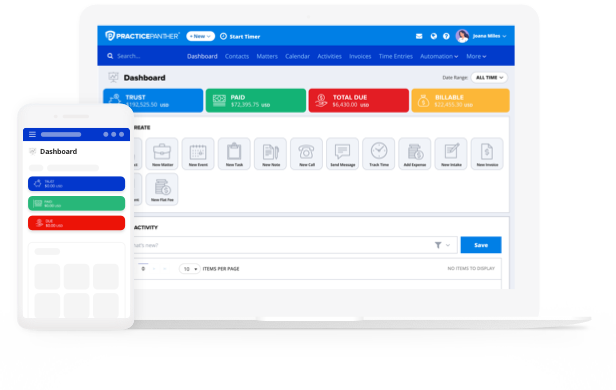
Widely regarded as “best value legal case management software”, PracticePanther’s all-in-one legal practice management platform consolidates every core firm function—matter management, billing, document storage, client intake, calendaring, and reporting—under a single interface. Data entered in one area flows automatically to the rest, so a time entry populates an invoice, a new contact creates a matter record, and a signed engagement letter lives alongside the case file it belongs to.
It is important to note that many brands tout ‘all-in-one’ solutions but fail to mention that many functions and capabilities are sold as add-ons. This inevitably bumps up the price and results in a more clunky user experience.
For firms that want to minimize administrative overhead and eliminate the risk of data falling through the cracks between systems, PracticePanther is the more straightforward path.
Learn more about all-in-one options in PracticePanther’s Guide to Choosing the Best Legal Case Management Software.
2. Single-Purpose Solutions
Single-purpose solutions do one job well, but require integration with other applications to cover the full range of firm operations. Some firms choose this route deliberately, often because they have an existing application they want to keep or a specific workflow.
To solve niche problems, some may opt for single-purpose software, but a centralized approach is generally recommended to prevent data from being siloed.
Must-Have Features in Any Legal Case Management Setup
Regardless of which approach your firm takes, the following six features need to be covered. Use this checklist to identify where your current setup has gaps:
- Are case files centralized, or spread across email threads, shared drives, and sticky notes?
- Do attorneys capture time in real time, or reconstruct it at the end of the day (or week)?
- Can staff retrieve any document in under 60 seconds? Is version control enforced?
- Is there a defined pipeline from first contact to signed engagement letter, or does it vary by attorney?
- Can firm leadership pull revenue, realization rate, and staff productivity data without discrepancies?
1. Billing and Time Tracking
Manual billing processes cost law firms real revenue. When attorneys reconstruct time at the end of a day or week rather than capturing it as work happens, billable hours fall through the cracks. A billing and time tracking system carries that data forward into invoices without manual re-entry.
PracticePanther’s legal billing features are built into the platform rather than bolted on, meaning time entries connect directly to matter records and invoices without any extra steps.
A complete billing setup should cover:
- Time tracking: Capture billable time via timer, manual entry, or calendar sync
- Invoice generation: Auto-populate from tracked time; support flat fee and contingency arrangements
- Online payments: Accept credit card, ACH, and eCheck payments
- Trust accounting: Maintain IOLTA compliance with separate ledgers and three-way reconciliation
- Accounts receivable: Track outstanding balances and automate payment reminders
2. Reporting and Analytics
Firm leadership can’t make good decisions without good data. Law firm analytics and reporting dashboards surface the metrics that matter: case volume by practice area, revenue per attorney, realization rates, origination, and accounts receivable aging.
The firms that grow intentionally—rather than just by taking whatever work comes in—are the ones using data to identify what’s working, which clients are most profitable, and where capacity is constrained.
3. Legal Client Intake and CRM
The intake process is often a client’s first real interaction with your firm, and it sets their expectations for how their case will be handled from then on. For someone calling about a legal matter, especially one involving a difficult situation, having to repeat their story can erode trust and patience before the engagement even begins. A legal CRM and intake system ensures the client isn’t re-explaining themselves at every touchpoint and your staff isn’t spending time re-collecting details that are already logged.
PracticePanther’s legal CRM and intake system manages the pipeline from first inquiry through signed engagement—tracking where every lead stands, automating follow-up, and eliminating the data re-entry that happens when a prospect becomes a client.
Additionally, conflict checks should occur early on. In PracticePanther, conflict checks can be run from anywhere in the platform, using a simple name or keyword search. A “run full search” will pull results across the entire system in one click-internal notes, tasks, events, emails, and more custom fields.
This means a new intake gets checked against everything the firm already knows before anyone picks up the phone or sends an email. Because that intake data is centralized in PracticePanther, the check is only as good as what is already in the system–which is another reason structured intake matters from first contact onwards.
4. Calendaring and Deadline Management
This is the one area where manual processes carry disproportionate risk, and where automated systems provide the clearest return.
The right legal calendaring setup sends reminders to every responsible team member, and syncs across devices. For litigation-heavy practices, a single matter can generate dozens of interconnected deadlines—all of which need to be tracked without relying on individual memory or a shared calendar.
Additionally, the ability to create workflows that notify your team of upcoming tasks improves internal communication and prevents roadblocks.
5. Legal Document Management
Legal document management software provides a centralized, searchable repository for every file, organized by client and matter rather than by who saved it or where it is stored. Another feature to look out for is e-signature. Having e-signature capabilities simplifies how you request, store, and collect client signatures. This ensures you and your team remain informed, offering instant notifications of when a document is signed.
Additional Considerations
Cloud vs. On-Premise
According to the ABA’s 2024 Legal Software Survey, approximately 75% of attorneys now use cloud computing for work-related tasks—up from 60% in 2021. Among mid-sized firms with 50–99 attorneys, adoption climbs above 94%.
The practical advantages are straightforward: access from any device, automatic updates, no on-premise server maintenance, and built-in backup and recovery. Nearly two-thirds of cloud users in the ABA’s survey cited browser-based access from any location as a key benefit, and more than 60% highlighted around-the-clock availability.
PracticePanther is fully cloud-based legal case management software, meaning your firm’s data is current and accessible whether you’re in the office, in court, or working remotely—with no IT overhead required to keep it that way.
Platform Security
Law firms are high-value targets for cybercriminals. Client files contain financial records, personal information, litigation strategy, and confidential communications. A recent study found that 20% of law firms claim cyberattacks targeted them in 2025
In addition to increased risk, under ABA Model Rule 1.6, attorneys have an ethical obligation to make reasonable efforts to protect client confidential information. That obligation extends to the software your firm uses.
When evaluating any platform, look for:
- SOC 2 Compliance: Offers independent verification of security controls
- Encryption: Protects data stored and transmitted through the system
- Multi-factor authentication: Reduces risk from stolen or compromised credentials
- Role-based access controls: Limits who can view sensitive client files
- Audit logs: Creates an accountable record of every action in the system
- Secure client portal: Eliminates unencrypted email for document sharing
Why an All-in-One Platform Matters
Many law firms start by adopting point solutions—one for billing, another for documents, another for intake. The problem is that disconnected legal software systems create data silos, duplicate work, and more opportunities for things to slip through the cracks.
That’s where comprehensive software for law firms like PracticePanther stands apart. Rather than managing a patchwork of applications, firms get practice management, billing, document management, client intake, calendaring, and reporting on a single platform.
Whether you’re a solo attorney or a growing firm, the right legal software helps you build a strong foundation for running a better practice.