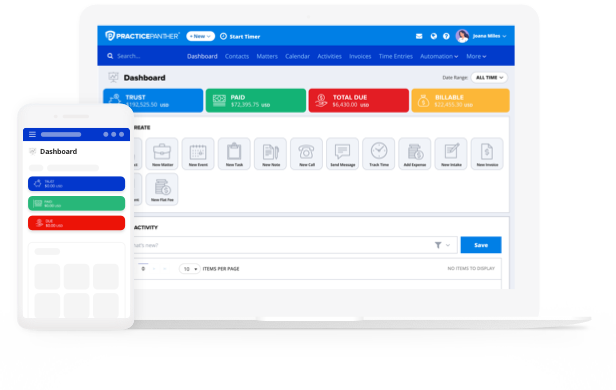
Running a solo practice means answering to yourself, but it also means every single administrative task falls on your shoulders. That includes billing, scheduling, client intake, and document management. It’s a lot, and that’s exactly why finding the right legal practice management software for solo attorneys is one of the most practical and consequential decisions you’ll make.
For solo firms, affordability is a real priority. According to the American Bar Association’s 2024 Legal Technology Survey, only 41% of solo practitioners report budgeting for software, compared to 90% of large firms.
That’s a big gap, and it represents a real opportunity. Solo attorneys who invest in the best legal practice management software for small firms get access to the same core capabilities as larger firms, without the enterprise price tag. That means doing your homework and finding the right software can provide you with a great advantage.
First Things First: What Does Your Practice Actually Require?
Before diving into feature lists and pricing pages, take stock of where your time actually goes. As a solo attorney, your workflow most likely looks quite different from that of a firm with a dedicated billing staff, paralegals, and office managers. Start by identifying the tasks that consume the most time or where errors tend to occur. You can’t implement the right solution for your practice until you’ve identified what actually needs solving.
For most solo practices, the core areas to prioritize include features like:
- Legal case management to keep all matter details in one place
- Legal billing to track time and generate invoices
- Operating and trust accounting for an accurate, real-time view into both client trusts and firm finances.
- Client intake to streamline how new matters get opened
- Legal document management so nothing gets lost
- Calendaring to stay ahead of deadlines
What Will Law Practice Management Software Actually Cost You?
One of the most useful filters when evaluating practice management platforms is transparent pricing. Some charge per user, while others charge a flat monthly rate. Others offer tiered pricing depending on the features included. For example, PracticePanther offers a solo tier for $49 a month for a single user. When it comes to budgeting, consider the following:
- Start with monthly billing, this lets you test the software in the context of your own workflows and preferences before locking into a long-term contract. Once you find the right fit, though, annual contracts become beneficial since they usually include a discount.
- Watch for any fees not included in the headline price. When comparing your options, try to get a sense of the total cost to get the features you’ll use (not just the base subscription).
How Well Does It Handle Legal Billing?
While it may not sound exciting, a legal billing feature stack is one of the highest-value capabilities in any practice management platform. The right platform should, at minimum, be able to handle:
- Time tracking and expense management to recover lost revenue, get paid faster, and capture more billable time.
- Automated trust account ledgers and reconciliation export to a separate system, chase down paper checks, or manually follow up on outstanding balances.
- Accept online payments that support credit card payments, ACH transfers, and any legal-specific payment processors you use.
- E-signature capabilities to help you close matters faster and reduce how much back-and-forth that has to happen before the work even begins.
Does the Price Tag Tell the Whole Story?
It is easy to evaluate practice management software purely by its monthly cost, but a more complete picture includes what the platform saves you in time (and what your time is worth).
Think about how much time you spend every month on administrative work like organizing documents, following up on outstanding invoices, and manually entering time entries. If that takes you around five hours a month, for example, that time savings alone often exceeds the subscription cost of the right platform.
This is especially true for solo firms, where every reclaimed hour translates to a billable hour, a client call, or just an earlier end to the workday. Platforms with strong legal accounting features have a concrete impact. When your trust, accounting, operating account, and billing records stay reconciled automatically, you have less time to spend untangling your books.
Will It Work With What You Already Use?
You should prioritize platforms that integrate with the software you already rely on. Look for integrations with your preferred email, calendar, and accounting software. When these systems share data, you spend less time on manual entry and more time on billable client work..
Ultimately, a platform that connects to your existing systems and data from day one is likely worth more to you in the long run than one that is feature-rich but requires countless workarounds or changes to how you prefer to work.
Can You Access It from Anywhere You Work?
Today’s cloud-based legal practice management platforms make professional-grade capabilities accessible for solo firms. And with no server infrastructure to maintain and no IT setup required, cloud platforms typically cost a fraction of what on-premise systems once did.
More importantly, cloud-based platforms let you work wherever you’re productive. Whether you’re at your desk, in a courthouse, or working from home, these platforms ensure your legal case management, documents, and billing records are all accessible and up to date.
According to the ABA’s Practice Management TechReport, cloud adoption continues to grow across all firm sizes. Data is automatically backed up, security is handled by the platform’s provider, and updates happen without any action on your part. That kind of maintenance-free infrastructure is an ideal situation for a solo attorney running a lean operation.
Your Software Evaluation Checklist
After working through the factors above, use this checklist to compare platforms side by side. It covers the six areas explored in this guide: core features, pricing transparency, billing capabilities, integrations, and cloud infrastructure.
Key All-In-One Legal Practice Management Features
- Legal case management workflows that bring together all aspects of your practice, including time tracking, document management, client portal, calendaring, workflows, and billing.
- Legal billing features such as: multi-device time tracking, bulk invoicing, credit card processing, and invoice generation.
- Operating and trust accounting with real-time visibility
- Client intake to streamline how new matters are opened
- Legal document management so nothing gets lost
- Calendaring to stay ahead of deadlines
Cost Vs. Value
- Transparent pricing, clearly stated on the website
- Monthly billing option available (to test before committing)
- Annual contract discount offered for long-term savings
- No hidden fees beyond the headline subscription price
Key Legal Billing Features
- Time tracking and expense management built in
- Automated trust account ledgers and reconciliation
- Online payments: credit card and ACH transfers accepted
- E-signature capabilities to close matters faster
Integrations
- Integrates with your preferred email client
- Syncs with your calendar application
- Connects to your accounting software
- Minimal workarounds needed to match your current workflow
Secure, Cloud-Based Platform
- Automatic data backups handled by the platform
- Security managed by the provider (not by you)
- Updates happen automatically without any action on your part
Is PracticePanther the Right Fit for You?
Running a successful solo practice requires more than just hard work — it requires efficient and streamlined processes. PracticePanther is built with solo attorneys in mind, offering all the features you need in one intuitive platform. Start your free trial today to see how much easier running your practice can be.