
There’s a rhythm to how most law firms run. Someone takes the call, someone else sends the forms, and eventually, everything gets where it needs to go. Until it doesn’t. And then you hear it:
Nobody meant to let it slide, but the client’s still waiting. And now, you’ve got to stop what you’re doing, retrace the steps, ask around, check the notes, and clean up a mess that didn’t need to happen.
This kind of thing happens more than anyone wants to admit. Not because people aren’t working, but because most firms are held together with habits, memory, and good intentions. The paralegal knows when to prep a letter. The receptionist knows when to nudge a client. The attorney knows what comes next, at least most of the time. Until someone’s on vacation. Or sick. Or busy. Or new.
And the time you lose patching it all back together? That’s time you can’t bill. Ten minutes here, an hour there. A full day gone chasing something that should’ve moved on its own. Multiply that by every case, every week, every person — and that’s where your billable hours are hiding.
A workflow changes that. At its simplest, a workflow is a repeatable series of steps that moves a task from start to finish. When you build workflows into your legal practice management software, things start moving on their own. The next step appears. The next task gets assigned. The deadline shifts based on when the last one was finished. Everyone knows what’s theirs to do, and the entire team works from one shared system.
And that’s when you start unlocking 400+ new billable hours per year.
When we surveyed law firms — big, small, solo, and growing — about the way they spend their time in their day-to-day operations, here’s what they told us:
That kind of weight drags behind everything you’re trying to move forward. And over time, it costs more than it seems.
Take the billable hour, for example. Most attorneys are expected to bill somewhere between 1,800 and 2,200 hours per year. Sounds doable on paper, but it becomes significantly harder in reality.
According to Yale Law School’s career resources and data, if you are required to bill 2,200 hours, that means you’re probably working over 3,000 actual hours a year once you account for everything else — admin, coordination, back-and-forths, chasing payments, fixing mistakes, and just trying to keep cases moving. That’s over 800 hours of work each year that’s real, necessary, and time-consuming… but unpaid.
To put that in perspective, if your billing rate is $300 per hour, losing 800 hours means walking away from $240,000 in potential revenue. Even reclaiming half of that could open the door to another full-time hire, more bandwidth, or simply a more sustainable pace.
Matthew Slingbaum, for example, knows this issue well. His firm handles high-volume malpractice and personal injury cases, which means the stakes are high and the margins thin. Before they built workflows, everything ran through email, Word docs, hallway conversations, and mental checklists.
Then Matthew Slingbaum started writing things down — not the case notes, but the actual process. What needs to happen, who should handle it, when it should move, etc. He turned those into automated workflows inside PracticePanther, an all-in-one legal practice management platform, and let the PracticePanther carry the load.
Once they implemented the workflows, tasks moved on their own. Emails went out without anyone needing to remember. Client updates went out automatically. Intake packets that used to take 40 minutes to prep were done in under five.
The result? Fifteen hours saved at Slingbaum Law every week. That’s 60 hours a month, or over 750 hours in a year.
And they’re not the only ones seeing that kind of impact. Here are a few examples of what we’ve seen across firms using automated workflows in specific parts of their practices:
| Process Type | Time Saved Per Week | Estimated Annual Hours Saved | How Workflows Change the Process |
| Client Intake | 4–6 hrs | 200–300+ | Cuts calendar back-and-forths and manual entry. Some firms save 30+ hours/month using custom client forms. |
| Billing & Payments | 3–5 hrs | 150–250 | Invoices are generated, reviewed, and sent faster. Workflows handle follow-ups and reminders, cutting down manual billing time each month. |
| Doc Prep | 4–6 hrs | 100–200 | Document templates and task-based handoffs speed up review cycles and eliminate bottlenecks. |
| Client Comms | 2–3 hrs | 100–150 | Using client portals and automated updates, firms spend less time chasing down replies. |
| Case Tracking | 10–15 hrs | 500–750 | Attorneys instantly see matter progress without digging through emails or files. Saves time across the whole team. |
The point here is that you don’t need to overhaul your whole practice to get that kind of time back. You need to start with one repeatable process and turn it into a clear sequence of tasks, owners, and deadlines.
That’s what the rest of this guide walks you through — how to spot the time you’re losing, how to build a workflow that saves it, and how to set your firm up to earn back hundreds of billable hours a year.
Before building anything, you need to decide which process is worth the effort. Some don’t happen often enough to matter, while others are simple enough that they’re better handled with a task template or calendar reminder. A few, though, are likely costing your team time every week.
To help you figure that out, we built a decision tree, which is simply a series of questions with different branches depending on how you answer. You start at the top, answer a question about the process you’re thinking of, and each answer takes you to the next step. By the end, you’ll have a clear recommendation: build a workflow, improve an existing one, or skip it altogether.
Start by picking one repeatable process. Intake is a common one, but this could also be your billing process, client follow-ups after a court date, or prepping documents for an initial filing. Then, follow the path based on how often it happens, how many people are involved, and what happens when something gets missed.
Why start out this way? You don’t have time to automate everything, and frankly, most firms don’t. That’s why it matters where you start. If you’re going to invest the time to build something, it needs to be something that will give time back. Continue on to the next page to see where to start.
If you’re still choosing your first (or next) workflow, it helps to think in terms of return of time. Where do you find yourself stopping to remind someone what to do? Where do things seem to wait too long for the next step? Where does your team feel busy, but not in a way that moves a matter forward?
Those are the places where time tends to collect in small drips. The kind that don’t seem like much, until you add them up and realize you’ve spent thirty hours this month doing something that could have taken five.
To help you narrow your focus in another way, here are a few types of workflows that tend to give time back quickly:
Getting paid should not take six follow-ups and three “Just checking in…” emails. And yet, for most firms, this is their unwanted reality. A billing workflow can create a cadence: invoice sent, automatic reminder after three days, follow-up after a week, then a final notice. The right sequence makes it easier to increase your cash flow and cuts out the time you’d otherwise spend tracking what’s been paid and what hasn’t.
The process of discovery is a huge time vacuum. The requests go out, the clock starts, and from that moment on, you’re wrangling documents, tracking responses, monitoring deadlines, and trying to make sure your client doesn’t miss anything. What makes it harder is that discovery doesn’t live with one person. Attorneys draft, paralegals organize, clients provide documents, and opposing counsel responds on their own time.
A workflow makes discovery so much easier. You can build in the full process — initial disclosures, interrogatories, production requests, deposition prep — and assign each piece to the right person with a deadline tied to the court’s schedule. As soon as one task is marked done, the next appears, and no one on the team has to guess what’s next or when it’s due.
The first version of a document is rarely the last. It needs input, review, edits, and final approval. If you’re doing this over email or even an internal chat system, something will get missed, or at best, delayed. With a workflow, the handoffs are built in.
The draft moves from attorney to paralegal to client to court without stopping to wait in anyone’s inbox. And for firms that use document templates, automating that first draft saves even more time.
This one hits almost every firm, regardless of size. Intake is a beast — you have conflict checks, scheduling, collecting documents, sending engagement letters, and making sure payment is in before work begins.
If even one of those steps stalls, you lose time chasing it down, and so does your staff. A workflow sets it all in motion the moment a lead comes in. Intake packets go out, tasks get assigned, and nothing waits for someone to remember what’s next.
You don’t need to build them all right away. Start with the one you feel the most, the one that keeps pulling you out of your day. If you can get one process off your plate and back into motion, you’ll feel it by the end of the month. And once that happens, you’ll want another.
That’s how the billable hours come back.

Once you’ve selected a process, the next step is putting structure around it. The simple goals of this new workflow should be saving time, giving everyone clarity, and fitting how your firm operates day to day.
The bigger goal is getting time back across the board — time you can put toward billable work instead of follow-up, reminders, or fixing missed steps. That’s how you start reclaiming hours, and eventually, hundreds of them.
This section walks through how to build a custom workflow for your firm. Intake is the working example here, since it’s a common process and often touches multiple people. However, the same framework can be applied to anything your firm handles on a regular basis, especially processes that involve deadlines, handoffs, or communication with clients.
Every workflow begins somewhere, and that starting point needs to be specific and easy to identify. For example, your intake process might start when a client agrees to move forward, when a consultation wraps up, or when a form is submitted through your website.
This is one of those details that seems small until it causes problems. If no one’s sure when the process begins, it’s easy for tasks to sit idle or never get started at all. Being clear about the starting point gives the workflow something solid to anchor to.
If you’re using legal practice management software, you can set this trigger to launch a workflow automatically. If you’re not, you’ll want to clearly document who’s responsible for starting the process and what action they need to take.
Questions to consider:
Once the starting point is clear, map out every task that needs to happen. This step should be detailed. Write each action in plain terms. Instead of “handle intake,” list out each part of intake, like sending the engagement letter, confirming payment, or setting up the matter in your files.
Every task should have a clear purpose and outcome. If a step involves reviewing, approving, or sending something, include that. This also helps you uncover steps you may be doing out of habit that don’t actually serve a purpose.
If you’re using legal practice management software, this is where you’ll start entering tasks into a workflow template. But even if you’re not, writing out the steps in a shared document or spreadsheet is a huge step forward from relying on memory or verbal reminders.
Example intake tasks might include:
A workflow is only useful if people know what they’re supposed to do and when they need to do it. Every task should have both a deadline and an owner. Otherwise, you’re creating a to-do list instead of an actual workflow.
Think about the natural flow of the process. Some tasks can happen right away. Others may depend on the client signing documents or payments being made. Legal practice management software makes this part easier by letting you assign tasks to specific people and set due dates relative to when the workflow starts.
For example, in PracticePanther, you might set the task “Send engagement letter” to be due immediately once the workflow starts. The next task, like “Confirm signed agreement and payment,” can be set to come due one day after that. A task such as “Draft initial filing documents” could then be set to follow a few days later, depending on how long that part of your process usually takes.
Rather than assigning hard calendar dates, PracticePanther lets you build deadlines that adjust based on when each task is completed. That keeps the workflow flexible, while still keeping everything on schedule.
Questions to ask:
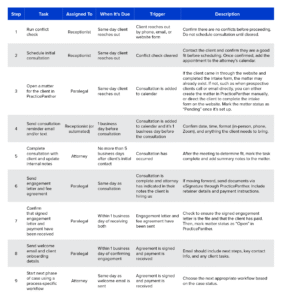
When you’re first starting to build workflows, it can be helpful to write them out like you’ll see below, before entering anything into your legal practice management software. Laying out each task, who’s responsible for it, when it should happen, and what triggers the next step makes it easier to spot gaps, clarify roles, and keep your team on the same page.
The example below shows what this might look like for a basic intake process. It’s based on how a firm might build this out in PracticePanther, but the same format works across the board. For firms just starting to use workflows, this approach can save time and help avoid rework later.

Inevitably, the first few workflows you create will likely have a few hiccups. That’s okay! The best way to identify those issues is by checking in with your team members using the workflow. When you have these conversations, remember that you’re not looking to rebuild everything — just to flag what’s slowing your team down or creating unnecessary friction. The goal is to identify small improvements that make the system smoother, faster, and easier to follow.
After a few weeks of using a new workflow, ask your team these questions:
If the answers to any of these questions raise concerns, that’s a good sign the workflow needs a few adjustments.
If a workflow isn’t working as anticipated, you do not need to start from scratch. In most cases, small changes are enough to keep things moving. Here are a few ways to troubleshoot and improve without overhauling the entire workflow:
You’ve just walked through the step-by-step process of building a workflow. Now it’s time to see what happens when it’s powered by the right software.
PracticePanther helps you take everything you’ve mapped out on paper and bring it to life inside your legal practice management software. Once it’s set up, your team doesn’t have to rely on spreadsheets and memory to keep a matter moving. The workflow does the work for you. And ultimately, that’s how firms start unlocking those 400+ billable hours.
Here’s what makes PracticePanther workflows stand out:
You don’t have to figure this out on your own, and you definitely don’t have to get it perfect the first time. PracticePanther gives you the structure to build workflows that actually save time, and the flexibility to adjust as your firm grows.
Want to see how your firm can use workflows to unlock more billable hours? Schedule a demo designed specially for your firm by clicking below.