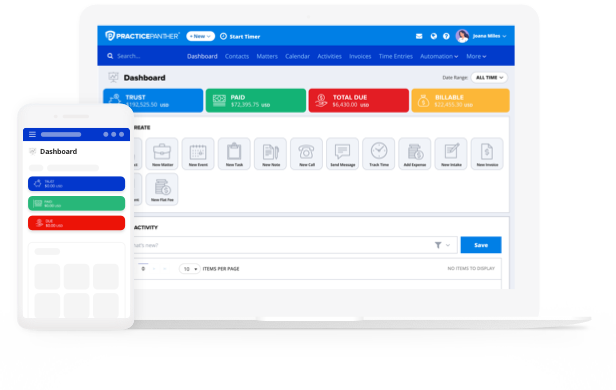
When you’re choosing intake software for law firms, think about the very first impression it gives a prospective client. The right system should collect everything you need to evaluate a case, sync that information automatically into your files, and make a busy intake staff feel like they have an extra set of helping hands. You shouldn’t have to chase down missing details or retype the same contact information twice; the software should do that work for you.
In this guide, you’ll find the top legal client intake software options built for firms of every size.
Best Lawyer Intake Software Options
While email remains the default way most firms communicate with their clients, it has clear drawbacks. Emails can pose security risks and aren’t organized by matter, causing critical client information to get lost in the shuffle of your inbox. Each of these drawbacks can be addressed by having a client portal as part of your practice management software.
With PracticePanther, your clients can log into the portal to:
- Check milestone activities related to their case
- Access shared documents
- Pay invoices
- Send and receive secure messages in one place
Ultimately, PracticePanther’s client portal helps prevent communication mishaps through frequent follow-ups.

1. PracticePanther
When it comes to automated legal intake, PracticePanther is consistently the first name firms mention, and for good reason. Our client intake system is built to eliminate manual data entry from the very first touchpoint with a prospective client. PracticePanther’s customizable forms are easy to access and categorize, so you can track every conversation and follow up all in one place. PracticePanther is ideal for firms of all sizes and practice areas that want intake, CRM, and case management working together from day one.
Key Features:
- PracticePanther’s cloud-based client intake software for legal firms stores all client and case information in a secure cloud environment
- Intake responses sync automatically to Contact records in PracticePanther, so staff never have to manually re-key a lead’s information.
- Track lead sources with custom Tags, giving you real insight into which channels actually bring in business.
- Build unlimited branded intake forms instead of relying on one generic questionnaire design.
- Create custom fields to capture exactly the details you need to begin working a case immediately, or make practice area-specific intake forms.
- Embed intake forms anywhere and place them in high-visibility spots, like your website and email signature, so you can onboard prospective clients faster.
- 256-bit SSL encryption and CAPTCHA protect every form submission, so client data stays secure from the first click.
- Get automated alerts whenever a new intake form is submitted, so staff can enable appropriate workflows.
- Run a global conflict-of-interest check from anywhere in the software using PracticePanther’s unified search feature—this allows you to see every instance where that name or keyword appears in your active or archived firm data.

2. MyCase
MyCase’s intake software for lawyers offers a seemingly connected interface, but unlike PracticePanther, it is not a truly all-in-one solution. Many of MyCase’s features rely heavily on third-party integrations, which adds a layer of inconvenience, as users often have difficulty setting them up.
Key Features:
- Customizable intake form templates with your firm’s logo added for a branded touch.
- Dynamic forms that show or hide questions based on a client’s previous answers, keeping the form short.
- Submissions sync into the client’s case file, cutting down on duplicate data entry.
- Notifications alert staff as new form submissions come in.

3. Clio
Clio’s intake tools live in a separate product, Clio Grow, which functions as an add-on rather than a built-in feature of its core plans.
Key Features:
- Customizable legal client intake form builder that can be embedded on your website, email, or text.
- Automated intake workflows that move leads through each stage without manual follow-up.
- Referral source and conversion analytics to see which marketing channels perform best.
- Conflict-of-interest checks across your existing Clio records.

4. Rocket Matter
Rocket Matter offers cloud-based client intake software for legal firms as a separate module built to integrate with its CRM.
Key Features:
- Logic-based intake forms that adjust questions based on prior answers.
- Data flows directly into the Rocket Matter CRM, powering document automation from the same information.
- Campaign tracking to see which marketing sources drive the most leads.

5. Filevine
Filevine markets an AI-assisted intake module primarily for higher-volume litigation practices.
Key Features:
- Lead-source analytics to track which channels convert best.
- Conflict management and e-signature tools built into the intake workflow.

6. Smokeball
Smokeball provides intake software, though full functionality isn’t included on every plan.
Key Features:
- Practice-area-specific web intake forms that populate matter fields directly, avoiding duplicate entry.
- A dashboard that tracks new leads and form status in real time.
- Conflict checks and case value estimates available when converting a lead into a client.
- Intake tools are included on the Prosper+ plan but sold as an add-on for Boost and Grow subscribers.

What Should I Look for in Legal Intake Software?
Choosing the right legal client intake software doesn’t have to feel technical. Strip away the jargon, and it really comes down to a handful of practical questions about how the software will work for your clients and your staff. Here’s what to look for:
- Easy for clients to fill out. A good legal client intake form should work smoothly on a phone, tablet, or laptop, without clients needing any special skills or instructions.
- No double data entry. Once a client submits a form, that information should land directly in your system, not require someone on your team to retype it.
- Different forms for different cases. A family law inquiry and a personal injury inquiry need different questions. Look for software that lets you build separate forms for each practice area.
- Looks and feels like your firm. Your intake form is often a client’s first real interaction with your firm, so it should carry your logo, colors, and branding rather than feeling like a generic questionnaire.
- Keeps client information secure. Make sure any form submissions are encrypted and stored safely, since intake forms often collect sensitive personal details.
- Shows you where leads come from. The best systems let you track whether a client found you through your website, a referral, or an ad, so you know where to focus your marketing.
- Grows with your firm. As you add practice areas or attorneys, your intake software should be able to keep up without forcing you onto a pricier plan just to get basic functionality.
- Fits into the tools you already use. Look for intake software that connects with your case management and billing system, so a new client’s information flows into their file automatically.
The market reflects just how central this has become to running a practice. The global legal tech market was valued at $28 billion in 2022, according to Statista, with continued growth expected as more firms move client-facing processes, such as intake, online.
Questions to Ask Yourself Before Choosing Legal Intake Software
Once you know what to look for, it helps to turn the evaluation inward. Ask yourself:
- How much time does my staff currently spend on manual data entry during intake? If the answer is “too much,” automation should be a top priority.
- Do I handle more than one practice area? If so, you’ll want a system that supports multiple, customizable intake forms rather than a single generic one.
- How quickly do I respond to new leads today? A slow intake process can cost you clients before they ever become clients.
- Is my current intake process mobile-friendly? Clients increasingly expect to complete forms from their phones.
- Where do most of my leads come from? If you don’t know, intake software with lead-source tracking can help you find out and adjust your marketing accordingly.
- Will this software work with the rest of my practice management system? Intake software that operates in a silo just creates a new bottleneck instead of solving the old one.
- What will this actually cost once I add the features I need? Some platforms advertise a low starting price but require paid add-ons to unlock functionality that matters most for intake.
Cloud adoption among law firms continues to climb each year. In its most recent Legal Technology Survey Report, the American Bar Association found that 73% of firms now use cloud-based legal tools, with document management and practice management software seeing the highest adoption rates. That shift underscores why client intake software has become the standard rather than the exception.

What Is the Best Client Intake System for My Firm?
When comparing options, look past the sticker price and ask what’s actually included. Several competitors treat intake as a costly add-on bolted onto their core plans, which can mean paying extra fees just to get forms that sync automatically.
PracticePanther is often called the best legal client intake software because it takes a different approach—building unlimited branded intake forms, automatic Contact syncing, and lead-source tracking directly into every subscription, so your firm gets a complete client intake system without hidden costs.
Ready to put a faster, more accurate intake process to work at your firm? Start a free trial to see PracticePanther’s intake software in action.