
You think you’re doing everything right when it comes to onboarding clients at your law firm. But then comes the gut punch: “I never heard back from you.” Or worse: “I went with someone else.”
Now you’re staring at your calendar, retracing your steps, wondering how a competent law firm like yours is still getting ghosted. Where’s the disconnect?
It’s not that you don’t care. If you’re reading this, you’ve probably already put time into your intake process. You’re not ignoring it — you’re looking for ways to tighten it up.
Turns out, winning clients is a big part of running the legal shop. With more than 1.3 million lawyers in the United States, you need to be prepared for stiff competition.
And it’s not only about other lawyers. Clients are coming in with higher expectations across the board. They’re used to fast, easy service from everything else in their lives — banking, shopping, even healthcare. The bar keeps getting higher. So when they reach out to a law firm, they expect that same level of responsiveness and clarity.
When intake feels clunky or inconsistent, clients pick up on it. Some won’t say anything — they’ll just stop responding. Others won’t even get far enough to schedule a consultation. Either way, the opportunity’s gone before you even knew there was one.
Intake is where most client relationships begin. When it’s clear, efficient, and thoughtful, it sends the right message: that your firm is ready, prepared, and paying attention. That kind of first impression makes people stay.
With the nine strategies in this guide, we’ll unpack the best-suited intake process that fits your practice, how it can grow your bottom line, and where you can plug the leaks. You’ll learn how to set clear expectations that build trust from the first conversation and attract clients that are the right fit.
Onboarding new clients shouldn’t feel like detective work. But more often than not, it does.
The client believes they’ve shared everything you need. You’re left staring at vague information crumbs in your notes, trying to connect the dots with only half the picture. You get to work, only to realize key details are missing. Now you’re chasing them down with emails and phone tag. The urgency gets lost, the communication breaks down, and the frustration becomes mutual.
While industries like banking and healthcare shifted to client-friendly systems years ago, many law firms held back — partly because the tech wasn’t built for them, partly because tradition was doing most of the talking. But the pandemic changed that by forcing every profession, law included, to rethink how they connect with people. Clients quickly got used to a new normal: fast, digital-first service.
Now, those same expectations are showing up at your front door. Even the New York City Bar Association has called out how challenging it is to run a small or mid-sized firm today, especially because the comparison isn’t lawyer to lawyer anymore. It’s lawyer to everything else in a client’s daily life. If it’s easier to check in with a doctor than to book time with your firm, that sends a message — whether you meant to or not.
So, where do you start? Intake forms. Not the handwritten kind that gets transcribed into your system later. That is an invitation for a lot of errors and lost leads. Today’s clients expect cleaner interactions, from texting over calling to skipping office visits entirely. A well-placed, thoughtfully built digital intake form takes that work off your plate and moves the relationship forward.
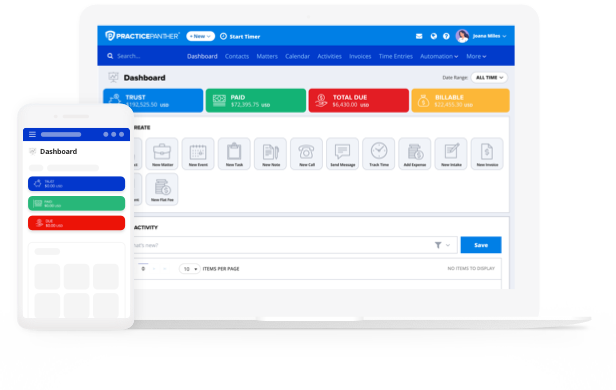
For example, if you want to embed a client intake form into your website, you can easily do that with legal practice management software like PracticePanther. This way, your CRM stays in sync and you can automate every step of managing your cases before they even begin (and long after they end). The data is clean, complete, and available before you’ve spent any real mental energy on the matter.
This setup starts working before a client even hits “submit.” When someone visits your site, they’re usually looking for three things:
If they can’t find your intake form — or if filling it out feels like a chore — you’re asking them to work harder than they should. That’s where you start to lose them.
And it’s not a rare problem. According to the Wyoming State Bar, it takes an average of eight emails to schedule a single consultation with a law firm. Eight. That kind of back-and-forth sends the wrong message: that your process is disorganized, or that their time doesn’t matter. A clear, accessible intake form on your website slices through that friction before it starts.

If your firm handles multiple practice areas, a single generic intake form won’t cut it. Basic contact information is just the starting point. When you rely on the same surface-level form across all case types, you’re setting yourself up for delays, follow-up emails, and missed details that could’ve been captured from the start.
Think about it: a criminal defense case demands quick access to facts — what happened, where, when, and who was involved. Meanwhile, an estate planning client wants to talk about wills, trusts, powers of attorney, and guardianship preferences. A generic intake form that fails to dig into the details relevant to either will leave both clients feeling unseen, and your team scrambling to catch up.
So, what to do? Instead of a generic form, you should:
If you’re using something like PracticePanther, you can build multiple custom forms, link them to different pages or email templates, and set them to automatically create new contacts or matters. That way, every inquiry starts with the right context already in place, and your team isn’t scrambling to catch up.
The intake form is one of the first interactions with the client, so you don’t want to make it like every other competitor. Clients can smell transactional energy from miles away — bland, robotic, and about as human as a voicemail greeting from 2007.
Add a single, surprising question that’s less “cookie-cutter.” Not as a gimmick, but as a signal that you’re paying attention and that their experience matters.
According to the 2024 Martindale-Avvo Legal Consumer Report, 58% of respondents said that knowing an attorney’s responsiveness is one of the top three factors in hiring. In other words, how you handle intake tells them how you’ll handle their case.
And the data goes deeper. Studies show that outcomes alone don’t determine client satisfaction. Even when a case ends in their favor, clients often feel disappointed if they’ve felt ignored, brushed off, or left out of the process.
That’s why the client-centred lawyering model, as first championed by David Binder, Susan Price, and others, works. This approach treats clients like collaborators, not case files. It recognizes that clients want to participate in decision-making; clients know better the non-legal consequences of decisions, and they deserve to define what “success” looks like for them.
And that’s exactly the opportunity you give them when you ask them thoughtful questions.
For example, “What outcome would feel like a win for you?”
It’s simple. It’s honest. And it tells the client that you’re listening, not just processing them through a system. It also gives your team context, you instantly understand expectations and avoid mismatches or messes later.
Here are some more unique questions you could ask:
You don’t have to crowd the form with all these questions. One or two should be enough to gauge their situation and to show that you’re listening before the first call even happens.
An intake form is a client’s first subconscious gut check. “Can I trust these people with my biggest challenge at the moment?” If it feels off — too generic, overly formal, or slapped together — they notice. That early impression can either build confidence or send them looking elsewhere.
Branding helps create trust by showing consistency and care. And yes, the visual part matters. Firms that maintain consistent branding across their materials see up to 90% higher recognition, according to multiple studies. But what really sticks is how your brand makes people feel when they interact with you, even through a form.
Here’s how to make that intake form part of the experience and your overall brand:
Over 75% of consumers say they’re more likely to work with a brand they feel connected to. That connection comes from small, consistent signals that show your firm is attentive, modern, and trustworthy.
If you’re using PracticePanther, branded forms can be built directly into your intake process. You can carry your visual identity and tone all the way through the first client interaction without extra steps or third-party pages.

The first client call is your firm’s vibe check. Clients are paying attention to more than your words — they’re picking up on your pacing, focus, and whether you sound prepared. If the call feels rushed, scattered, or inconsistent, they’ll take that as a red flag.
Scripting your intake calls helps with that. It gives your team a reliable structure so every caller gets a consistent, professional experience without rushing, rambling, or forgetting what matters. Plus, firms that use intake scripts often see measurable improvements: call handling times drop by 15–20% and client satisfaction goes up.
A strong intake script should:
This also makes training easier. New staff can get up to speed quickly, and even experienced team members benefit from having a steady guide, especially on busy days when details can get missed.
Most leads don’t fall through because they’re uninterested. They disappear because no one followed up in time—or at all. According to recent research, only 52% of sales professionals follow up after initial contact. That gap is costing law firms real business.
Tagging your leads is how you stop that from happening. Think of tags as digital sticky notes. Instead of digging through emails or guessing what stage a lead is in, tags make it crystal clear — needs consult, no response, waiting on docs, referred by [X], intake form pending, needs follow-up — whatever fits your workflow.
Done right, tagging systems help you prioritize leads, assign next steps, and balance workloads across your team. You instantly know who’s ready to move forward and who needs more nurturing.
For example, with PracticePanther, tags can trigger specific actions or workflows. For example, in PracticePanther, tagging a contact as “Ready to Retain” can automatically assign a “collect retainer” task to your receptionist. Leads tagged “No Response – 48h” can be filtered and nudged with a scheduled follow-up email. You can even assign practice area tags so contacts go straight to the right attorney without manual handoffs.
Tagging also gives you something more valuable than a cleaner inbox: insight. You’ll start to see patterns, like what types of leads convert fastest, where delays happen most often, and which referral sources send the highest-quality clients. That data helps you focus your time and marketing spend where it actually works.
Most intake gaps are about visibility. Tags fix that by turning a long list of contacts into a system you can act on.
You can’t teach speed. We’ve all heard this quote, often attributed to former Oakland Raiders owner Al Davis. In the legal world, while speed may not be innate, it is essential and, fortunately, teachable.
Study after study shows that lawyers do not respond in time to potential clients. According to the American Bar Association, 42% of client voicemails or web-generated forms from potential clients take three or more days for a reply. Additionally, 34% of potential client callers did not receive a callback within 24 hours, and 25% said they would not contact that firm again.
This is where automation becomes your best friend. When a potential client fills out an intake form, their information should go straight into your database. Automating a confirmation message as soon as they submit their intake form ensures they feel acknowledged instantly. Quick turnaround is crucial because if you don’t follow up, someone else will.
Beyond initial contact, PracticePanther makes it easy to automate the rest of your intake process and the whole case. You can automatically create follow-up tasks, assign them to your team, collect documents and payments, send confirmation emails or texts, and even build a nurture sequence to stay top-of-mind.

Not all clients are created equal. Some come ready to pay, ready to sign, and ready to follow your advice. Others drain your time, ghost you, or try to bargain down your retainer. Knowing where each type comes from helps you avoid wasted spend and make smarter marketing decisions.
This is why tracking referral and lead source data matters. It’s simple to set up and incredibly useful over time.
It starts with one simple question: “How did you hear about us?” Add it to your intake form. Bonus if you include a “Referred by” field to catch names you’ll want to remember and thank later to keep those referrals flowing.
From there, you can:
When you track lead source data consistently, patterns emerge. Maybe your Instagram DMs never convert. Maybe your best clients come from one local accountant who swears by you. Maybe that Google Ads campaign you spent $2,000 on brought you two no-shows.
With the right intake strategy, you can actually measure that. PracticePanther, for instance, lets you set up custom fields to capture referral and source data on every new lead. You can go a step further and apply tags to sort them by channel, giving you a clear view of which types of clients come from where.
Running your firm on five different platforms is like playing a sports game with five separate coaches shouting different plays. Intake in one system. Billing in another. Docs in a separate drive. Emails lost somewhere in some folder.
You lose time switching tabs, chasing down logins, and re-entering the same data in different places. All this fragmentation creates risk. Missed deadlines, delayed follow-ups, and inconsistent client communication often trace back to scattered systems.
Using a single platform for intake, case management, billing, communication, and document storage keeps everything connected. When a lead fills out your intake form, their info flows directly into your system. Tasks, follow-ups, appointments, and billing steps can be built out without repeating steps or missing context.
PracticePanther, for example, pulls everything together so your intake process doesn’t feel separate from the rest of your workflow. From the moment a lead reaches out, their information flows through every stage — scheduling, follow-up, billing, and beyond — without the usual back-and-forth or repeated data entry.
The more connected your systems are, the easier it is to move quickly, stay consistent, and keep your team on the same page. That kind of clarity shows up in every part of the client experience.
If intake has ever felt like the one part of your practice that doesn’t quite run smoothly, it might be time to see what it looks like when everything clicks into place. You can book a custom demo or try PracticePanther free to see how it works for your firm.