A potential client calls while you’re in court. Another fills out your web form late at night, a third emails your office manager, and a past client refers a friend by text. By the next morning, those four inquiries sit in four different places, and at least one of them gets answered late or never.
A CRM for law firms gives every inquiry a single home. This article explains how a CRM improves client intake, starting with the first moment someone contacts you.

What a Legal CRM Does During Client Intake
Your legal CRM keeps every inquiry, contact detail, note, and next step in a single record, so your intake process no longer depends on anyone’s memory or inbox.
A law firm CRM works differently from a general-purpose sales CRM. It’s built around matters, conflicts, and confidentiality, which a sales CRM is not designed to handle. Because prospective clients may share sensitive details before they ever hire you, your system needs to protect that information from the first contact. A CRM for law firm client intake tracks each contact through five stages:
- Inquiry: Someone contacts you by phone, web form, email, or referral, and the CRM creates a record.
- Screening: You review the inquiry for fit, including practice area, location, and an initial conflict check.
- Consultation: You meet with the prospective client to discuss their situation and whether you can help.
- Engagement: You send your engagement agreement, and the person decides whether to hire you.
- Retained: The person signs and becomes a client, and their record carries into the matter.
With each stage visible in one place, you can tell right away which inquiries need a reply first.
How a CRM Helps You Respond to New Leads Faster
Adopting a law firm CRM means your calls, web forms, emails, and referrals are logged in one place, and each one gets an owner and a due date. This is the foundation of law firm lead management: nothing sits unassigned, and you always know who owns the next step.
From there, follow-up reminders make sure no inquiry waits more than a day for a response. If a lead stalls, the task stays on your list until someone completes it.
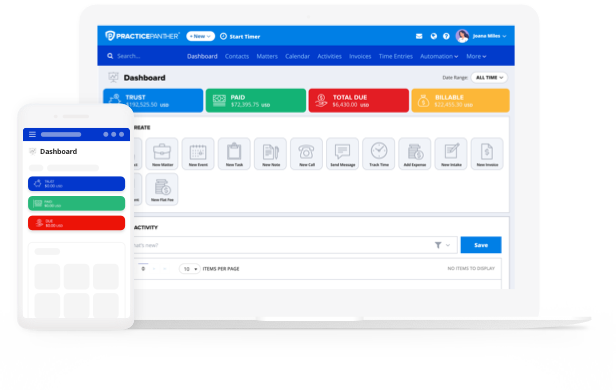
For example, imagine a caller leaves a voicemail at 7:00 p.m., after your office has closed. PracticePanther logs the call as a new lead and creates a follow-up task for the next morning. When you check your daily email summary over breakfast, you can see the newly scheduled task alongside your other priorities. By the time you open PracticePanther, you already know a prospective client needs a response. You can quickly access the caller’s contact details, review the inquiry, and send a timely acknowledgment before your day gets busy.
This proactive approach helps prevent new inquiries from slipping through the cracks, keeps outstanding responsibilities visible, and makes it easier to start each day with a clear plan rather than spending time figuring out what needs your attention.
Keep one important distinction in mind: your initial reply should simply acknowledge receipt of the inquiry, explain when the caller can expect to hear back, and outline any administrative next steps. It should not provide legal advice or establish expectations about the merits of the caller’s potential case.
How to Build an Intake Pipeline You Can Track
An intake pipeline for lawyers works best when every stage has a clear name. To build your own, start with this seven-stage framework:
- New inquiry
- Screened
- Consultation scheduled
- Consultation held
- Engagement sent
- Retained
- Not retained
Record the lead source for every inquiry and the reason for every lost lead. After a few months, you can see which referral sources send you clients who sign and which ones don’t.
Four numbers can tell you most of what you need to know:
- Response Time: How long a new lead waits for your first reply.
- Consultation Show Rate: The percentage of scheduled consultations that actually happen.
- Consultation-to-Retained Rate: The percentage of consultations that become clients.
- Top Reasons Leads Are Lost: Common patterns across your “not retained” records.
Review your pipeline weekly with whoever handles intake. A 15-minute check-in is enough to catch stalled leads and fix small problems before they become habits. Use that time to confirm your follow-up messages stay within the solicitation limits in ABA Model Rule 7.3.
How a Law Firm CRM Keeps Prospective Client Information Organized and Confidential
A strong client intake process for law firms protects information as carefully as it collects it. When using legal CRM software, store conflict-check details with the inquiry and note the outcome, so anyone who opens the record can see that the check was done. In PracticePanther, data and entities are organized in a hierarchical structure built around a “Client First, then Matters” model. Within this framework, each object level inherits from or relates directly to the tier above it. This hierarchical object structure ensures that every billable hour, case document, and calendar event is automatically organized under the correct matter and client, completely eliminating data silos. By keeping all files perfectly linked, it allows law firms to run instant conflict checks, generate accurate invoices with one click, and view a complete case history from a single dashboard
Not everyone on your team needs to see everything—CRMs for law firms let you limit who can view sensitive intake notes, so details about a prospective client’s situation stay with the people who need them.
Housekeeping matters, too. You can use a legal CRM to clean up duplicate contacts, so you don’t send two follow-ups to the same person or lose notes across separate records.
When you decline an inquiry, send a clear non-engagement message and log it in the record. The person then knows where they stand, and you have documentation that you told them.
Your duties to a prospective client apply even when you never take on their case. These are covered in ABA Model Rule 1.18, and a well-maintained intake record makes them easier to meet.
How PracticePanther Connects Client Intake to Your Cases and Billing
Intake is only the first stage of the client relationship. With PracticePanther, lead and intake details carry into the matter once a client signs, so you don’t have to retype contacts, notes, or documents.
Billing starts from the same record, too, so the time you track and the invoices you send stay connected to the person who first reached out. And your intake, cases, and billing all draw from one source.
PracticePanther helps you accurately measure where leads come from, respond faster, and spend less time on data entry and more time with clients.
Start your free PracticePanther trial to see the platform in action, or click the button below to schedule a free demo and learn how it can simplify your intake process: