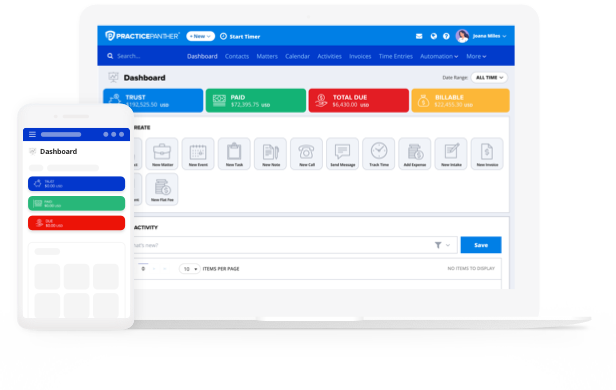
Now available on-demand!
With so many ways to customize PracticePanther, every firm manages casework, handles billing, and builds reports a little differently. Chances are there are a few time-saving features your firm may be underutilizing, from deploying conditional task workflows to keep client casework moving to batch entering billables and generating invoices across multiple matters all at once.
We’ve worked with thousands of legal professionals to compile the best practices that help turn these repetitive processes into streamlined workflows that add up to significant time savings throughout the day.
In this recorded live session, “Tips & Tricks to Automate Task Creation and Manage Batch Billing”, PracticePanther’s David Silberberg & Shaina Crawford walk through the tips, tricks, and shortcuts that can help your team reduce clicks and get more done in PracticePanther.
Set & Forget: 4 Ways to Replace Repetitive Processes in PracticePanther (3:23)
Strong workflows are the backbone of an efficient firm. While every case may be different, many of the steps your team takes to move that case forward are repeatable. The more you can automate ahead of time, the less your team has to manually recreate as work comes in.
The first set of tips is about building repeatable processes once and letting PracticePanther do more of the work from there. The common thread: if your firm already knows how a repeatable process should work, you shouldn’t have to rebuild it every time.
Conditional Task & Event Workflows: Trigger The Right Next Step Automatically (6:19)
Most firms are familiar with setting up and assigning tasks as an effective way to manage case progress, but manually creating and assigning these for every case scenario can be time-consuming. In PracticePanther, your firm can build Conditional Task & Event Workflows that trigger the right tasks and events automatically, so casework keeps moving, and your team’s agenda only shows what they can act on right now.
Automated Reminders: Make Client Follow-Up Easier & Timely (12:08)
Client communication is where a lot of casework tends to stall out. Oftentimes, bottlenecks come about because clients don’t turn in paperwork on time or forget they have an outstanding invoice. Automated Reminders make it easy to schedule task notifications to clients before or after their due date, taking routine follow-up off your team’s plate.
Invoice Templates: Build Branded, Professional Invoices Once and Reuse Every Time (13:12)
When clients have clearly structured and accurate invoices they can pay directly from, you’re less likely to have disputes. Creating these one by one could take multiple days, but in PracticePanther, all it takes is a few clicks. If your firm regularly uses the same invoice format for certain clients or case types, Invoice Templates let you configure that setup once and automatically generate a properly formatted, professional invoice when you need it.
Custom Hourly Rates: Auto-Apply Unique Rates to Any Matter (15:24)
If you regularly create matters that use a different hourly rate than your standard one, you can save those specific rates as Custom Hourly Rates within matters ahead of time instead of manually entering them independently after the fact.
Batch Actions: 3 Strategies to Increase Billing Efficiency (16:40)
Once your workflows are set up, the next win is billing just as efficiently. For many firms, billing can become a time-consuming ritual. You’re only logging time entries you remember and invoicing clients one at a time.
Billing is where a few built-in shortcuts can give back the biggest block of your time. Let’s walk through a few common billing scenarios and how PracticePanther’s batch billing workflows speed them up.
Multiple Billables: Log a Whole Day of Time at Once (18:42)
The workday gets busy and time doesn’t always get logged as it happens. If you find yourself entering time at the end of the day or week, PracticePanther’s Multiple Billables functionality takes this process from a cumbersome line-by-line activity to a more streamlined task by enabling you to create and update time entries, expenses, and flat fees in bulk instead of one by one.
Batch Billing: Invoice a Full Month of Clients in a Single Sweep (20:59)
Many firms already generate invoices in PracticePanther each month. If you’re still creating them one by one, Batch Billing knocks out a month’s worth of invoices instantly and keeps everything for that period in one place. We show you how to prioritize a saved invoice template for specific contacts and matters, batch-generate account statements so overdue clients can see what they still owe, and use the approval process to batch-approve and then send invoices once you’re happy with them.
Batch Payments: Apply Every Available Retainer Together (25:33)
Checking every matter for available retainer or credit takes up important admin time. Instead, use Batch Payments to apply all available retainers across invoices in one pass, so you’re not opening matters individually to reconcile.
Unlocking Shortcuts: Navigating PracticePanther Like a Pro (27:01)
Up to this point, we’ve shown you specific tips within our case management workflow and billing features. Those matter on their own, but the real payoff is being able to see key firm data in one place and jumping to any part of the platform in half the time.
Almost everything in PracticePanther has two paths. Most know the ‘standard route’ of clicking through tabs & menus to find a client, matter files, or a time entry. But there’s also a set of shortcuts that take you anywhere you want to go on the platform. And the biggest time-savers are things you set up once, then benefit from every day after.
Saved Reports: Revisit Your Go-To Data Views Instantly (29:42)
If you rebuild the same reports with the same filter sets every week, instead save your preferred setup as a Saved Report and return to those same filter views again any time in the future. We also share one of our favorite underutilized time-saving setups: creating a bookmark folder in your preferred browser to save all your most important reports and open them all with one click.
Billing Analysis Report: Compare All Billing Data In One Place (33:03)
PracticePanther’s Billing Analysis Report combines several of the most-used billing reports into a customizable view, so you can compare what’s been worked, billed, or left outstanding across every time entry, flat fee, and expense. We also cover how you can use the Billed By & Originated By Summary Cards to review Billed Hours and Worked Amount by firm total, individual staff member, or originating attorney at a glance.
Watch the Full Recording to Learn More
When used across every client, every entry, and every report you open in a day, these shortcuts add up fast and result in getting real time back.
Get a clearer picture of how PracticePanther’s proven workflows make it easy to track case progression, increase billing efficiency, and navigate firm data more efficiently by watching the full recording of our live session.