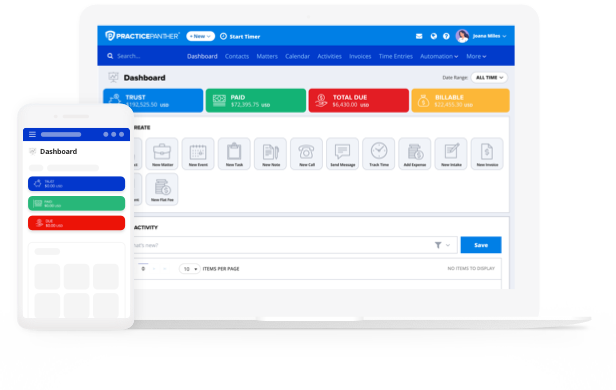
Billing and payments are more than administrative necessities; they are central to how firms grow, manage risk, and deliver a professional client experience.
Lackluster billing processes hurt firms on multiple fronts. They strain cash flow by delaying revenue. They erode client satisfaction when billing feels confusing or impersonal. And they drag down staff productivity by forcing teams to patch together workarounds instead of relying on legal billing software built for legal workflows.
This guide serves as a roadmap for firms evaluating legal billing software features and thinking beyond basic billing. We’ll walk through the capabilities that matter most, including time and billing automation, the invoicing experience, payments and cash-flow features, and the trust accounting, compliance, and security features that protect firms as they grow.
Time, Billing, and Automation
Most billing problems start with good lawyers doing real work and telling themselves, I’ll log it later. Later turns into the end of the day. Or the end of the week. Or the moment you’re staring at an invoice and realizing some of that work is already gone for good.
Automation steps in before that happens. It ties time tracking and billing together so revenue doesn’t depend on perfect memory or a time-intensive monthly cleanup. When the system does the heavy lifting, billing stops being reactive and starts working the way it should.
Here’s what that shift looks like in practice:
- Manual Entry to Automated Capture: Instead of reconstructing your day, time gets recorded as you work. Start a timer, add an entry manually, move on to the next task. The record builds itself while your focus stays on the matter.
- Basic Invoicing to Automated, Custom Invoicing: Waiting weeks to send invoices creates friction—for you and your clients. Automated billing workflows generate custom invoices as work progresses.
The Building Blocks Behind the Scenes
Effective automation shouldn’t be complicated. Your time and billing software should include features that quietly stay in sync, like:
- Real-time and manual time entry
- Matter-based billing
- Automated invoice generation
- Recurring billing
- Flat-fee, hourly, and hybrid billing support
- Automated payment reminders
- Bulk billing runs
- Write-downs and adjustments
Together, these features create a system where billing keeps pace with the work, instead of lagging behind it.
The Real Business Impact
When automation sits underneath your billing process, the payoff is visible:
- Less revenue leakage because fewer billable moments fall through the cracks
- Faster billing cycles that get invoices out while the work is still fresh
- Lower administrative burden for attorneys and staff
- Stronger realization rates with cleaner, more predictable bills
Automation functions as a profit-protection engine, making it harder for revenue to disappear. It keeps the value of your work intact without asking you to spend more time thinking about billing than you already do.
Which Billing Automations Most Improve Law Firm Cash Flow?
Cash flow issues rarely mean a firm isn’t doing enough work. More often, the problem lies in the gap between completed work and payment. That gap widens when invoices are issued late, reminders are missed, or clients wait until nudges to pay.
The right billing automations narrow that gap, with the ability to:
- Instant Invoice Generation: The longer an invoice waits, the less urgent it feels. Automation allows invoices to generate as soon as work is approved or a billing cycle closes. The work is done, the invoice goes out, and the clock starts moving immediately.
- Automatic Payment Reminders: Most late payments aren’t intentional. They’re forgotten. Automated reminders handle follow-ups consistently and professionally, without someone on your team tracking dates or sending uncomfortable emails. Clients get a prompt, and payments come in sooner.
- Schedule Recurring Billing: For ongoing matters, recurring billing creates predictability on both sides. The firm bills on a set schedule. Clients expect it. Revenue stops spiking and stalling month to month and starts showing up consistently.
When billing happens faster and follow-ups don’t slip through the cracks, cash flow stabilizes. Faster billing plus fewer delays equals stronger, more predictable monthly revenue, without asking your attorneys to change how they practice law.
Invoicing Clarity and Client Experience
Most payment delays don’t come from clients refusing to pay. They come from clients hesitating. An invoice lands, they don’t quite understand it, and instead of paying, they pause. That pause turns into an email or a call or a quiet write-down just to move things along.
Confusing invoices tend to create three predictable problems:
- Disputes over line items or charges that weren’t clear upfront
- Delays while questions get answered
- Write-offs when it feels easier to reduce the bill than argue about it
Clear invoices flip that dynamic. When a client can immediately see what the work was, why it mattered, and how to pay, trust goes up and friction drops.
Core Invoice Experience Features
Invoice clarity comes from giving clients exactly what they need, no more, no less. Look for invoicing software for lawyers that includes:
- Custom invoice templates
- Matter-level line-item detail
- Expense breakdowns
- Payment links embedded directly in invoices
- Client portal access
- Status indicators (sent, viewed, paid, overdue)
These features remove ambiguity. Your clients know what they’re looking at, where the invoice stands, and how to act on it immediately. Clear invoicing signals professionalism. It shows clients you respect their time and understand their need for transparency. That confidence matters. Clients who understand their bills are more comfortable paying them, and more comfortable continuing the relationship.
Over time, that clarity supports:
- Stronger professionalism in every client interaction
- Greater transparency around fees and scope
- Higher payment confidence with fewer objections
- Better long-term retention built on trust, not tension
Invoicing is part of the client experience. When invoices are clean, consistent, and easy to act on, payment speeds up and relationships last longer.
Payments and Cash-Flow Features
Payments do more than close the loop on billing. When they work the way your law firm needs them to, they become a growth lever. The faster and cleaner money moves from invoice to account, the less time your firm spends managing cash and the more predictable your revenue becomes.
What Legal Payments Software Actually Does
The best online legal billing software ties each payment back to a matter, routes funds correctly, and supports the rules law firms have to follow.
That’s the key difference between true legal payment solutions and generic processors. A standard payment app might accept a card, but it won’t understand trust accounting, settlement workflows, or the difference between earned and unearned funds.
Your law firm needs a payment system built for legal work, including:
- Trust-safe payments that handle IOLTA requirements correctly
- Matter-linked payments that connect every dollar to the right case
- Settlement-safe workflows that reduce risk when large or sensitive payments move through the firm
When payments align with how your firm actually operates, your cash flow stops feeling fragile.
Core Payment Features That Support Cash Flow
A strong legal payments system, like PracticePanther, brings these capabilities together in one place:
- Online invoice payments
- Credit card and ACH support
- Trust-compliant payments
- Partial payments
- Payment plans
- Invoice reminders
- Payment reconciliation
Each feature removes a small point of friction. Combined, they dramatically shorten the path from invoice to collected revenue.
How This Affects Firm Financial Health
When payments integrate cleanly with billing and matters, the financial impact shows up quickly:
- Faster revenue realization as clients pay with fewer steps
- Lower accounts receivable thanks to easier, more flexible payment options
- Less staff time spent on collections and follow-ups
- More predictable monthly cash flow you can actually plan around
Payments shouldn’t be the bottleneck at the end of the process. When they’re designed for legal workflows, they accelerate growth by keeping money moving reliably, compliantly, and without constant intervention from your team.
Best Payment Options To Reduce Client Friction for Invoices
Most clients don’t delay payment because they disagree with the bill. They delay because paying takes effort. Another login. Another form. Another thing to deal with later. Every extra step adds friction and friction slows collections.
Payment flexibility removes those obstacles. Look for time and billing software for lawyers that includes payment options like:
- Credit cards and ACH: Credit cards offer speed and convenience. ACH appeals to clients who prefer direct bank payments or want to avoid card limits. When firms support both, clients choose what feels easiest and payments happen sooner.
- Mobile Payments: Invoices don’t get opened only at desks. Mobile-friendly payment links let clients pay from their phone in a few taps.
- Saved Payment Credentials: When clients don’t have to re-enter payment information every time, friction drops sharply. Saved payment methods make repeat payments easier and remove the pause that often turns into procrastination.
- Installment Plans: Not every client can (or wants to) pay a larger invoice all at once. Installment plans create a clear path forward without putting the firm in a collections posture.
- Auto-Pay Options: Auto-pay removes timing from the equation entirely. Once authorized, invoices get paid automatically, without reminders or follow-ups. Consistency replaces chasing.
At the operational level, it’s simple math: fewer barriers to paying invoices lead to more reliable collections. When clients can pay how and when it works best for them, your firm sees steadier cash flow without increasing pressure on clients or staff.
Trust Accounting, Compliance, and Security
Trust accounting, compliance, and security sit at the ethical core of a law firm’s financial operations, and when they break down, the consequences go far beyond a messy ledger.
Trust accounting governs how firms handle client money that doesn’t belong to them yet, like retainers, settlements, and other unearned funds. Those dollars must stay separate from your firm’s operating accounts until they’re earned or properly disbursed. That separation is a professional obligation.
This is why legal billing works differently than general business accounting. A typical accounting system doesn’t understand earned versus unearned funds, matter-level tracking, or jurisdiction-specific trust rules. IOLTA compliance, at a functional level, means the software tracks where every dollar lives, when it can move, and why, without relying on manual workarounds or after-the-fact corrections.
Core Compliance and Security Capabilities
A legal billing platform built for trust accounting includes safeguards that operate continuously in the background:
- Separate trust and operating ledgers
- Retainer tracking
- Automatic application of trust funds to invoices
- Detailed audit trails
- Bank reconciliation
- Role-based permissions
- Data encryption
- Secure client portals
These controls don’t slow your firm down, they prevent mistakes before they happen.
What’s at Stake When Compliance Is Weak
Trust accounting errors aren’t minor bookkeeping issues. They can trigger:
- Ethical violations that require disclosure
- Financial penalties and costly remediation
- License risk tied to mishandled client funds
- Breakdowns in client trust that damage long-term relationships
Strong compliance infrastructure functions as risk prevention. It protects your attorneys, safeguards your clients, and preserves your firm’s reputation. When trust accounting runs correctly and securely, it gives you something invaluable: confidence that the financial side of the practice meets the same professional standard as the legal work itself.
How To Evaluate Trust Accounting and IOLTA Compliance Features
Almost every trust accounting solution claims to support IOLTA compliance features. The real question is how well the system holds up when something goes wrong or when someone asks you to prove your numbers.
Here’s what to look for when evaluating a potential solution:
- Jurisdiction Compatibility: Trust rules vary by state. A usable system reflects those differences in how it handles deposits, transfers, and reporting. If compliance depends on manual steps or workarounds, the risk shifts back onto your firm.
- Reconciliation Transparency: Reconciliation shouldn’t feel like detective work. You should be able to see, clearly and quickly, how trust balances align with bank statements and individual matters. If the numbers don’t tie, the system should help you spot where and why.
- Audit-Readiness: Audits don’t wait for convenient timing. Strong platforms maintain a clean, continuous record of activity so firms can respond without scrambling. You want software that keeps you ready all the time, not just after a cleanup sprint.
- Exportable Reports: When regulators, auditors, or internal teams need data, access matters. Reports should export cleanly and completely, without requiring additional formatting or explanation.
- Historical Ledger Visibility: Trust history can’t disappear. You should be able to review prior balances, transactions, and adjustments at the matter and account level, even months or years later.
The takeaway for buyers is straightforward: good trust accounting software provides visibility, proof, and defensibility, so compliance stays built into daily operations instead of becoming a periodic source of stress.
Insights and Reporting
Law firm financial reporting is where billing data stops being historical recordkeeping and starts guiding real decisions. When the numbers are visible and current, you don’t have to rely on gut feel to understand what’s working, what’s lagging, and where revenue risk is building.
What Legal Reporting Actually Covers
Modern legal reporting pulls together the full financial picture of the firm in one place. That includes:
- Financial dashboards that surface key metrics at a glance
- Billing analytics that show how much work turns into collectible revenue
- Payment tracking across matters and clients
- Trust balances tied to earned and unearned funds
- A/R aging that reveals where money gets stuck
Instead of chasing reports across systems, attorneys and firm leaders see patterns as they develop.
Core Financial Reports Firms Rely On
Strong platforms make these reports easy to access and easy to act on:
- Revenue by matter
- Revenue by attorney
- Billing realization rates
- A/R aging
- Trust balances
- Payment method breakdown
These reports move the conversation from “How busy are we?” to “How healthy is the firm financially?”
How Firms Use Reporting Strategically
When reporting stays current and reliable, it supports decisions that shape your firm’s future:
- Staffing decisions based on workload and revenue contribution
- Pricing strategy informed by realization and write-offs
- Client profitability analysis that separates growth opportunities from revenue drains
- Forecasting grounded in real payment behavior, not assumptions
Reporting acts as a strategic engine. It helps you allocate time, talent, and attention where it produces the strongest return.
What Reporting Dashboards Predict Late Payments and Delinquencies?
Effective dashboards highlight:
- Payment behavior trends that show how clients typically pay over time
- Client payment history across matters and billing cycles
- Overdue thresholds that flag invoices aging past normal patterns
- At-risk accounts where delays repeat or balances grow
These indicators act as early warnings. When you spot trouble before invoices age out, you can intervene sooner by adjusting payment terms, sending reminders, or revisiting billing expectations. Early visibility prevents revenue loss and keeps small delays from becoming permanent write-offs.
Best Legal Billing Software Features for Small Solo Firms vs. Large Firms
Not every firm needs the same level of complexity. A solo attorney trying to get bills out quickly faces a very different reality than a multi-office firm managing layered approvals and high invoice volume. The best billing software adapts to those differences without forcing every firm into the same workflow.
Best Features for Small and Solo Law Firms
For small firms, billing has one primary job: move work to payment quickly, without creating extra admin work. These firms tend to be speed-focused, cost-conscious, and short on internal support staff.
The best billing software for solo lawyers should include:
- Simple time and expense tracking
- One-click invoice creation
- Automated payment reminders
- Built-in online payments
- Flat-fee and hourly billing support
- Mobile access
- Easy-to-use client portal
- Minimal setup requirements
- Straightforward trust accounting
- Out-of-the-box reporting that works without customization
At this size, simplicity wins. Small firms don’t need enterprise-level configuration—they need automation that keeps billing from stealing time away from client work. The right software acts like a virtual back-office assistant, handling reminders, invoices, and payments quietly in the background.
Best Features for Mid-Size and Large Law Firms
Larger firms operate differently. Billing becomes more process-heavy, approval-driven, and data-intensive as headcount, matter volume, and client expectations grow.
These firms benefit from features designed for scale and oversight:
- Advanced role-based permissions
- Multi-layer billing review and approval workflows
- Complex trust accounting and reconciliation
- Department- or practice-area-level reporting
- High-volume invoice batching
- Custom rate tables by team and client
- Advanced A/R and collections tracking
- API integrations with accounting, document, and CRM systems
- Advanced security and audit controls
At this level, billing stops being a simple administrative task. It becomes a financial operations system. Enterprise firms need visibility across teams, accountability at every step, and controls that hold up under scrutiny.
Non-Negotiable Features for Every Firm
No matter the size of the firm, some expectations don’t change. Every legal billing platform should support:
- Trust accounting compliance
- Secure client payments
- Time and expense tracking
- Clear, easy-to-understand invoices
- Reporting visibility
- Strong data security
- Reliable support and onboarding
These fundamentals anchor the entire billing process. Whether you’re a solo attorney or a large firm with multiple practice groups, billing software should protect revenue, support compliance, and scale with the way you practice law, not work against it.
From Back Office To Growth Driver: Reframing Billing Technology
Billing and payments software has a bigger job than most firms give it credit for. It shapes how money moves through the firm, how risk gets managed, and how clients experience the business side of legal work.
When it’s built correctly, it becomes three things at once:
1. It’s a growth platform that helps your firm capture more of the work you already do and turn it into predictable revenue.
2. It’s a risk control system that protects trust accounts, supports compliance, and reduces exposure before problems surface.
3. And it’s a client experience engine that makes paying easier, clearer, and far less contentious.
When those pieces work together, you’ll feel the difference. Cash flow becomes more predictable. Fewer issues turn into write-offs or cleanup projects. Clients spend less time questioning bills and more time moving forward.
If you’re evaluating billing and payments solutions, the next step is simple: look closely at the features, workflows, and safeguards that support growth instead of slowing it down. You can start that process by reviewing PracticePanther’s Law Firm Software Guide