Here’s a scenario that plays out in many law firms every day: the case management system works. Not well, exactly—but well enough. Deadlines get met. Clients get billed. Files get stored somewhere. And because nothing is broken badly enough to demand immediate attention, changing it is perpetually pushed down the priority list.
The problem with “good enough” is that it has an invisible cost. It shows up in the hour a paralegal spends reconciling two spreadsheets. It shows up in the client who calls twice because their portal login hasn’t worked since the last update. It shows up in the managing partner who can’t answer a simple question—“How much revenue did we generate last quarter?”—without a deep dive into three separate systems.
Operational drag is invisible precisely because it accumulates slowly. But at some point, your system stops being a solution and starts being a constraint. The question isn’t whether your current system still works. It’s whether it’s actively supporting the way your firm needs to operate—today, and two years from now.
The Hidden Cost of “Good Enough” Software
Many attorneys work about 43 hours per week, and roughly 16 hours—nearly 37% of their time—are spent on administrative tasks rather than practicing law. Broken legacy systems are often part of the problem.
These inefficiencies don’t announce themselves; they normalize. Staff develop workarounds, and the workarounds become the process. Soon, no one remembers there’s a better way.
Consider what your team likely absorbs on a typical week:
- Attorneys re-entering the same client information across multiple platforms because the integrations don’t hold.
- Staff manually tracking deadlines in a shared calendar or a spreadsheet that lives only on one person’s desktop.
- Leadership spending hours pulling together reports that a modern system would generate in seconds.
These are bigger than minor inconveniences; they’re billable hours diverted into administrative overhead. Multiply a 20-minute workaround by five staff members, five days a week, and you’ve lost nearly two full workdays every week to a system that technically “works.”
As your firm grows, these inefficiencies compound. A system that was tolerable for a four-person firm becomes genuinely limiting for a firm of twelve.

Operational Warning Signs It’s Time to Upgrade
Some warning signs are obvious. Others are so embedded in daily operations that they stop registering as problems. Ask yourself honestly whether any of the following sound familiar:
- Your workflows live in spreadsheets. If your intake process, matter tracking, or billing reconciliation depends on a spreadsheet that lives outside your case management system, you have a visibility gap—and a single point of failure. Learn more about how to maximize your workflows to unlock 400+ billable hours in our comprehensive guide.
- Your team says “it works, but…” When staff mentions seemingly “minor” software grievances, listen carefully. That “but” represents friction that’s been accepted because it’s familiar—not because it’s acceptable.
- Reporting requires extensive manual effort. If understanding your firm’s performance requires exporting data, reformatting it, and running calculations in a separate application, your business decisions are always operating on a time lag.
- Remote work strains the system. If attorneys working from home or a second office can’t access the full functionality they need, your system isn’t built for the way work actually happens.
- Integrations are fragile or absent. If your case management system doesn’t connect reliably with your accounting software, document storage, or email platform, you’re running disconnected operations, not an integrated firm.
Food For Thought…
How often does your team spend time managing your software rather than using it? If the answer is “more than a few minutes a day,” you’re paying a productivity tax that a better system would eliminate.
What a Case Management Platform Should Deliver
Before you evaluate whether to upgrade, it’s worth being clear on what you’re actually looking for. A legal management platform shouldn’t just be a digital filing cabinet. It’s your operational backbone and must actively support every stage of a legal matter from intake to invoice.
At a minimum, your platform should provide:
- A single source of truth for all case and client information: contacts, documents, communications, deadlines, and billing history unified in one place.
- Automated workflows that eliminate repetitive administrative tasks—reminders, follow-ups, task assignments—without requiring staff to manage them manually.
- Integrated billing and time tracking that captures billable hours in real time and connects directly to invoicing.
- Real-time reporting dashboards that give leadership visibility into caseload, revenue, performance, and firm health without requiring extra manual data pulls.
- Secure cloud-based access that supports attorneys and staff whether they’re in the office, at home, or in court.
If your current system doesn’t deliver on these fundamentals, you’re losing precious time running an endless workaround.
A Framework for Evaluating Whether It’s Time for a Change
Upgrading your case management platform is a significant decision and one that deserves a structured evaluation, not a gut reaction to a bad week. Here’s a four-part framework to guide the conversation:
Step 1: Map Your Operational Friction
Identify every process in your firm that requires a manual workaround, a parallel spreadsheet, or duplicate data entry. Don’t filter for “big” problems. Remember, small, recurring friction points add up. Ask: What do you spend time on that feels unnecessary?
Step 2: Assess Your Visibility Gaps
Consider the questions you can’t currently answer without manual effort: Which practice areas are most profitable? What does your average matter lifecycle look like? Where are matters most likely to stall? If the answers aren’t readily accessible, you’re making strategic decisions without the full picture.
Step 3: Test Your Growth Readiness
If you added three attorneys tomorrow, could your current system support the additional caseload without creating new bottlenecks? If you expanded into a new practice area, could you configure the workflows you’d need? Growth exposes the limits of constrained systems faster than anything else.
Step 4: Calculate the Opportunity Cost
The question isn’t “What does upgrading cost?”—it’s “What does staying cost?” Estimate the time your team currently spends on administrative tasks that automation would eliminate. Translate that time into dollar value. Then ask whether the status quo is actually the conservative choice.

How PracticePanther Helps Firms Move Beyond “Good Enough”
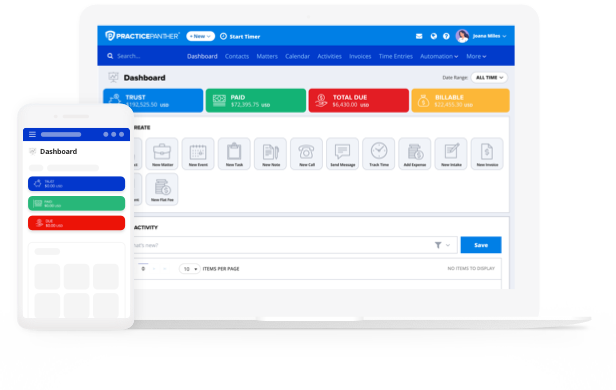
PracticePanther is built for firms that are ready to stop managing around their software and start being supported by it. The platform brings case management, billing, client communications, and reporting into a single, unified environment—so your team spends time on legal work, not administrative maintenance.
For firms making the switch from older systems, the transition process matters as much as the destination. PracticePanther’s dedicated onboarding specialists work directly with your team to configure the platform for your workflows, migrate your existing data, and ensure your people are confident from day one. Live support means questions don’t become disruptions.
Firms that upgrade to PracticePanther gain:
- Automated task and workflow management that reduces administrative overhead across every matter.
- Built-in billing and time tracking that captures revenue as it’s earned, not after the fact.
- Centralized client and matter information is accessible to your entire team from anywhere.
- Secure, cloud-based access designed for hybrid and distributed teams.
- Real-time reporting dashboards that give leadership clear, current visibility into firm performance.
Stop Settling, Start Streamlining
Many firms delay upgrading their case management system because the current one still technically works. The calendars sync, matters are stored somewhere, and invoices eventually go out the door. On the surface, it feels manageable.
But “good enough” technology often masks the operational friction happening beneath the surface. Manual workarounds, disconnected systems, and limited visibility slowly divert billable time into administrative overhead. As your firm grows, those inefficiencies compound, turning small inconveniences into real operational barriers.
Upgrading your case management system isn’t just about replacing software. It’s about equipping your firm with a platform that supports efficient workflows, clearer insights, and a better experience for both your team and your clients.
If you’re starting to evaluate your options, it helps to understand what modern legal software should deliver and how to compare platforms effectively.
Download PracticePanther’s Law Firm Software Buyer’s Guide to learn what features to prioritize, the questions to ask vendors, and how to choose a system that will support your firm’s growth for years to come.