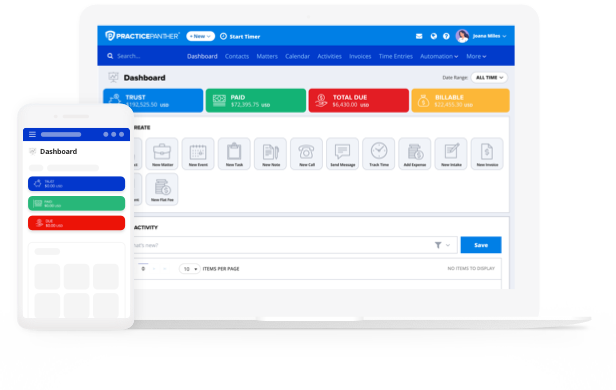
Billing remains one of the most challenging parts of running a successful law firm. Attorneys must balance client transparency, time accuracy, and firm profitability, all while managing demanding workloads. For that reason, cheat sheets like a billable hours chart serve as a quick resource for tracking productivity and ensuring consistent billing practices.
However, these cheat sheets only get you so far. Legal billing software makes tracking and calculating billable hours simpler, more accurate, and more compliant.
Below, we’ll break down how attorneys calculate and manage time, and how legal office billing software like PracticePanther helps firms streamline their billing process.

What is a Billable Hours Chart?
A billable hours chart is a reference sheet that attorneys use to convert time spent on billable tasks into standard billing increments. Traditionally, firms bill in 6-minute increments, meaning each tenth of an hour is recorded as 0.1 on an invoice.
For example:
Minutes Worked Decimal (Hours)
6 minutes 0.1
12 minutes 0.2
30 minutes 0.5
60 minutes 1.0
This kind of chart helps attorneys quickly determine how much time to record for each task. Whether drafting a motion, reviewing discovery, or taking a client call, lawyers can reference the chart to maintain consistent billing.
Historically, these charts were printed and kept on desks for easy reference. Now, attorney billing software automatically converts time entries into the proper billable format, removing the need for manual calculations and reducing errors.
How Do Lawyers Bill Time?
Attorneys typically bill clients based on the amount of time spent performing tasks directly related to serving a client’s matter. Common billable activities include:
- Legal research and document drafting
- Court appearances or depositions
- Client consultations and strategy sessions
- Reviewing contracts, discovery, or correspondence
Lawyers record this time using time-tracking software, often linked to their billing systems. With PracticePanther’s built-in time tracking, attorneys can:
- Start and stop timers directly from case files or client matters
- Automatically capture time spent on emails, calls, and tasks
- Sync time entries to invoices without rekeying data
- Generate accurate reports on billable vs. non-billable time
How to Calculate Billable Hours and Ensure Nothing Gets Missed
To calculate billable hours manually, attorneys multiply the number of hours worked by their hourly rate. For example, a lawyer billing $300 per hour who spends 2.3 hours on a client’s case would record $690.
Using a billable hours chart simplifies these conversions, but even minor rounding errors or missed entries can add up to significant revenue loss over time.
That’s why many firms turn to PracticePanther to automate and simplify the process. Instead of relying on memory or spreadsheets, attorneys can log time directly from tasks, calendar events, or documents, and let the platform calculate billable totals automatically.
The Money Finder feature takes this a step further by scanning your account for any unbilled activities—like calls, emails, or meetings—that haven’t been added to an invoice. This ensures that every minute of work is captured and billed accurately before it slips through the cracks.
With custom tagging, firms can categorize time entries by case type, client, or activity, giving them deeper insight into where time is spent and how it contributes to firm profitability.
Using PracticePanther, lawyers can easily:
- Log and calculate billable hours automatically from existing workflows
- Review unbilled time entries through the Money Finder feature
- Generate pre-bills and invoices with one click
- Set different rates for partners, associates, and paralegals
- View real-time productivity and utilization reports
By combining precise time tracking with powerful automation, PracticePanther gives firms complete confidence that every billable hour is accurately calculated—and nothing is left behind.

Billable Hour Best Practices
Billable hours remain the foundation of law firm profitability, but accuracy depends on the systems and habits behind them. Even the most diligent attorneys can lose track of time entries, mislabel activities, or rely on inconsistent rounding methods. To improve law firm billing accuracy and recover lost revenue, attorneys should combine strong billing habits with the right billing and invoicing software.
Here are five proven billable hour best practices to help your firm capture every minute and increase profitability:
- Capture time as you work.
Reconstructing billable hours at the end of the day or week can lead to underbilling and forgotten tasks. PracticePanther’s real-time legal time tracking software lets attorneys start and stop timers directly from tasks, calls, or calendar events — on desktop or mobile — ensuring every billable minute is logged accurately as work happens. - Use clear and detailed descriptions.
Clients expect transparency and want to understand exactly what they’re paying for. Replace generic entries like “legal research” with specific notes such as “researched case law on non-compete enforcement.” With PracticePanther, attorneys can customize billing descriptions to maintain clarity and consistency across every invoice. - Review and reconcile regularly.
Routine billing audits help prevent missed or misclassified time entries. PracticePanther’s custom tagging automatically filters activities by tags, allowing attorneys to see which tasks have missed time entries and take corrective action to log billable hours. - Automate your billing process.
Manual billing is time-consuming and prone to error. With automated billing, firms can generate pre-bills, apply custom rates, and send custom invoices in just a few clicks. Automation minimizes administrative work, speeds up collections, and ensures billing accuracy across the entire firm. - Leverage analytics to improve performance.
Tracking time is essential—but analyzing it is transformative. PracticePanther’s reporting and analytics dashboards give firm leaders a complete view of utilization, realization, and productivity trends. By understanding where time is spent and where it’s lost, firms can make smarter staffing decisions, optimize workloads, and maximize profitability.
When attorneys follow these billable hour best practices and use PracticePanther’s all-in-one legal billing software, they can capture more revenue, enhance client transparency, and create a more efficient, profitable firm.
Looking Beyond the Billable Hours Chart
While the attorney billable hours chart remains a valuable quick reference, effective legal billing demands automation and real-time tracking. PracticePanther’s legal billing software allows firms to modernize this process—ensuring accuracy, consistency, and transparency while freeing attorneys to focus on their clients.
By combining traditional billing best practices with modern technology, firms can maintain the integrity of the billable hour while improving efficiency and profitability in today’s competitive legal landscape.