Billing is the lifeblood of profitability, where your firm’s work turns into revenue, yet reviewing billables and staff contributions often means pulling multiple reports and reconciling spreadsheets to fully understand performance. Without a centralized view, it becomes difficult to answer critical questions in real time, such as how productive your firm was this month, how much work remains unbilled, or where write-downs are impacting revenue.
PracticePanther’s Billing Analysis Report eliminates the guesswork by combining all billing, productivity, and revenue data into a single source of truth. Below, we’ll explore how this report helps firms gain clarity and control at every stage of the billing process, from work completed to revenue collected.

Unify Your Billing Data with PracticePanther’s Billing Analysis Report
The Billing Analysis Report provides your firm with complete visibility into billing and productivity metrics, allowing you to see exactly what has been worked, billed, adjusted, or left outstanding without needing to jump between reports. Rather than stitching together time, billing, and invoice data after the fact, everything lives in one customizable, comprehensive report you can trust.
With line-item-level views across time entries, flat fees, and expenses, firm owners and billing teams can identify revenue gaps and quickly validate invoice accuracy before they go out. Slice data by date range, timekeeper, or status in seconds with dynamic filtering and adjustable columns. Turning month-end billing from a manual reconciliation exercise into a fast, repeatable process.
Instantly Review Your Firm’s Billing Output at a Glance
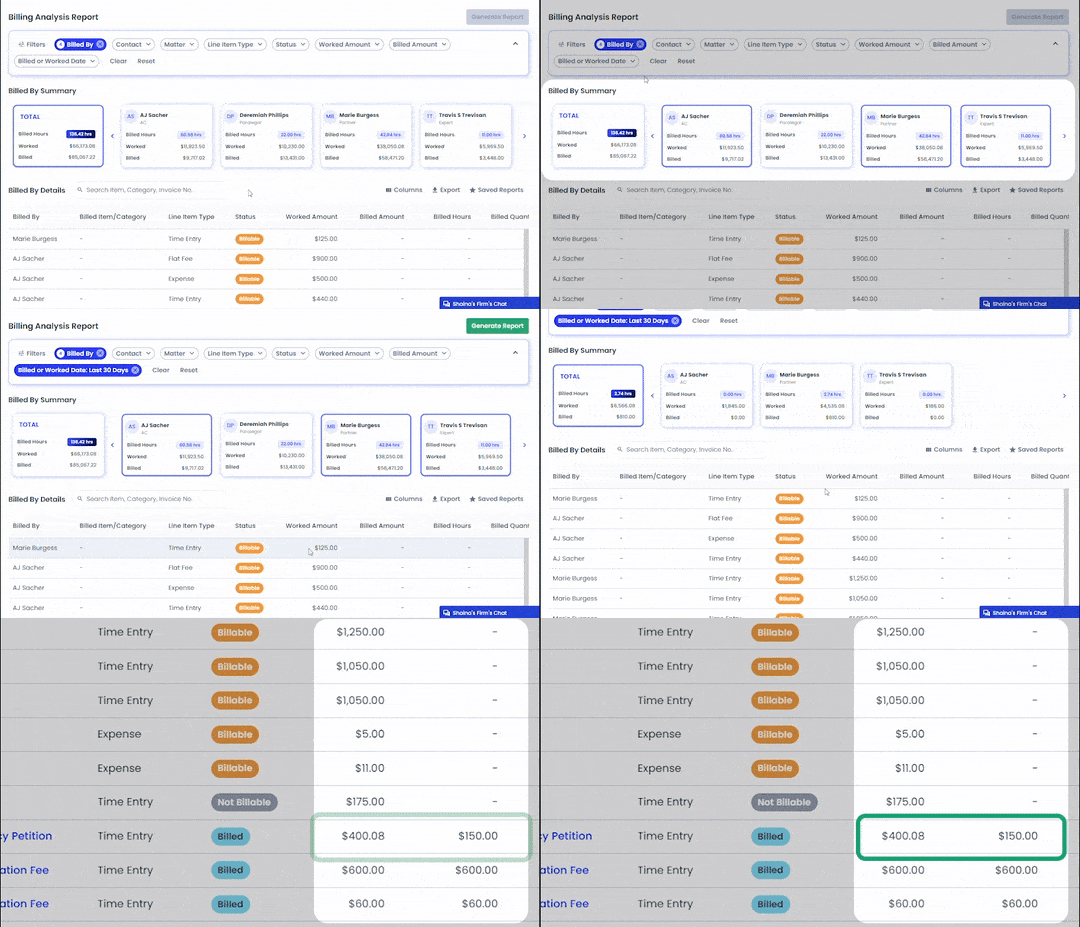
At the top of the Billing Analysis Report, Billed By Summary Cards provide an immediate read on firm performance. These cards surface the total billed hours and amounts alongside total worked amounts, either firm-wide or broken down by individual staff member.
Imagine opening the report to review last month’s performance. Within seconds, you know how productive the firm was, which attorneys hit their targets, and where gaps between worked and billed output may exist. No exporting data, no cross-checking timecards, just clear insights the moment the report loads.
By anchoring the analysis in high-level performance metrics, the Summary Cards provide essential context for everything that follows, ensuring you always understand the bigger picture before digging deeper.

See the Full Story of Your Team’s Productivity Any Week, Month, or Year
After viewing your firm’s billing output at a high level, the Billing Analysis Report lets you zoom in on when work is actually happening. With Worked and Billed Date filters, you can analyze team productivity across any timeframe.
Whether you’re reviewing last week’s workload, comparing this quarter to last, or evaluating year-over-year trends, the report makes patterns immediately clear, highlighting work surges, slow periods, and workload shifts by practice area.
For example, if you’re preparing for a busy litigation period, you can quickly review the last 90 days of completed work to identify workload distribution and team capacity needs. Equipping you to make more effective, proactive staffing and budgeting decisions.
Quickly Spot Billing Adjustments & Write-Downs
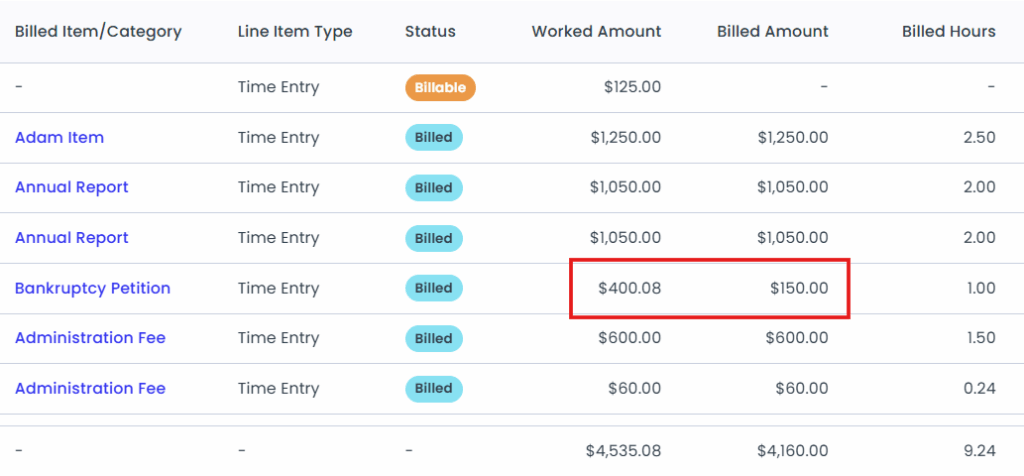
Write-downs and billing adjustments quietly erode revenue when they’re reviewed too late. This report makes it easy to confirm if your billed revenue accurately reflects the work completed by displaying Worked and Billed amounts side-by-side.
By setting the Status filter to Billed, you can quickly pinpoint where reductions occurred during invoicing and uncover repeat patterns across specific clients, practice areas, or staff members. Instead of guessing why revenue falls short of expectations, you can clearly see where and how often adjustments are happening. Armed with this insight, firms can take corrective action by refining billing workflows, addressing scope creep, improving time capture, or renegotiating client arrangements that consistently require write-downs.
Catch Unbilled Work Before Invoices Go Out
Even the most disciplined billing process can fall short if billable work never makes it onto the invoice in the first place. Missed time entries and expenses don’t just create reporting gaps; they translate directly into lost revenue. The Billing Analysis Report serves as a final safeguard, enabling the easy identification of every billable entry that hasn’t yet been invoiced.
With simple date and status filters, you can instantly spot unbilled work across any time period and address it before invoices go out. For example, you might uncover $2,500 in unbilled time and expenses from the past week alone. Instead of writing that off as an oversight, you can invoice for it confidently and ensure that earned revenue actually gets collected.
Bring Total Clarity to Your Firm’s Billing Process with the Billing Analysis Report
The Billing Analysis Report gives firm leadership the visibility they need to simplify billing workflows, improve invoice accuracy, and understand performance at every level, from firm-wide billing output to individual staff member productivity.
Whether you’re reviewing last month’s results, preparing to send out invoices, or looking for opportunities to improve profitability, this report ensures you’re always working from a complete and accurate picture of your firm’s financial health. Ready to see the Billing Analysis Report in action? Book a personalized demo to see how PracticePanther’s comprehensive reporting and all-in-one law firm management platform can help your team operate more efficiently, bill more confidently, and get paid faster today!